Goal and plan templates: a ready-made plan in one tap
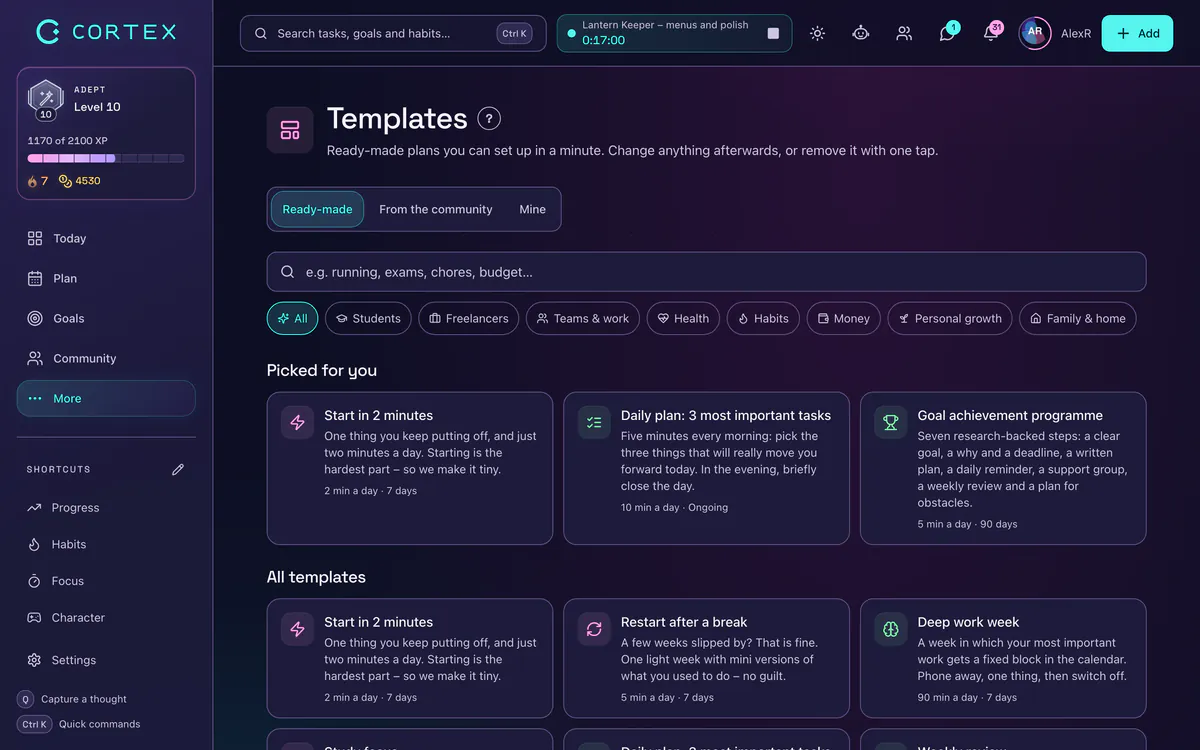
A template is a ready-made plan you adapt to yourself: instead of a blank page you get a goal with milestones, scheduled tasks, habits and calendar blocks – for a half marathon in 12 weeks, exam season, moving house or a family budget, for example. In the CORTEX app you pick from more than 30 templates, fill in a few details, choose your pace and see exactly what will be created before anything happens. Below: why templates work, how to choose the right one, examples and what to do when a plan does not fit.
- A template does the hardest part of planning for you: it breaks a big goal into steps and gives them dates, so tomorrow you know what to do.
- CORTEX has 30+ templates in 8 categories (students, freelancers, teams, health, habits, money, personal growth, home and family); each shows its length and time per day.
- Before you apply one you see “What gets created” – goals, tasks, habits, routines, calendar blocks or budgets – and you choose Easy, Normal or All in.
- Everything a template created can be removed again in one step; you can save your own plan as a template and share it with a friend by link.
- Templates are free for everyone. For health and sport templates: we are not doctors, so check with your doctor if you have a health condition.
Why start from a template instead of from scratch
The biggest obstacle to a big plan is rarely laziness – it is the blank page. “I want to run a half marathon” is a wish. Questions turn it into a plan: how often a week, how long, when to add and when to ease off? By the time you have answered them yourself, the excitement has often worn off.
A template answers those questions up front. It gives you a sensible starting pace, splits the goal into smaller steps and puts a date on each one. Goal-setting research has shown for decades that specific, challenging goals lead to better results than a vague “do your best” (Locke and Latham, 2002), and plans that say when and where you will act make it more likely that you actually do (Gollwitzer, 1999). A template gives you both: a concrete goal plus slots in your calendar.
The second reason is realism. People consistently underestimate how long things take – psychologists call it the planning fallacy (Buehler, Griffin and Ross, 1994). A template built on a proven approach, with an easier week every few weeks for example, protects you from a plan that falls apart after three days.
What a template creates in CORTEX
A CORTEX template is not a PDF to print. One tap creates real things in your account that you then use as usual:
- A goal with milestones – progress comes from finished tasks, so you see how close you are.
- Tasks with dates – spread over the weeks so they show up in your day plan at the right time.
- Habits and routines – a morning routine or daily study, for example, with streaks.
- Calendar blocks – regular slots for training or studying in the hour grid.
- Depending on the template also budgets, projects and clients, vision board cards or a mind map.
Before you apply a template you see a “What gets created” preview with the exact list. If the template needs a module you have switched off (Finance for a budget, say), it tells you and switches it on only with your consent.
How to pick and set up a template: 4 steps
- Open Templates under More. On the Ready-made tab, filter by category – students, freelancers, teams, health, habits, money, personal growth or home and family.
- Read “Who it’s for” and “Why it works”. Every template shows its length (84 days, say) and an estimate of time per day (40 minutes, say). If that does not fit your week, pick another one or a lower intensity.
- Make it yours. Enter a few details – the race date, the exam subject, moving day – and choose Easy, Normal or All in.
- Check the preview and tap Use this template. The goal, tasks and habits appear in your plan and on Today.
Template examples and who they are for
| Template | Who it is for | Length and time |
|---|---|---|
| Half marathon in 12 weeks | People who can run about 8 km comfortably and want to finish 21.1 km | 84 days, about 40 minutes a day |
| Exam season | Students with several exams in a row | 21 days, about 90 minutes a day |
| Moving house without chaos | Anyone moving in the next few weeks | 70 days, about 20 minutes a day |
| Family budget | Households that want to know where the money goes | 31 days, a few minutes a day |
| Morning routine | Anyone who wants a calmer, steadier start to the day | open-ended, about 10 minutes a day |
| Start in 2 minutes | People who keep putting things off and just need to get going | 7 days, 2 minutes a day |
Other templates cover a language in 90 days, job interview prep, a wedding, a freelance month with clients and invoicing, a two-week team sprint or a year plan with measurable results. For sport and health templates: we are not doctors – if you have a health condition, check with your doctor first.
When a plan does not fit: adjust it, remove it, save your own
A template is a starting point, not a contract. Everything it creates is a normal task, habit or goal – move, shorten or delete them like anything else. If you find the template does not suit you at all, remove it under Settings → My templates in one step: only what the template added disappears, the history of your finished work stays, and the removal can be undone.
It works the other way round too. Got your own proven routine – a morning routine, presentation prep, a month-end close? Save a goal, routine, project or your Today layout as a template and share it with a friend by link. Community templates are moderated before they appear in the gallery.
Long plans go well with a regular weekly review: once a week you look at what worked and adjust the pace. And if you would rather build a goal yourself from the ground up, read how to write SMART goals.
Frequently asked questions
What is a template in CORTEX?
A ready-made plan – a goal with milestones, tasks with dates, habits, routines or calendar blocks – that you add to your account in one tap and adapt to yourself. The gallery has more than 30 templates in 8 categories.
How much do templates cost?
Nothing. Templates and all of CORTEX are free for everyone, with no ads and no credit card.
Can I remove a template later?
Yes. Under Settings → My templates you remove everything a template created in one step. The history of your finished work stays, and the removal can be undone.
Can I create my own template?
Yes. Save a goal, routine, project or your Today layout as a template and share it by link. Community templates are checked by moderators before they appear in the gallery.
Does a template replace a coach or a doctor?
No. Templates help with planning and habits. For sport and health templates: if you have a health condition, check with your doctor first.
Sources and further reading
- Locke, E. A. & Latham, G. P. (2002): Building a practically useful theory of goal setting and task motivation – American Psychologist
- Gollwitzer, P. M. (1999): Implementation intentions: Strong effects of simple plans – American Psychologist
- Buehler, R., Griffin, D. & Ross, M. (1994): Exploring the "planning fallacy" – Journal of Personality and Social Psychology
Level up your life
CORTEX is free for everyone. Tasks, a one-click day plan, time tracking, habits and rewards in one system – on desktop and mobile.
CREATE A FREE ACCOUNT