Mind map app: how to make a mind map (and one that draws itself)
A mind map is a diagram with one central topic and branches that radiate out into subtopics, keywords and details. It is a fast way to see a whole subject – a project, an exam, a decision – on one page. This guide gives you a six-step method, an example you can copy, and the mind map in CORTEX: a free mind map app that builds itself from the vision, goals, tasks and subtasks you already have, so it never goes out of date.
- A mind map is a radial diagram: the main topic in the middle, main branches around it and sub-branches with keywords. The method was popularized by British author Tony Buzan.
- Mind maps are useful for studying, brainstorming, planning projects and outlining writing or talks.
- A good map has 3–7 main branches, one to three words per branch, and its deepest level written as concrete next steps.
- In CORTEX, the Mind map is an interactive graph that assembles itself from your vision board, goals, tasks and subtasks.
- CORTEX is a free gamified productivity app – tasks, a one-click day plan, time tracking and habits, with XP, levels and real-life rewards.
What a mind map is
A mind map replaces lines of notes with branches. The central topic sits in the middle, thick main branches come out of it, and thinner sub-branches come out of those. Each branch ideally holds a single keyword or short phrase, often with a color or icon.
British author Tony Buzan popularized the term and method in the 1970s, although radial diagrams for organizing ideas are older. The advantage over linear notes: you see the whole and the connections between the parts at once.
What mind maps are good for
- Studying: a whole chapter or course on one page.
- Brainstorming: collecting ideas fast without sorting them yet.
- Project planning: breaking a goal or a client project into parts and steps.
- Writing and talks: the outline of an article, proposal or presentation.
- Decisions: options, pros and risks side by side.
A mind map example you can copy: launching a side project
Here is a complete example. Copy it to paper or any tool and swap in your own topic. Indentation shows the branch level.
CENTER: Launch my side project (next 3 months)
- 1. Product
- Core feature
- define the one job it does
- first working version
- Feedback
- 5 test users
- one survey
- Core feature
- 2. Money
- Budget
- tools
- domain
- Price
- costs
- what people pay today
- Budget
- 3. Audience
- Where they hang out
- First post
- story
- screenshots
- 4. Time
- 2 evenings a week
- Saturday morning block
- 5. Me
- Sleep
- One evening off
Connections: Price ↔ Feedback (ask test users what they pay now) · Time ↔ Sleep.
Notice three things: five main branches (not fifteen), only keywords on the branches, and the deepest level is already a step you can tick off.
Another example: exam season
| Level | Content |
|---|---|
| Center | Finals – fall semester |
| Main branches | Statistics, Microeconomics, Law, Spanish |
| Sub-branches (Statistics) | Exam date, textbook ch. 1–6, practice problems, office hours |
| Details | Ch. 1–2 this week, ch. 3–4 next week, 2 practice tests |
| Connections | Statistics ↔ Microeconomics (regression in both) |
For the study plan itself, see how to gamify studying.
How to make a mind map in 6 steps
- Write the main topic in the middle. Keep it short: "Side project", "Moving house", "Finals".
- Add 3–7 main branches. The main categories. More than seven usually means a level is missing.
- Use keywords, not sentences. One to three words per branch; your brain fills in the rest.
- Branch down until you reach actions. Stop when a branch is something you could do in an hour.
- Connect related branches. Draw a line or arrow between branches that depend on each other.
- Use color as a guide, not a goal. One color per main branch helps; an hour of decorating isn't work.
Hand-drawn maps vs. a map that builds itself
Most mind mapping tools give you a blank canvas, which is perfect for brainstorming and studying. For planning goals, a hand-drawn map has one weakness: it goes stale. You finish a task, add a new one – and unless you redraw the map, it lies.
| Hand-drawn mind map | Mind map in CORTEX | |
|---|---|---|
| Good for | Brainstorming, studying, outlines | Seeing your vision, goals, tasks and subtasks together |
| Who builds it | You, by hand | The app, from what you have entered |
| Up to date | Until you stop redrawing it | Always matches your current goals and tasks |
| Freedom of shape | Total | Fixed structure: vision → goal → task → subtask |
The two work well together: a hand-drawn map to figure out what you want, an automatic map to see where you actually stand.
The mind map in CORTEX
In CORTEX the Goals section has three tabs: Goals, Vision board and Mind map. You don't draw the map; it is an interactive graph built from what you already have:
- Vision items from the vision board – where you want to end up.
- Goals – with categories and progress calculated from finished tasks (see the goal tracker).
- Tasks from the task planner linked to each goal.
- Subtasks – the checklist of each task.
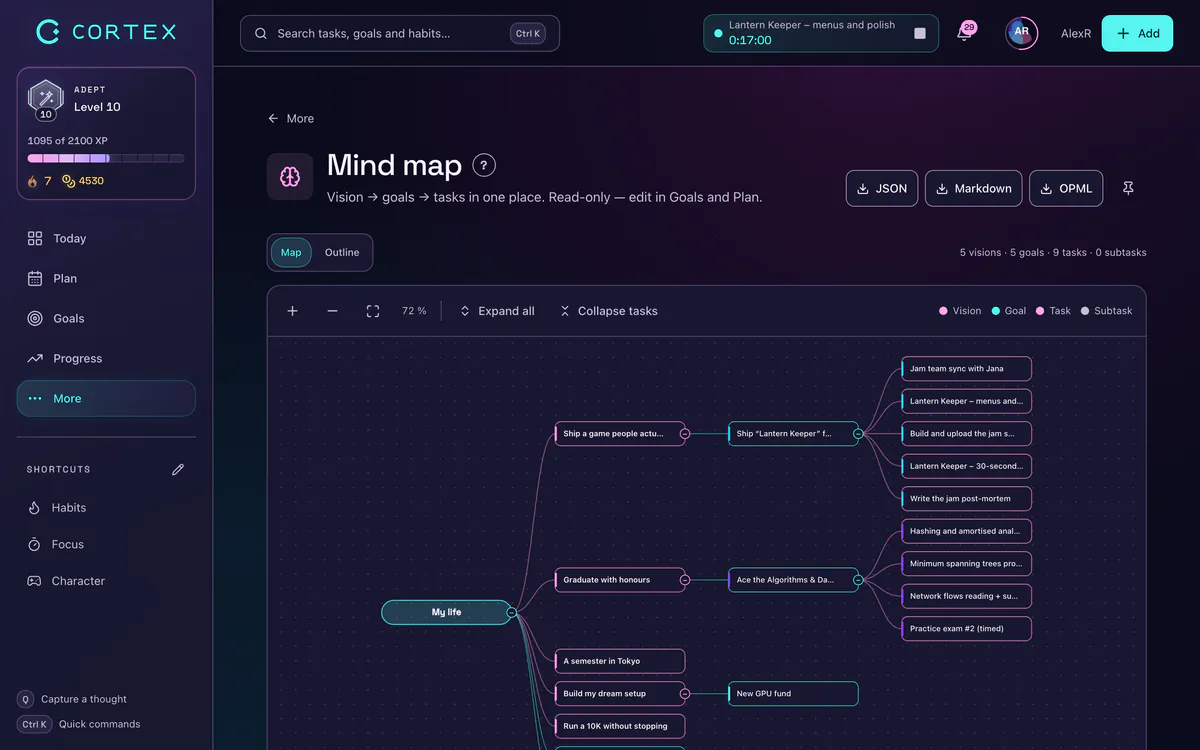
The map answers a question your task list can't: which goal does this task serve, and which goals have no tasks at all? A goal with no branches under it is a goal you are not working on this week.
You change the map by editing your vision, goals or tasks. For free-form brainstorming with no link to tasks, paper or a dedicated canvas tool is the better fit.
From mind map to plan
Use the side-project example above:
- Turn the center into a vision item – "My own product" with an image on the vision board.
- Turn main branches into goals. Not all of them at once – pick the 1–3 that matter now, such as Product and Audience.
- Turn sub-branches into tasks linked to those goals. Quick capture does it in one line:
Define the core feature monday ~1h #Product. - Turn details into subtasks. Anything you can do in under an hour is a subtask.
- Once a week, open the map and look for goals with no tasks. The weekly review is the natural moment.
Want the bigger picture of how goals become daily work? Read SMART goals and let Plan My Day put the tasks into today's free slots.
Common mind mapping mistakes
- Full sentences on branches. The map turns into scattered prose.
- Too many main branches. More than seven means a category level is missing.
- A map instead of work. A beautiful map is not a finished project. After mapping comes the first step.
- A map that goes stale. For goal planning, use a map that updates with your tasks, or redraw it regularly.
Frequently asked questions
Is there a free mind map app?
Yes. CORTEX includes a free mind map that builds itself from your vision board, goals, tasks and subtasks. It is meant for planning, not free drawing; for blank-canvas brainstorming, paper or a dedicated canvas tool works better.
How do I make a mind map?
Write the main topic in the middle, add 3–7 main branches with keywords, and break each branch into subtopics and details until you reach concrete steps. Finally, connect related branches and use one color per main branch.
Where can I find a mind map example?
This page has two: "Launch my side project" with five main branches and an exam season map. Swap the center and branches for your own topic.
Who invented mind maps?
British author Tony Buzan popularized the term "mind map" and the method in the 1970s, although radial diagrams for organizing ideas were used earlier.
Can I use the CORTEX mind map on my phone?
Yes. CORTEX runs in any modern browser and installs on iOS and Android as a PWA from the browser menu.
Sources and further reading
Level up your life
CORTEX is free for everyone. Tasks, a one-click day plan, time tracking, habits and rewards in one system – on desktop and mobile.
CREATE A FREE ACCOUNT