Weekly review: a 20-minute template with 15 questions (free printable)
A weekly review is a 15 to 30-minute check-in where you close the past week (what got done, what slipped, what you learned) and pick the few things that matter most next week. The free printable weekly review template is right below, followed by a 20-minute step-by-step routine, 15 questions with versions for students, freelancers and gamers, a short summary of the GTD Weekly Review, and how to run it all in CORTEX.
- A weekly review has two halves: closing the past week (done, slipped, learned) and setting up the next one (fixed appointments, top priorities, the hardest task).
- David Allen, creator of Getting Things Done, calls the Weekly Review the "critical success factor" of the method. The GTD version has 11 steps in three groups: Get Clear, Get Current and Get Creative.
- Twenty minutes at a fixed time each week is enough for most people. A review that takes two hours tends to get skipped.
- Reviewing progress matters: Amabile and Kramer (2011) found that making progress in meaningful work is one of the strongest everyday boosters of motivation.
- Planning the hardest task as an if-then plan ("If it is Tuesday at 9, then I start the report") helps: implementation intentions had a medium-to-large effect on goal attainment in a meta-analysis (Gollwitzer & Sheeran, 2006).
Free weekly review template (printable)
One page, three blocks. It is adapted from the three phases of the GTD Weekly Review (Get Clear, Get Current, Get Creative), condensed for people who don't run a full GTD system. Click "Print this template"; it fits A4 and US Letter, and "Save as PDF" in the print dialog gives you a reusable file.
Weekly review
| ☐ Inbox and messages to zero or flagged ☐ Loose notes and photos collected ☐ Open browser tabs closed or saved ☐ Head dump: everything on my mind written down |
| What did I finish this week? | |
|---|---|
| What slipped, and why? | |
| Biggest win, however small: | |
| Overdue tasks: done / rescheduled / deleted? | |
| Waiting on others for: | |
| Fixed appointments next week: | |
| Next week's 3 big rocks: | |
| Hardest task: if [when/where], then I will… |
| What gave me energy? What drained me? | |
|---|---|
| One idea or someday/maybe item worth starting: | |
| One thing just for fun next week: |
Close: put Monday's first task in the calendar · reward yourself for doing the review.
The 20-minute weekly review, step by step
Set a timer and go in this order. The times are a guide, not a rule.
| Minutes | Step | What you do |
|---|---|---|
| 0–5 | Clear | Collect loose ends: notes, photos of whiteboards, flagged emails, browser tabs. Write down everything still on your mind. |
| 5–9 | Look back | Scan last week's calendar and done list. Answer: what got done, what slipped, what was the win? |
| 9–13 | Get current | Go through your task list. Every overdue task gets done, rescheduled or deleted. Check what you're waiting on from others. |
| 13–17 | Look ahead | Check next week's fixed appointments. Pick 3 big rocks. Turn the hardest one into an if-then plan. |
| 17–19 | Get creative | Glance at your someday list. Is one idea ready to become a project? |
| 19–20 | Close | Put Monday's first task in your calendar. Then reward yourself; you just did the thing most people skip. |
15 weekly review questions
You don't need all 15 every week. Answer the first two in each group, and the rest when you have time.
Look back
- What did I finish this week?
- What slipped, and what was the real reason?
- What was my biggest win, however small?
- What took much longer than I expected?
- What did I learn that I want to remember?
Look ahead
- What three outcomes would make next week a good week?
- What is already fixed in my calendar?
- What is the hardest task, and exactly when and where will I start it?
- What can I drop, delegate or postpone?
- What am I waiting on from other people, and do I need to nudge anyone?
Energy and wellbeing
- When did I have the most energy this week, and what was I doing?
- What drained me, and can I avoid or shrink it next week?
- How did I sleep, and what got in the way?
- Who did I spend time with that I want more of?
- What is one thing I will do just for fun next week?
Question 3 matters more than it looks. In their research on knowledge workers' daily diaries, Teresa Amabile and Steven Kramer (2011) found that the days people felt most motivated were the days they made progress on meaningful work, even small progress. Most of us forget our wins by Friday. Writing one down makes it count.
Question 8 is the one that changes next week. Plans phrased as "If situation X, then I do Y" are called implementation intentions, and a meta-analysis of 94 tests found they had a medium-to-large effect on reaching goals (Gollwitzer & Sheeran, 2006). "If it's Tuesday at 9 a.m., I open the report draft before email" beats "work on report".
Versions for students, freelancers and gamers
Add five questions for your situation.
Students
- Which classes or topics did I fall behind on?
- Which deadlines and exams are in the next two weeks?
- Did I test myself this week, or only re-read?
- Which topic needs a second review a few days from now?
- What will I do to recover after the next big deadline?
If exam season is coming, turn this into a game with XP and boss fights.
Freelancers
- How many hours did I work, and how many of them can I bill?
- Which invoices are unpaid or overdue?
- Which client is waiting on me, and which one am I waiting on?
- Did I spend any time on finding new work this week?
- Did I take a real day off?
For rates and tools, see our app for freelancers page.
Gamers: the XP recap
- How many quests did I complete, and how much XP did I earn?
- What loot did I earn, and did I actually claim it?
- Which attribute grew most this week, and which one is falling behind?
- What is next week's boss (the hardest task or deadline), and what are the prep quests?
- Which side quest goes in next week's slot? (Need ideas? Try our side quest generator.)
The GTD Weekly Review in brief
The weekly review became famous through David Allen's Getting Things Done (GTD). Allen has called it the "critical success factor" for making the method work. The official version has 11 steps in three groups. In our own words:
- Get Clear: gather loose papers and materials; process your inboxes to zero; write down anything still in your head.
- Get Current: review your next-action lists; go back through last week's calendar for leftover actions; look at the upcoming calendar; review what you're waiting for; review each project and bigger outcome so every project has a next action; check any checklists you use.
- Get Creative: review your someday/maybe list; add any new, bold ideas.
The 20-minute version above keeps the same order (empty out, update, look ahead) but drops the steps that only make sense with a full GTD system. If you run GTD properly, use the full list; our Getting Things Done guide explains the whole method. Allen's own advice on frequency is relaxed: a review at any time and any frequency is better than none.
Weekly review vs. weekly planning
They are often mixed up, but they do different jobs:
| Weekly review | Weekly planning | |
|---|---|---|
| Looks | Backwards first, then ahead | Ahead only |
| Question | "What happened, and what matters now?" | "What goes on which day?" |
| Output | Clean lists and 3 priorities | A day-by-day plan |
| Time | 15–30 minutes | 10–20 minutes |
You need both, in that order: review first, then plan. Plan without reviewing and you schedule the wrong things; review without planning and your insights stay on paper. For the planning half, use our free printable weekly planner and the time blocking method. For longer horizons, check your goals against SMART goals once a month.
Common weekly review mistakes
- Turning it into a two-hour audit. If the review is exhausting, you will skip it. Cap it at 30 minutes; do the deep cleaning once a month.
- Skipping it when the week went badly. That is exactly the week you need it most. A bad week reviewed is a lesson; a bad week ignored tends to repeat.
- No fixed time. "Sometime this weekend" means never. Put it in your calendar.
- Only looking at tasks. Energy, sleep and people decide next week as much as your to-do list does.
- Choosing ten priorities. Three big rocks. Everything else fills the gaps.
- Judging instead of adjusting. The goal is a better next week, not a verdict on you. Ask "what will I change?", not "why am I like this?".
A short daily version helps too: our evening routine guide has a five-minute shutdown that makes the weekly review faster.
How to do your weekly review in CORTEX
CORTEX is a free gamified productivity app with tasks, a one-click day plan, time tracking and habits, plus XP, levels and real-life rewards. Most of the numbers your review needs are already there:
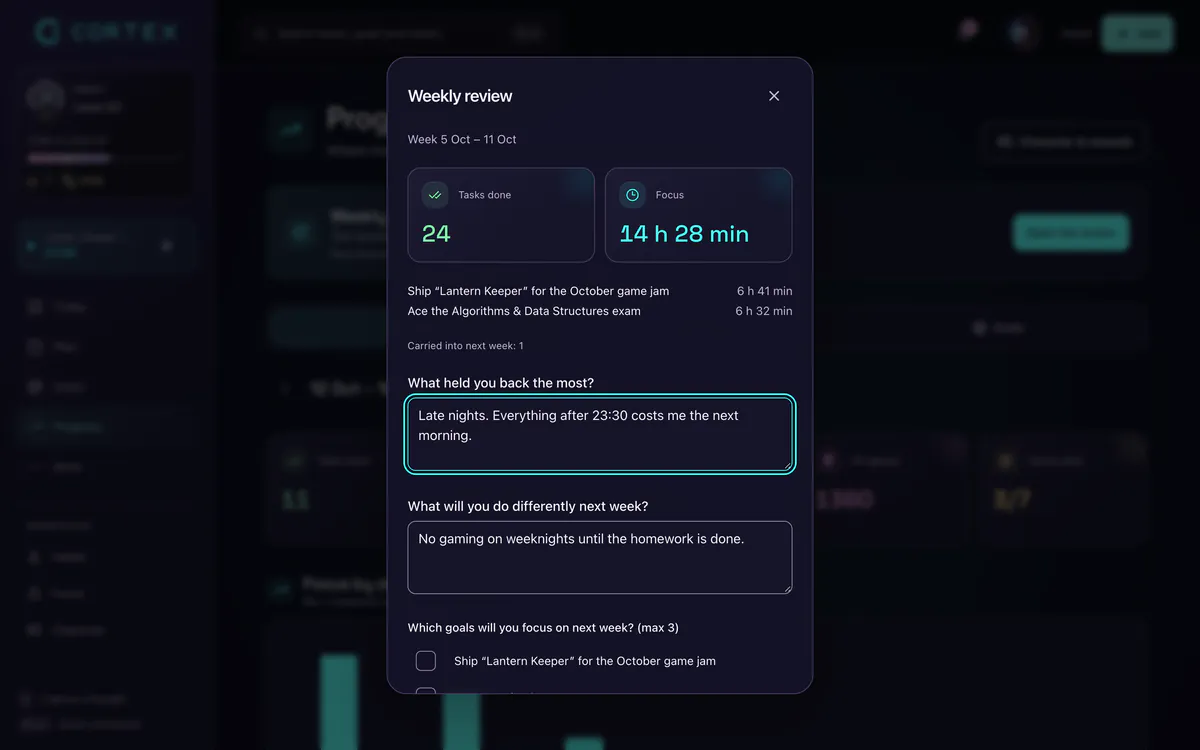
- Open the Review page and set the dates to the past seven days. The quick presets are this month, last month, last 30 days and this year, so for a weekly review you pick the start and end dates yourself. CORTEX compares the period with the one just before it of the same length: time tracked, tasks done and credits earned, plus your activity streak, time per project and activity by day.
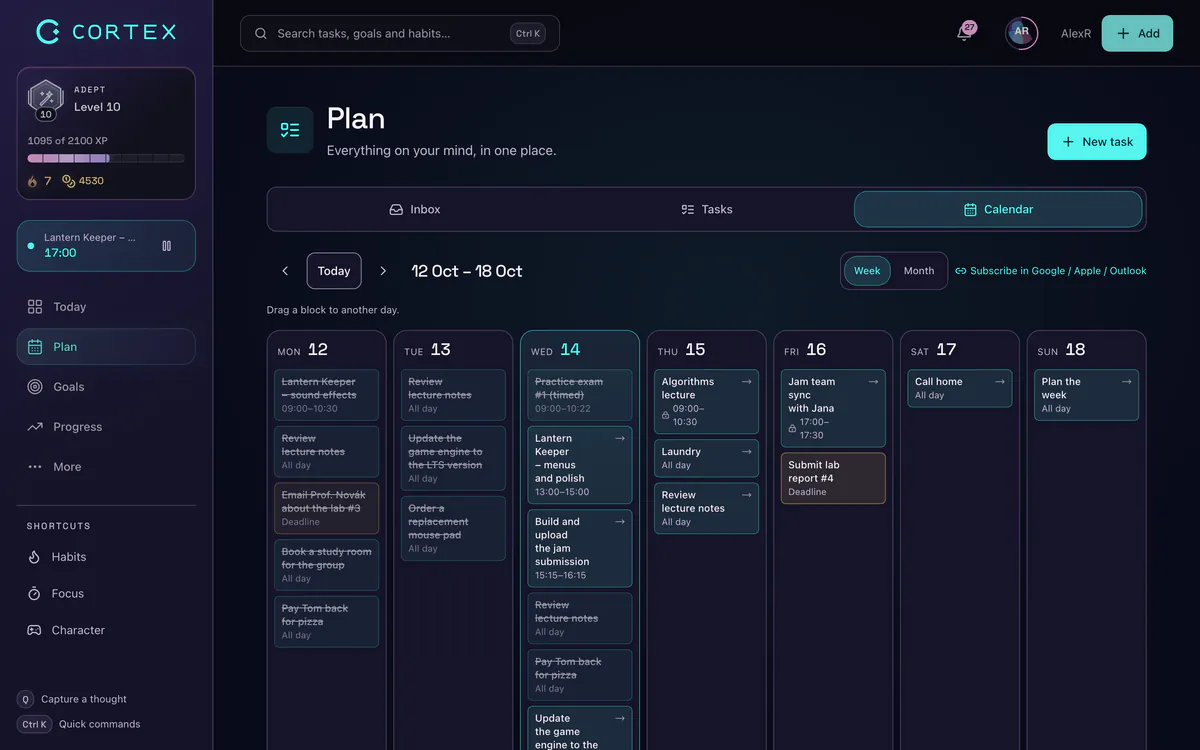
- Clear the overdue pile in the planner. The planner groups tasks into Overdue, Today, Tomorrow, This week and Later. For each overdue task: finish it, snooze it (moves it to tomorrow), give it a new date or delete it.
- Check your goals. Each goal shows progress as a percentage from its finished tasks. Does every active goal have at least one next task?
- Pick 3 big rocks. Give them the highest priority. With quick capture,
!p1sets it in one line:Draft chapter 3 tuesday @9:00 ~2h !p1 #Thesis. - Lay out the week in the calendar. The week view shows tasks on a time grid; drag and drop them to the right day and time.
Related: the day planner turns each day of your week into a time-blocked plan with one click, and the goal tracker keeps your bigger goals visible between reviews.
GTD®, Getting Things Done® and GTD Weekly Review® are registered trademarks of the David Allen Company. CORTEX is not affiliated with the David Allen Company.
Frequently asked questions
What is a weekly review?
A weekly review is a short, regular check-in, usually 15 to 30 minutes, where you look back at the past week and set up the next one. You clear loose ends, note what got done and what slipped, update your task list and pick the few priorities that matter most next week.
What questions should I ask in a weekly review?
Start with three: What did I finish? What slipped, and why? What are the three outcomes that would make next week good? Then add questions about your hardest task, what you are waiting on from others, and what gave you or cost you energy.
How long should a weekly review take?
About 20 minutes is enough for most people; 30 at most. If it regularly takes longer, you are probably doing monthly-level cleanup every week. Keep the weekly review short and do a deeper review once a month.
What is the GTD weekly review?
It is the weekly check-in from David Allen's Getting Things Done method, with 11 steps in three groups: Get Clear (collect and process everything), Get Current (review lists, calendar, waiting-for items and projects) and Get Creative (review someday/maybe ideas and add new ones). Allen calls it the critical success factor of GTD.
What day is best for a weekly review?
Whichever day you will actually keep. Friday afternoon works well for closing the work week while details are fresh; Sunday evening works well for setting up the week ahead. Pick one fixed slot and put it in your calendar.
What's the difference between a weekly review and weekly planning?
A weekly review looks back and decides what matters; weekly planning puts those priorities on specific days and times. Do the review first, then the plan, ideally in the same session.
Sources and further reading
- Getting Things Done: The GTD Weekly Review (the 11 steps)
- GTD Podcast Episode #43: The Power of the GTD Weekly Review
- Amabile & Kramer (2011): The Power of Small Wins, Harvard Business Review
- Gollwitzer & Sheeran (2006): Implementation intentions and goal achievement – a meta-analysis of effects and processes, Advances in Experimental Social Psychology
Level up your life
CORTEX is free for everyone. Tasks, a one-click day plan, time tracking, habits and rewards in one system – on desktop and mobile.
CREATE A FREE ACCOUNT