Free online Pomodoro timer
This free online Pomodoro timer runs 25 minutes of focus, a 5-minute break and a long break after every fourth session – automatically. Hit Start (or press Space), pick 50/10 or 90/15 if you need longer blocks, and keep the tab open: the countdown shows in the tab title and a beep tells you when to switch.
Settings: presets, custom minutes, sound & notifications
Press Space to start or pause. Runs in your browser; settings are saved on this device only.
- A Pomodoro is 25 minutes of single-task focus followed by a 5-minute break; after four Pomodoros you take a longer break of 15–30 minutes (Francesco Cirillo, the Pomodoro Technique).
- This timer is free, needs no account and runs in your browser. It switches focus → short break → long break on its own and counts your sessions.
- It is built on timestamps, not a decrementing counter, so it stays accurate even when the tab is in the background or your laptop throttles timers.
- Presets: 25/5 (classic), 50/10 (longer study or work blocks) and 90/15 (deep work). You can also set any custom length from 1 to 180 minutes.
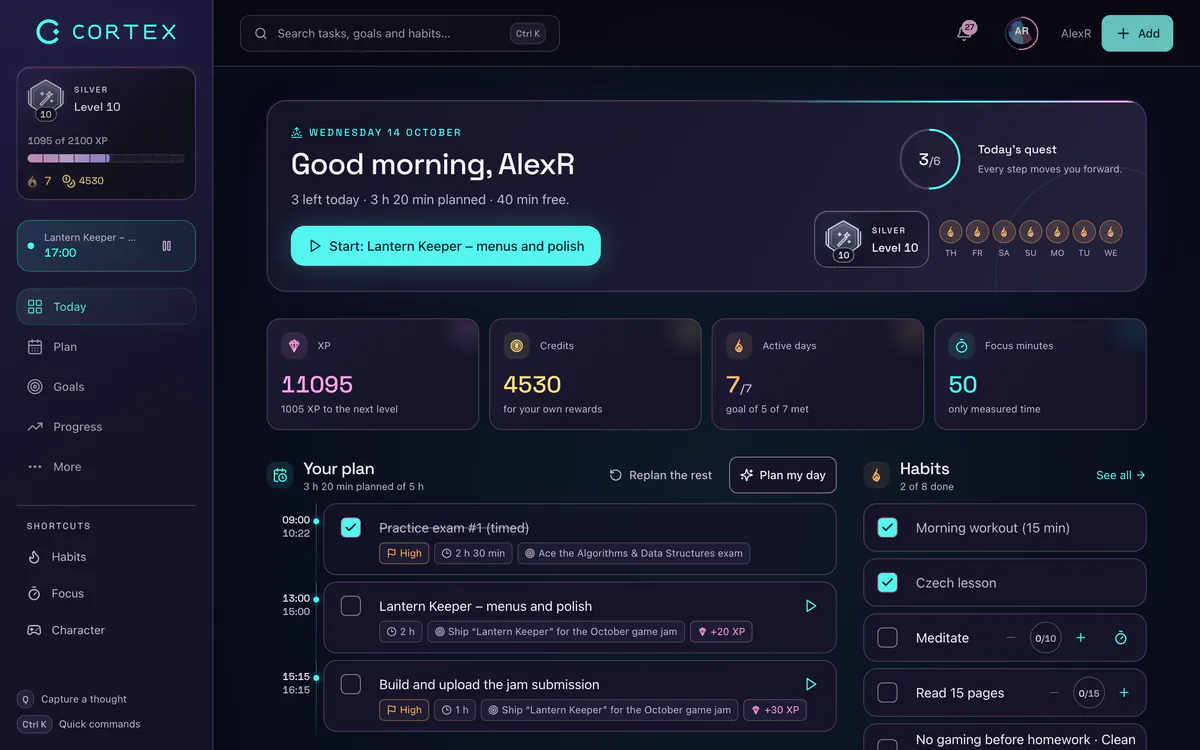
- CORTEX, a free gamified productivity app, has a built-in 15/25/50-minute focus timer with ambient sounds plus named work timers that log your hours to reports.
How to use this Pomodoro timer
- Pick a rhythm. The default is the classic 25/5 with a 15-minute long break after every four sessions. Open Settings for 50/10, 90/15 or your own minutes.
- Write down one task. Before you hit Start, decide what this Pomodoro is for: "Outline chapter 3", not "work on thesis". One session, one task.
- Press Start or Space. The remaining time appears in the browser tab, so you can switch to your document and still see it.
- Stop when it beeps. Even mid-sentence. Leave yourself a one-line note about where to restart, then take the break – away from the screen if you can.
- Let it roll. With auto-start on, the next session starts by itself. Turn it off in Settings if you prefer to press Start each time.
Controls at a glance: Reset restarts the current session, Skip jumps to the next one (a skipped focus session isn't counted – in Cirillo's method an interrupted Pomodoro doesn't count either), the mode buttons let you jump straight to a break, and reset count starts a fresh set. Your settings, the sound toggle and today's count are saved in this browser only. If you reload the page mid-session, the timer picks up where it was.
Which Pomodoro setting should you choose?
There is no single "best" length. Pick by the kind of work and by how quickly you warm up:
| Preset | Long break | Good for | Watch out for |
|---|---|---|---|
| 25 / 5 (classic) | 15 min after 4 | Starting when you don't feel like it, admin, email, revision, the first sessions of the day | Coding or writing that needs 10+ minutes just to load context |
| 50 / 10 | 30 min after 4 | Study blocks, writing, design, problem sets | Skipping breaks because you "feel fine" |
| 90 / 15 (deep work) | 30 min after 2 | One hard problem, a long draft, a big refactor | Starting this cold – warm up with a 25 first |
| 15 / 5 (custom) | 15 min after 4 | Low-energy days and tasks you have been avoiding | Staying at 15 forever – stretch it once starting is easy |
A simple rule: if you regularly ignore the bell because you're in the middle of something, your sessions are too short. If you check your phone halfway through, they're too long. Adjust by 5–10 minutes a week, not all at once. Whatever length you choose, keep the breaks: in a 2011 lab study, Ariga and Lleras found that people who briefly switched away from a long, monotonous task twice did not show the usual drop in performance, while the group that never paused did. For long, demanding work, read our guide to deep work.
The Pomodoro Technique in two minutes
Francesco Cirillo developed the method as a university student in the late 1980s, using a tomato-shaped kitchen timer – "pomodoro" is Italian for tomato. The core loop is simple:
- Choose a task.
- Set the timer for 25 minutes.
- Work on that task only until it rings.
- Put a check mark on paper.
- Take a short break (about 5 minutes).
- After four Pomodoros, take a longer break (15–30 minutes).
Two details make it work and are often skipped: a Pomodoro is indivisible (if you abandon it, it doesn't count, which is why our Skip button doesn't count it either), and you note interruptions instead of acting on them – jot "reply to Sam" on a scrap of paper and get back to the task. The full method also includes planning your Pomodoros in the morning and recording them in the evening. We explain all of it, with examples, in our complete guide to the Pomodoro Technique.
A focus timer for studying: how to set it up
The Pomodoro rhythm fits studying unusually well, because it forces you to start and gives your brain regular breathing room. A setup that works for most students:
- One topic per Pomodoro and a concrete output: "10 flashcards on chapter 4", "solve problems 1–5", "summarize the lecture in 5 bullets".
- Active recall in the last 5 minutes. Close the book and write down what you remember. It feels harder than rereading – that's the point.
- Breaks off-screen. Stand up, refill water, look out of a window. Scrolling a feed is not a break; it's a new input.
- Phone in another room or at least face down and silent for the whole set.
- Plan the evening by count: "four Pomodoros of statistics" is easier to commit to than "study all evening".
For exam weeks, many students like 50/10: long enough for a full problem set, still with a real break. If focus itself is the problem, our guide on how to focus better covers the environment side.
Pomodoro settings for ADHD-style brains
If your brain needs a reward now and long tasks feel like a wall, the timer is less about time management and more about lowering the cost of starting. These are practical tweaks people use – not medical advice, and not a substitute for professional support:
- Shorter first session. Set focus to 10–15 minutes. Starting is the hard part; once you are moving, you can extend.
- Keep the time visible. The countdown in the tab title makes time concrete instead of abstract.
- Turn on auto-start and sound. Fewer decisions between sessions means fewer chances to drift.
- Use the break as the reward, and decide what it is before you start (a snack, a song, a walk).
- Park intrusive thoughts. Keep a sticky note next to you and write them down instead of switching tabs.
More ideas in our guides on how to stop procrastinating and the ADHD planner app.
What makes a good Pomodoro timer?
Most "best Pomodoro timer" lists compare apps by looks. These are the things that actually matter when you use one every day – and how this page handles them:
| Must-have | Why it matters | This timer |
|---|---|---|
| Accurate in background tabs | Browsers slow down timers in hidden tabs; counters that subtract "1 second per tick" drift | Yes – calculated from the real end time |
| Automatic long breaks | You shouldn't have to count sessions yourself | Yes, every 2–8 sessions |
| Countdown in the tab title | You see the time without leaving your work | Yes |
| Sound you can mute | Libraries, open offices, calls | Yes, generated in the browser |
| No account, no install | Zero friction to start | Yes, also works offline once loaded |
| Links focus to your tasks and hours | Shows where your time actually went | No – that's what an app is for (see below) |
From timer to system: Pomodoro in CORTEX
A browser timer is perfect for a single session. When you want the Pomodoros to add up to something, you need them next to your tasks. CORTEX is a free gamified productivity app – tasks, a one-click day plan, time tracking and habits, with XP, levels and real-life rewards. Here is how focus works there:
- Focus timer in the top bar: 15, 25 or 50 minutes with a progress bar and a "done" notification inside the app.
- Ambient focus sounds: Lofi, Synth, Bio/nature, Zen and Wave/alpha, so you don't need a separate music tab.
- Named work timers on the Today screen ("Thesis", "Client site", "Spanish") – you can run several at once, and the minutes land in reports with time per goal and category, exportable to CSV or PDF. (The focus countdown itself isn't logged; the work timers are.)
- Plan My Day turns your task list into a time-blocked day with one click, so you know what each Pomodoro is for.
- XP and credits for finished tasks, which you spend in a reward shop on rewards you set yourself – see the gamified productivity app.
Pomodoro® and Pomodoro Technique® are registered trademarks of Francesco Cirillo. CORTEX is not affiliated with or endorsed by Francesco Cirillo.
Frequently asked questions
How long is a Pomodoro?
A classic Pomodoro is 25 minutes of focused work followed by a 5-minute break. After four Pomodoros you take a longer break of 15–30 minutes. Many people adapt the length – 50/10 and 90/15 are common – but the idea stays the same: a fixed block of single-task focus, then a real break.
Does the Pomodoro Technique work for studying?
For many students, yes. It makes starting easier, breaks a big subject into countable sessions and builds in regular rest. It works best when every Pomodoro has a concrete output (for example 10 flashcards) and you use the last minutes for active recall rather than rereading.
What are the best Pomodoro timer settings for ADHD?
There is no official setting, and this isn't medical advice. Many people with ADHD-style focus start with shorter sessions of 10–15 minutes, keep the countdown visible and let the next session start automatically. Once starting feels easy, stretch the focus block by 5 minutes at a time.
Does this Pomodoro timer work in a background tab or offline?
Yes. The timer calculates the remaining time from the real end timestamp, so it stays accurate when the tab is hidden or your computer throttles background timers. Once the page has loaded, it doesn't need an internet connection. Keep the tab open – closing it stops the sound and notifications.
Is 50/10 better than 25/5?
Neither is better in general. 25/5 makes starting easier and suits admin or low-energy days; 50/10 suits work that needs time to warm up, like writing or coding. If you keep ignoring the bell, go longer; if you drift halfway, go shorter.
What should I do during a Pomodoro break?
Something that rests your attention: stand up, stretch, drink water, look into the distance or walk around. Avoid starting anything that pulls you in – social feeds, email or news – because it makes returning to the task harder.
Sources and further reading
Level up your life
CORTEX is free for everyone. Tasks, a one-click day plan, time tracking, habits and rewards in one system – on desktop and mobile.
CREATE A FREE ACCOUNT