Productivity app: how to choose one you will still use next month
A productivity app helps you get things out of your head, decide what to do when, and actually finish it – anything from a plain to-do list to a full system with a day plan, time tracking and habits. There is no single best one; it depends on the problem you are solving. Below: five questions that make the choice easy, the difference between a building kit and a ready-made system, the usual mistakes, and an honest look at what CORTEX does and doesn't do.
- Productivity apps differ mainly in the problem they solve: capturing tasks, planning time, focus, habits, notes, or a freelancer's hours and invoices.
- Before you choose, answer five questions: your main problem, solo or team, which devices, budget, and how much you want the app to do for you.
- A building kit (blank pages and databases) gives you freedom but you build and maintain the system; a ready-made system works on day one with a fixed structure.
- Most people do well with one app for action (tasks, time, habits) and one for knowledge (notes).
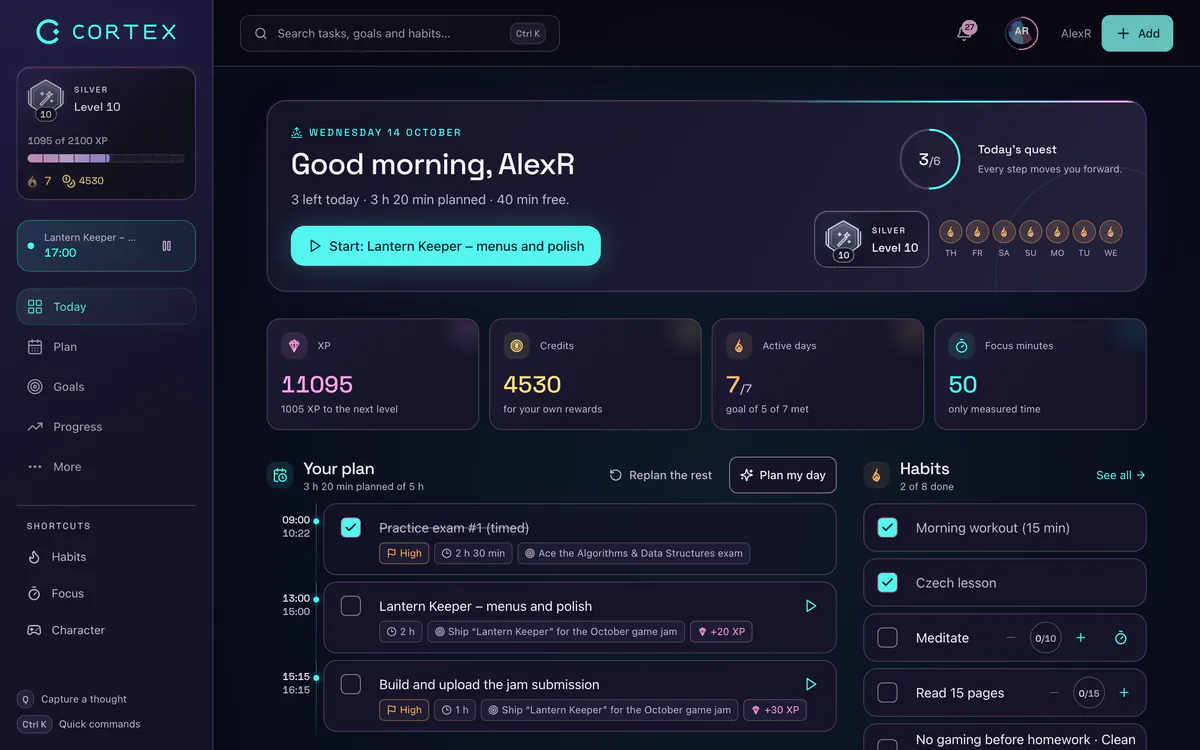
- CORTEX is a free gamified productivity app – tasks in one sentence, a one-click day plan, a calendar, focus sessions and time tracking, habits and goals, with XP, levels and real-life rewards.
5 questions to ask before you pick an app
- What is your main problem? You forget things (→ a reliable task list), you don't know what to do when (→ a day plan and calendar), you get distracted (→ a focus timer), habits don't stick (→ a habit tracker), you lack motivation (→ game mechanics and rewards), your information is a mess (→ a notes app), or you lose track of hours and invoices (→ time tracking).
- Solo or team? Team projects need shared spaces, comments and permissions. Your own work only needs a personal system.
- Which devices? Phone, laptop, both? Some apps are tied to one platform; browser-based ones run everywhere.
- What is your budget? Check exactly what the free plan includes and whether its limits will pinch in a month.
- How much should the app do for you? Some people want a blank canvas; others want the app to propose the plan and only confirm it.
If your answers are "solo, phone and laptop, free, and more than just a list", read on about ready-made systems. If they are "large team and shared projects", you need a team project tool – CORTEX is not built for that.
Types of productivity apps
| Type | Solves | Watch out for |
|---|---|---|
| To-do list | Capturing and checking off tasks | Doesn't tell you when to do what |
| Calendar and day planner | When to do what, a schedule in time | Planning by hand takes time |
| Focus timer | Working in blocks without distractions | Doesn't plan anything by itself |
| Habit tracker | Regular habits and bad habits | Easy to forget when separate from tasks |
| Notes app | Knowledge, documents, a second brain | Tasks get lost inside notes |
| Time tracker | Hours per project, reports, billing | Often yet another app for freelancers |
| Gamified app | Motivation through XP, levels and rewards | The game must not replace the plan |
The methods behind these apps are covered in time blocking, the Pomodoro Technique, Getting Things Done and how to gamify your life.
Building kit or ready-made system?
The second big choice is between a building kit – blank pages, tables and databases you assemble into a system – and a ready-made system, where tasks, calendar, time and habits are wired together from the start.
| Building kit | Ready-made system | |
|---|---|---|
| Getting started | Hours or days of setup, or someone else's template | Minutes, the structure is there |
| Freedom | Nearly unlimited | Fixed architecture; you customize the content |
| Maintenance | You maintain formulas, relations and views | The app maintains the logic |
| Automation | Whatever you build | Day plan, recurrence, reminders, reports |
| Best for | People who enjoy tuning systems; docs and wikis | People who mainly want to get things done |
A combination that works for many people: one app for action (tasks, plan, time, habits) and one for knowledge (notes, documents). More than two or three apps usually means you check none of them regularly.
What CORTEX does
CORTEX puts the pieces people usually spread across several apps into one free system – no paid tiers:
- Tasks in one sentence. Press Q and type "proposal for Corner Café tomorrow @10:00 ~45m !p1 #clients" – date, time, duration, priority and goal are parsed. Recurrence, subtasks and a list grouped by day. See the to-do list app.
- A one-click day plan. Plan My Day fits tasks into the free slots of your day around fixed appointments, keeps a buffer and tells you what doesn't fit.
- A calendar with time blocking – day and week as an hour grid with drag and drop; an external calendar can be shown read-only as busy blocks.
- Focus and time tracking – one timer on a task (Pomodoro or free), reports and CSV/PDF export. See the time tracking app.
- Good and bad habits with a streak and heatmap per habit – the habit tracker.
- Goals, a vision board and a mind map with progress from finished tasks – see the mind map app.
- A game layer: XP, levels, credits and a shop for rewards you define yourself – the gamified productivity app.
What CORTEX doesn't do
- No App Store or Google Play app – it installs from the browser as a PWA.
- No team workspaces, Kanban boards or task comments; collaboration means shared goals and alliances.
- External calendars are read-only; no two-way sync.
- Not a notes app for long documents.
Test an app properly in two weeks
- Pick one app, not five at once.
- Bring over only what is alive – dated tasks, recurring things, active projects. Leave the old pile in a backup. Moving from another app? Import your tasks from a backup or CSV.
- Plan each morning and close the day in five minutes each evening. Write the hardest task as an if–then plan ("When it is 9 a.m., I open the proposal"); implementation intentions had a medium-to-large effect on goal attainment in a meta-analysis (Gollwitzer & Sheeran, 2006).
- After a week, review – what was missing, what you never used. The weekly review has a 20-minute routine.
- After two weeks, decide. If you open the app without being reminded, it fits.
Common mistakes when choosing
- Testing five apps at once and none of them properly.
- Moving the whole old mess. The new app instantly looks like the old one.
- Expecting the app to fix the method. Without a regular planning habit, no app helps – see how to stop procrastinating and how to focus.
- Choosing by feature count. What matters is whether you open it on a tired Tuesday evening.
Frequently asked questions
What is the best productivity app?
The one that solves your main problem and that you open every day. If you want tasks, a day plan, time tracking, habits and goals in one free app with a game layer, try CORTEX. For team projects or long documents, you need a different kind of tool.
How do I choose a to-do or productivity app?
Answer five questions: what your main problem is, whether you work solo or in a team, which devices you use, what you want to pay, and how much the app should do for you. Then test one app for two weeks on real tasks.
Is one app for everything better than several specialized ones?
Most people do well with one app for action (tasks, time, habits) and one for notes. More than three apps usually means none of them gets used regularly.
Is CORTEX really free?
Yes. Every feature, including the day plan, time tracking, habits and goals, is free for everyone, with no credit card. Voluntary support unlocks nothing.
Does CORTEX work on iPhone and Android?
Yes, as a web app (PWA) you add to your home screen from the browser. It is not in the App Store or Google Play.
Can I move my tasks from another app?
Yes, if that app can export a backup or CSV. The import shows a preview, lets you pick projects and can be undone in one click.
Sources and further reading
Level up your life
CORTEX is free for everyone. Tasks, a one-click day plan, time tracking, habits and rewards in one system – on desktop and mobile.
CREATE A FREE ACCOUNT