Freelance work schedule: how to set your hours – and an end to the day
As a freelancer you set your own work schedule – which is exactly why work spills into evenings and weekends. What works: a fixed start and end, two blocks of focused work, set windows for clients and email, and availability you agree on in advance. Research on recovery shows that mentally detaching from work in your free time is linked to better well-being and less exhaustion. Below is a weekly template and how to stick to it.
- A fixed start and especially a fixed end to the day stop work from expanding to fill it.
- Psychological detachment from work during leisure time is linked to better well-being and less exhaustion (Sonnentag, 2012); relaxation, mastery experiences and control over free time also aid recovery (Sonnentag & Fritz, 2007).
- Very long weeks deliver less with every extra hour (Pencavel, 2014).
- Put client availability into fixed windows and tell clients in advance.
- Set the boundary between work and private life deliberately – people differ in how separate they want them (Allen, Cho & Meier, 2014).
Why freelancers need working hours even though nobody checks
Freelancing removes everything that used to hold the boundary: leaving the office, colleagues going home, a manager who doesn't want overtime. Instead you get "I'll just answer this client quickly" at 10 p.m. and a weekend with the laptop "just for an hour".
It doesn't work long term. Pencavel (2014) showed with historical data that in very long weeks each extra hour adds less and less. And Sonnentag (2012) reviews research linking mental detachment from work in your free time with better well-being and less exhaustion – without it, you are less effective the next day.
How to set your hours: 6 steps
- A fixed start and end. Pick times you can keep on most days. The end matters more than the start – without it, the day inflates.
- Two focus blocks. In your best hours (see chronotype and productivity). How much focus you can manage: how many hours of focused work a day.
- Client windows. Group calls and meetings into set times, e.g. Tuesday and Thursday afternoons.
- Batched email and admin twice a day, and invoicing once a week – see task batching.
- An end-of-day ritual. Ten minutes: note what's left, plan tomorrow, close the laptop. The ritual tells your brain "done".
- One full day off a week, no exceptions.
A weekly template for freelancers
| Time | Mon | Tue | Wed | Thu | Fri |
|---|---|---|---|---|---|
| 8:30–11:00 | Deep work | Deep work | Deep work | Deep work | Deep work |
| 11:00–11:30 | |||||
| 13:00–15:00 | Second block | Clients, calls | Second block | Clients, calls | Invoices, timesheets, weekly plan |
| 15:00–16:30 | Lighter work, buffer | Lighter work, buffer | Learning, sales | Lighter work, buffer | Off or buffer |
| 16:30–16:45 | End of day: note what's left, plan tomorrow | ||||
The template is a starting point, not a law. Adjust it to your clients and to what time tracking shows you. For tools, see the app for freelancers page.
The boundary between work and private life
Allen, Cho and Meier (2014) describe how people set the boundary between work and family differently – some keep them sharply apart, others blend them. Neither is the one right answer; what matters is choosing deliberately. For freelancers working from home, it helps to have:
- a place just for work (even if it is one specific desk),
- separate notifications – work apps muted outside working hours,
- a physical end – close the laptop, clear the desk, a short walk,
- experiences outside work – sport, hobbies, people; Sonnentag and Fritz (2007) count "mastery" experiences, challenges outside work, as a source of recovery.
Irregular projects, kids and busy seasons
A fixed schedule is the ideal; freelance reality is messier. A few adjustments help:
- Bursty projects: keep at least a fixed end to the day and one day off a week, even when the content of the day changes. After a heavy week, deliberately plan a lighter one.
- Kids: plan work blocks around daycare and school, deep work into the longest quiet window, and batches of small tasks into the short ones.
- Seasonal work (weddings, tax season, festivals): accept longer weeks in season, and balance them deliberately with time off afterwards.
- Clients in other time zones: fixed windows for calls, everything else asynchronously by email.
Measuring your real hours helps: how many you actually work each week and how many you bill – see the time tracking app.
When a client wants an instant reply
- Separate urgent from fast. Most "urgent" emails can wait for the next window.
- Agree on a channel for real emergencies (phone), so you don't have to watch email constantly.
- Charge for out-of-hours availability or build it into your rate – see the hourly rate calculator.
Your working hours in CORTEX
- Day start and end are set in planning settings; Plan My Day schedules tasks only within them, with the buffer you choose.
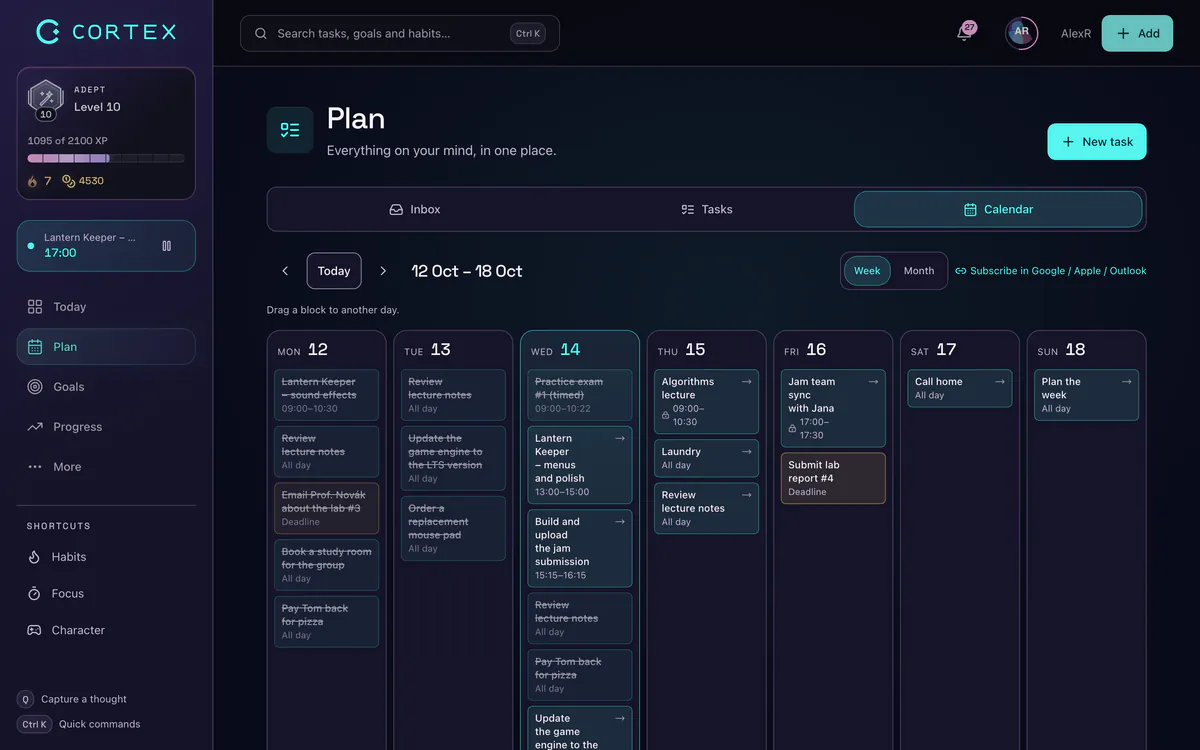
- A weekly calendar grid – blocks for deep work, clients and admin as recurring tasks.
- Time tracking per project – see how many hours you really work each week and how many you bill.
- Quiet hours for notifications – the app's reminders don't disturb you outside working hours.
Frequently asked questions
Do freelancers need set working hours?
Not by law, but a fixed start and end to the day protect both output and rest. Without them, work easily spreads into evenings and weekends.
How many hours a day should a freelancer work?
It depends on the field, but most people manage 2–4 hours of focused work a day; the rest is communication, admin and lighter tasks. Very long weeks give less with every extra hour.
How do I separate work and life when working from home?
A fixed end to the day, a place just for work, muted work notifications outside working hours and a short end-of-day ritual. Activities outside work help too.
How do I tell clients I'm not always available?
Tell them your availability windows and a channel for urgent issues in advance, for example in your email signature. Price out-of-hours availability into your rate.
What is psychological detachment from work?
Not thinking about or doing work during your free time. Research links it with better well-being and less exhaustion.
Sources and further reading
- Sonnentag (2012): Psychological Detachment From Work During Leisure Time, Current Directions in Psychological Science
- Sonnentag & Fritz (2007): The Recovery Experience Questionnaire, Journal of Occupational Health Psychology
- Pencavel (2014): The Productivity of Working Hours, The Economic Journal
- Allen, Cho & Meier (2014): Work–Family Boundary Dynamics, Annual Review of Organizational Psychology and Organizational Behavior
Level up your life
CORTEX is free for everyone. Tasks, a one-click day plan, time tracking, habits and rewards in one system – on desktop and mobile.
CREATE A FREE ACCOUNT