The productivity app for freelancers who are their own boss
A good app for freelancers answers three questions every day: what should I work on now, how long did it really take, and was it worth it? CORTEX is a free productivity app that does this in one place – each client job becomes a goal with tasks, named timers log the real hours, reports show where your time went, and a one-click day plan fits it all into today.
- CORTEX is a free gamified productivity app – tasks, a one-click day plan, time tracking and habits, with XP, levels and real-life rewards.
- Freelancers can set up each job or client project as a goal with tasks, a deadline and progress calculated from finished tasks.
- Several named work timers can run at once; logged minutes appear in reports by goal and category, with CSV and PDF export.
- Your effective hourly rate for a job = what you were paid ÷ all hours tracked on it, including calls, revisions and admin.
- CORTEX gives you trustworthy hours per goal but does not store hourly rates, so you do the division yourself or in a spreadsheet via CSV export.
What freelancers actually need from an app
Employees get structure handed to them: a manager sets priorities, a calendar fills itself, the salary arrives regardless. Freelancers have to build all of it. The best productivity app for freelancers covers the daily loop, not just one piece:
| Freelance problem | What helps | In CORTEX |
|---|---|---|
| Five clients, one brain | One place for every job and its tasks | Jobs as goals; quick capture with #Client |
| "What do I do first?" | An ordered plan for today | Plan My Day, one click |
| Fixed-price jobs that eat your week | Real hours per job | Named timers, reports per goal |
| Underpricing | Effective hourly rate per job | Reports + the hourly rate calculator |
| Deep work vs. constant pings | Protected focus blocks | Focus timer 15/25/50 min with focus sounds |
| No boss to say "good job" | Visible progress and rewards | XP, levels, a reward shop you stock yourself |
Every job is a goal
In CORTEX, a client project maps naturally to a goal: "Corner Café – website redesign", deadline November 30, category Work. Under it go the tasks – brief, wireframes, first draft, revisions, handover – each with an estimate and priority. The goal's progress percentage moves only as tasks get done, so you know honestly where a project stands before the client asks. Details in the goal tracker.
Adding work is quick. Press Q anywhere and type:
Send proposal to Corner Café tomorrow @10:00 ~30m !p1 #CornerCafe
That one line sets the date, time, 30-minute estimate, top priority and the goal. Recurring admin – weekly reporting to a retainer client, monthly bookkeeping – uses *weekly or *monthly so it shows up on its own.
Timers that show where the hours really go
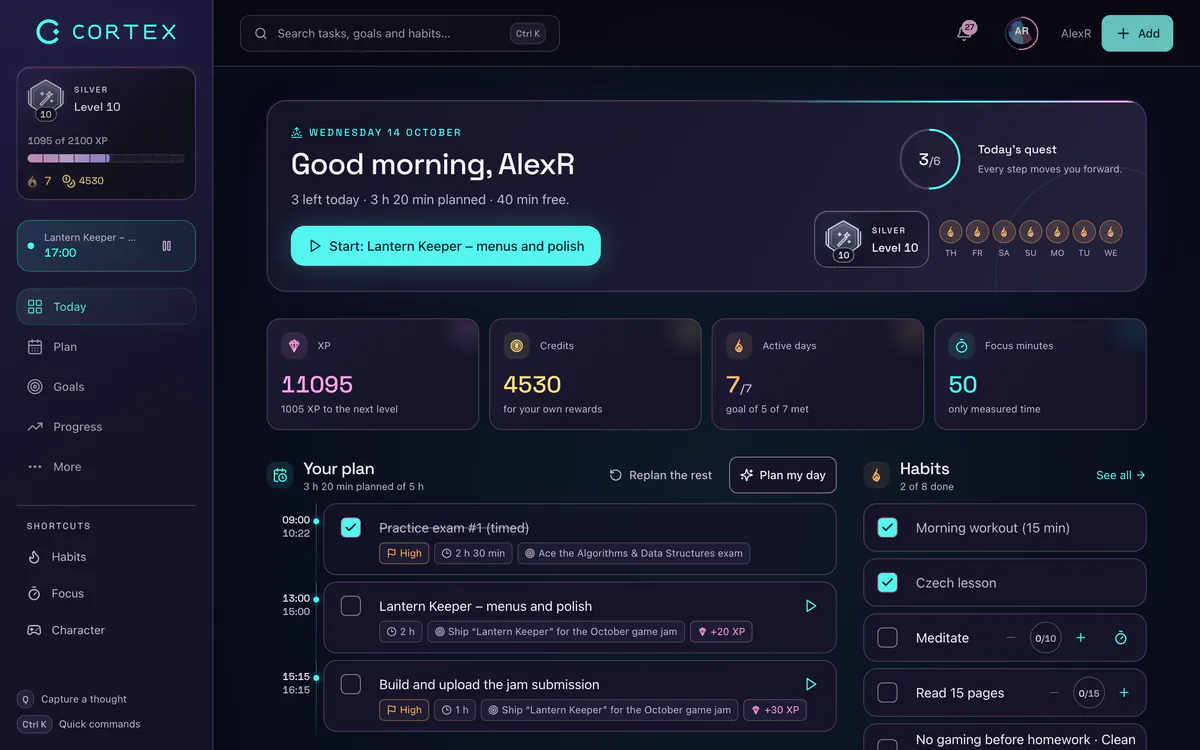
The Today screen has named work timers: tiles like "Corner Café design", "Client calls" or "Admin" with Start/Stop. Several can run at once – handy if you want a "Client X" timer and a "Meetings" timer going together. Logged minutes flow into reports.
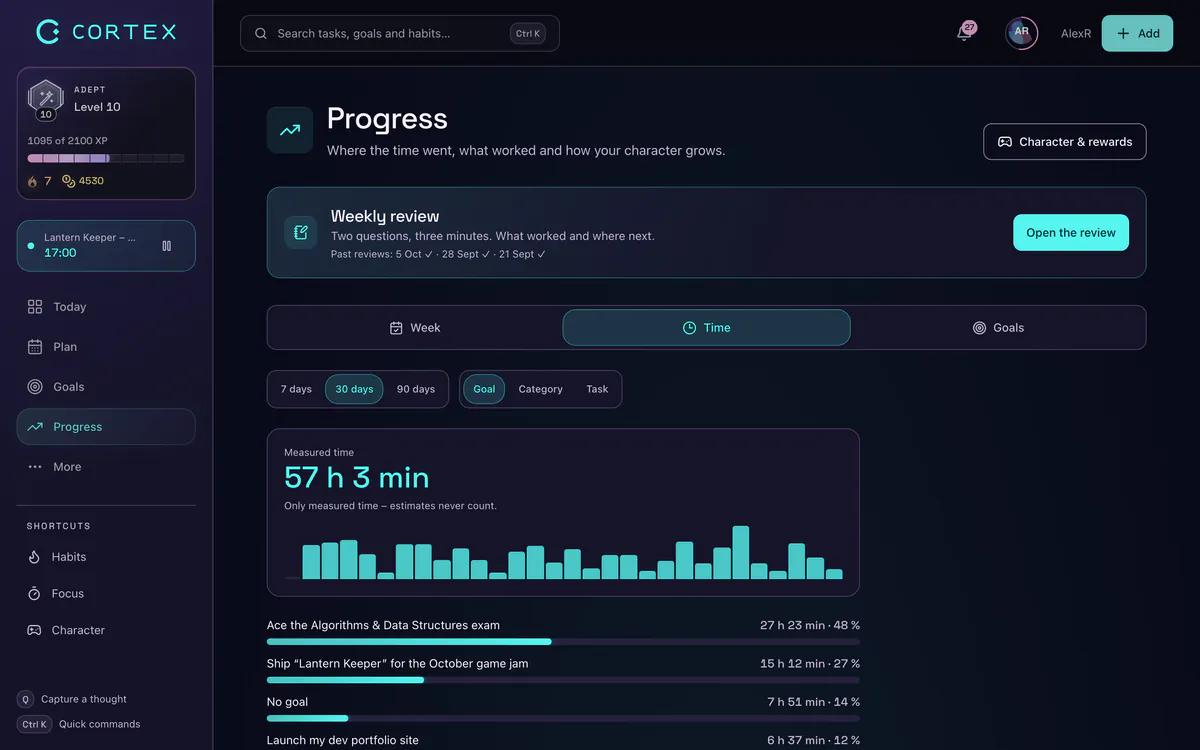
Reports then show total time, time per goal (project) and category, finished tasks, a productivity percentage and an XP trend, with presets for this month, last month, the last 30 days or the year. You can fix entries manually and export to CSV or PDF – useful as an attachment to a timesheet for hourly clients. See time tracking for the full tour.
Your real hourly rate: the number that changes how you price
On a fixed-price job, your effective hourly rate is simply:
Effective rate = amount paid ÷ all hours tracked on the job
"All hours" means everything: the discovery call, the emails, the third round of revisions, the invoice. Example: a $2,400 website job you quoted assuming 30 hours ($80/h). Reports show 46 tracked hours. Your real rate was about $52/h – a third less than you thought.
CORTEX doesn't store rates or calculate money – it gives you trustworthy hours per goal, and you do the division (or export to CSV and let a spreadsheet do it). Do this for every finished job for two or three months and patterns appear: which clients pay well per hour, which project types always overrun, how much unpaid admin you carry.
Then use the freelance hourly rate calculator to set the rate you actually need, and quote your next fixed-price jobs with real data instead of hope.
A day plan that respects client calls
Freelance days mix fixed appointments (calls, deadlines) with flexible deep work. Plan My Day handles exactly that: it keeps your fixed-time items, then fills free 15-minute slots between now and 22:00 with your tasks – overdue first, then by priority, then shortest first. It shows what doesn't fit, so you can renegotiate a deadline before it's late. "Apply" writes the times; "Re-plan" recalculates after a surprise call. It's rule-based, not AI, so the result is predictable. More in the day planner.
Protect the creative work with the focus timer – 25 or 50 minutes, optional focus sounds – and read deep work for the method behind it.
A freelancer's weekly system
- Monday, 15 minutes: review each client goal. Add next tasks with estimates. Anything without a deadline gets one or gets dropped. Too much on the list? Sort it with the Eisenhower Matrix.
- Every morning: set the Prime directive (the one deliverable that must ship), press Plan My Day, Apply.
- During work: start the matching timer. Capture new requests with Q instead of switching context.
- Friday, 15 minutes: open reports for the week. Hours per client vs. plan? Which job is overrunning?
- End of month: monthly review (time tracked, tasks done vs. last month), export hours for clients, calculate effective rates for finished jobs.
And because nobody else will celebrate your shipped project: the game layer gives XP for finished tasks, 100 XP for a completed goal, and credits for a reward you choose – a day off, a new keyboard, a nice dinner.
What CORTEX is not (so you can pick well)
- Not an invoicing tool for most countries – it doesn't create invoices from tracked time. (Invoicing for Czech freelancers is available in the Czech version.) Pair it with your local invoicing or accounting software.
- Not a CRM. Time is linked to goals/projects and categories, not to a client database.
- Not a team workspace. Collaboration is shared goals and alliances. For an agency with many people, a dedicated team project tool fits better.
- No calendar sync with Google Calendar or Outlook yet.
If you only need a stopwatch with client billing rates, a dedicated time tracker may be simpler – see Toggl and Clockify alternatives. CORTEX shines when you want planning, tracking and motivation in one free app.
Frequently asked questions
What is the best app for freelancers?
It depends on your bottleneck. If you need planning, real time tracking and motivation in one place, CORTEX is a free option with jobs as goals, named timers, reports and a one-click day plan. If you mainly need invoicing or a CRM, pair it with specialized software.
Is there a free productivity app for freelancers?
Yes. CORTEX is free for everyone with all features and no credit card, including timers, reports with CSV and PDF export, goals and the day planner.
How do I calculate my real hourly rate as a freelancer?
Divide what a client paid for a job by every hour you spent on it, including calls, revisions and admin. Tracking time per job is the only way to get the hours right.
Can CORTEX track time for multiple clients?
Yes. Create a goal or a named timer per client or project; several timers can run at once. Reports show time per goal and category, and you can export to CSV or PDF.
Can I share a project with a collaborator?
Yes, as a shared goal. Invite a collaborator by email or username; once they accept, you both see the same progress and can assign tasks to each other. CORTEX is not a full team workspace, though.
Does it work on my phone?
Yes. CORTEX is a web app that installs as a PWA on iOS and Android via "Add to home screen". It is not in the App Store or Google Play.
Sources and further reading
Level up your life
CORTEX is free for everyone. Tasks, a one-click day plan, time tracking, habits and rewards in one system – on desktop and mobile.
CREATE A FREE ACCOUNT