The Pomodoro Technique: how to use 25-minute focus blocks (and when not to)
The Pomodoro Technique is a time-management method created by Francesco Cirillo: you pick one task, work on it for 25 minutes without switching (one "pomodoro"), take a short break, and after four pomodoros take a longer break. That is the whole core – the rest of this guide covers the rules that make it work, variants for students and restless brains, the mistakes that quietly break it, and when another method fits better. Want to start right now? Open our free online Pomodoro timer in another tab and read on during your first break.
- The Pomodoro Technique was developed by Francesco Cirillo, who began working on it in the late 1980s as a university student; "pomodoro" is Italian for tomato, after his tomato-shaped kitchen timer.
- Classic cycle: 25 minutes of focused work, a short break of about 5 minutes, and a longer break of roughly 15–30 minutes after four pomodoros.
- A pomodoro is about one task and no switching; urges and interruptions get written down and handled later.
- In a 2023 study with university students (Biwer et al.), pre-set breaks were linked to better mood and similar task completion in less time than self-chosen breaks.
- It fits well for studying, admin and tasks you avoid; it fits poorly for meetings, on-call work and deep flow that a timer would interrupt.
What is the Pomodoro Technique?
The Pomodoro Technique is a method for working in short, timed sprints of full focus separated by deliberate breaks. Francesco Cirillo began developing it in the late 1980s while he was a university student struggling to concentrate. He used a tomato-shaped kitchen timer – pomodoro in Italian – and the name stuck, both for the method and for each 25-minute unit of work.
Cirillo first self-published a book about the method in 2006; a revised hardcover edition, The Pomodoro Technique: The Acclaimed Time-Management System That Has Transformed How We Work, was published by Currency (Penguin Random House) in 2018 and added material on using it in teams.
The timer is the famous part, but the idea behind it is more interesting. A pomodoro is short enough that starting feels easy ("I only have to do 25 minutes"), long enough to make real progress, and it ends with a guaranteed break, so you never have to decide when to rest. It turns time from a vague, anxious "I have all afternoon" into countable units: this report is a three-pomodoro job.
How to do the Pomodoro Technique in 6 steps
- Pick one task. Not "work on the thesis" but "draft section 2.1". If a task needs more than five pomodoros, split it (a simple to-do list template with a column for estimated pomodoros helps). If it needs less than one, batch it with similar small tasks.
- Set a timer for 25 minutes. A kitchen timer, your phone or a browser tab like our Pomodoro timer all work. The act of starting it is a small commitment ritual.
- Work on that task only until the timer rings. No email, no chat, no "quick check". If a thought pops up, write it on a piece of paper and go back.
- Mark the pomodoro. Put an X on your list next to the task. The tally is your record – and a small hit of progress.
- Take a short break (about 5 minutes). Stand up, get water, look out of the window. Avoid anything that pulls you into a new context, like social media or your inbox.
- After four pomodoros, take a longer break (about 15–30 minutes). Then start the next set.
Break lengths vary slightly between descriptions of the method; around 5 minutes for short breaks and 15–30 for long ones is the common version. What matters more is that breaks are real breaks and that you return when they end.
Cirillo's book also treats the method as a daily loop rather than a timer trick: plan the pomodoros at the start of the day, track them as you go, and review at the end how many each task actually took. That review is where your estimates get better over time.
The rules that make it work
Most people who say "Pomodoro doesn't work for me" skipped one of these.
- A pomodoro is indivisible. You cannot do half a pomodoro and count it. If you abandon it, it does not get an X – start a fresh one.
- Internal interruptions get written down. The urge to check your phone, look something up or start another task goes on a list. Cirillo suggests noting each one on your sheet, which also shows you how often you drift.
- External interruptions: inform, negotiate, call back. When a colleague or family member interrupts, briefly tell them you are in the middle of something, agree on a time to get back to them, and do it after the pomodoro ends. Real emergencies win, of course – then the pomodoro is void.
- If you finish early, keep going on the same task. Review, polish, write the next step. Do not jump to a new task mid-pomodoro.
- The break is not optional. Skipping breaks feels productive for an hour and then costs you the afternoon.
How to use a Pomodoro timer
You can use any timer, but a dedicated Pomodoro timer removes friction because it switches between work and break automatically. Here is how to set one up so it helps instead of nags:
- Choose your lengths before you start – classic 25/5, or one of the variants below. Do not change them mid-session.
- Write the task down first. The timer measures focus; it does not decide what to focus on.
- Use sound, not pop-ups. An audible end signal lets you keep your eyes on the work.
- Put the timer where you can see it, but not in your face. A visible countdown helps some people; others find it stressful. Try both.
- Count completed pomodoros. At the end of the day, the count is a more honest measure of deep work than hours at your desk.
Our free online Pomodoro timer runs in your browser with no sign-up, supports custom lengths and works on your phone too.
Pomodoro Technique for students
Studying is where the Pomodoro Technique shines: the work is self-directed, deadlines are far away until suddenly they are not, and the phone is always within reach. Here is a sample evening study session:
| Pomodoro | Task | What "done" looks like |
|---|---|---|
| 1 | Biology: re-read lecture 6 notes | Key terms underlined, 5 questions written |
| 2 | Biology: answer the 5 questions from memory | Gaps marked in red |
| 3 | Math: problem set, exercises 1–4 | Four solutions, one marked "ask in class" |
| 4 | Essay: outline the introduction | Thesis sentence + 3 bullet points |
| Long break – dinner, walk, no studying | ||
Three things make it work better for students:
- Make pomodoros active. Testing yourself, solving problems and explaining concepts out loud beat passive re-reading. Use the timer to protect active study, not to time highlighting.
- Phone in another room. Not face down on the desk – out of reach.
- Study with a friend, timed together. Start the same timer, work silently, chat in the breaks. It adds accountability without the distraction.
There is some research support for the structure. In a 2023 study, Biwer and colleagues compared university students who took pre-set breaks (including a Pomodoro-like schedule of 24 minutes of study and 6 minutes of break) with students who chose their own breaks. The systematic-break groups reported better mood, and they reached similar task completion in less time; self-chosen breaks were linked to longer study and break stretches with more fatigue. It was a single-day study with a modest sample, so treat it as encouraging, not conclusive.
Pomodoro variants: 25/5 is a starting point, not a law
| Variant | Work / break | Good for |
|---|---|---|
| Classic | 25 / 5, long break after 4 | Most people, most tasks; the best place to start |
| Short sprint | 15 / 3–5 | Getting started on a dreaded task, low-energy days, restless brains |
| Long block | 50 / 10 | Writing, coding, design – work with a long warm-up |
| Flexible ("flowtime") | Work until focus fades, then a break proportional to the work | Experienced users who already know their rhythm |
| Team pomodoro | Shared 25 / 5 timer | Co-working, study groups, pair programming |
If you have ADHD-style focus that comes in bursts, many people find shorter sprints easier to start, and the guaranteed break makes boring tasks tolerable. This is a practical tip, not medical advice – experiment and keep what works. For more ideas, see our guide to focusing and the ADHD planner page.
Common Pomodoro mistakes
- Using breaks to scroll. Your brain does not rest when you swap a work screen for a social feed. Move your body instead.
- No task chosen before the timer starts. You spend the first ten minutes deciding what to do. Pick tomorrow's first pomodoro the evening before, or sort your list with the Eisenhower Matrix.
- Tasks that are too big. "Thesis" is not a pomodoro task. "Find three sources for chapter 2" is.
- Ignoring the timer when you are "in the zone". Occasionally fine; habitually, it means you skip rest and crash later. Consider the 50/10 variant instead.
- Counting hours, not pomodoros. Eight hours at a desk with constant switching might contain three real pomodoros. Count the real ones.
- Treating a broken pomodoro as failure. Interruptions happen. Void it, reset, start again – no guilt.
When the Pomodoro Technique does not fit
Be honest about where it breaks down:
- Meeting-heavy or on-call days. If you are interrupted every ten minutes by design (support, parenting a toddler, retail), 25-minute blocks will constantly fail. Use pomodoros only in the protected gaps.
- Deep creative flow. Some writers and developers need 60–90 minutes to reach full depth, and a bell at minute 25 can be a hard reset. Try 50/10, or plan longer blocks with time blocking and the deep work approach.
- Collaborative work in real time. Workshops, calls and brainstorming have their own rhythm.
A common combination: time blocking decides when you work on what; pomodoros decide how you work inside each block. And if the real problem is that you cannot start at all, read how to stop procrastinating – a 15-minute pomodoro is one of the best starting tricks there is.
Running Pomodoros in CORTEX
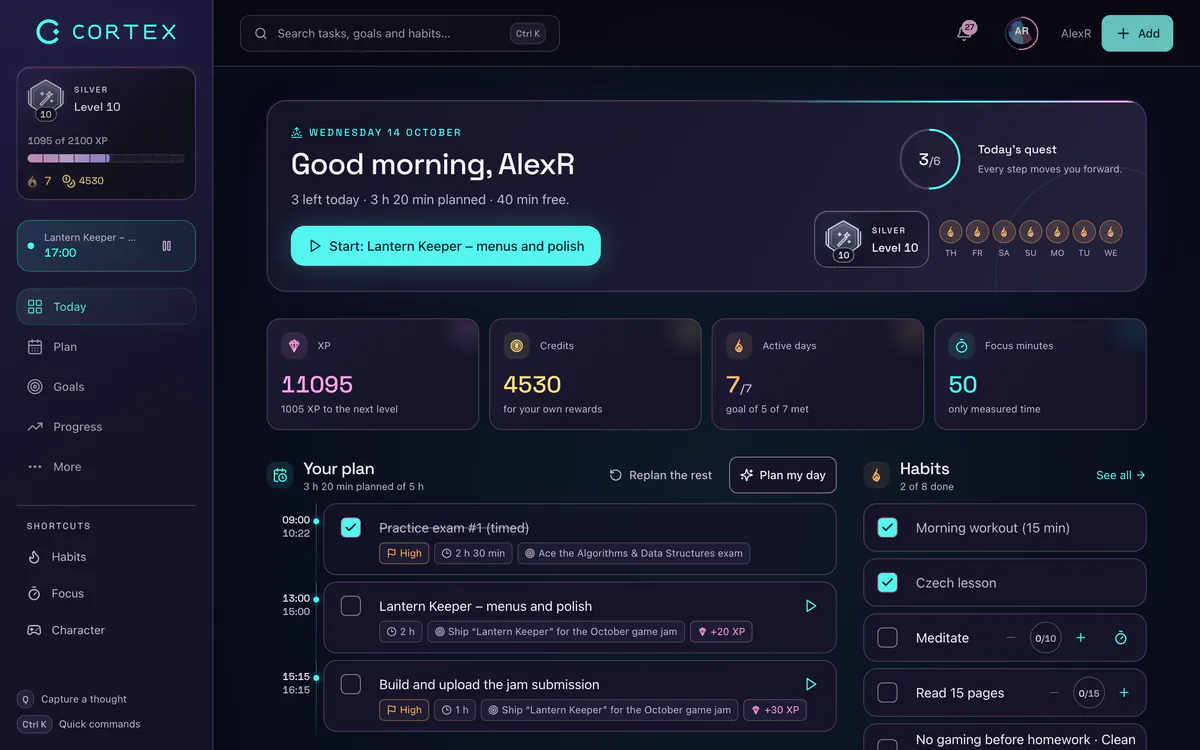
CORTEX is a free gamified productivity app – tasks, a one-click day plan, time tracking and habits, with XP, levels and real-life rewards. It has a focus timer built into the top bar, so you do not need a separate tab:
- Focus timer: 15, 25 or 50-minute countdowns – the short sprint, classic and long-block variants – with a progress bar and an in-app notification when time is up.
- Focus sounds: optional ambient audio (lofi, synth, nature, zen and alpha-wave style) to mask background noise.
- Logged time: the countdown itself is not logged; for records, start a named work timer (for example "Thesis") on the Today screen, and the minutes go into your reports.
- Rewards: finishing the task you focused on earns XP and credits you can spend on real rewards in your own reward shop.
Frequently asked questions
What is the Pomodoro Technique in simple terms?
It is a way of working in focused 25-minute sprints called pomodoros, each followed by a short break of about 5 minutes, with a longer break after four sprints. During a pomodoro you work on one task only and write down distractions instead of acting on them.
How do I use a Pomodoro timer?
Write down one task, set the timer to 25 minutes, and work only on that task until it rings. Mark the pomodoro as done, take a 5-minute break away from screens, and repeat; after four rounds take a 15–30 minute break. A free browser tool like the CORTEX Pomodoro timer switches between work and breaks for you.
Is the Pomodoro Technique good for students?
Yes, studying is one of its best uses because the work is self-directed and distractions are constant. It works best when each pomodoro has an active goal – such as answering practice questions – and the phone is out of reach. A 2023 study with university students found that pre-set breaks were linked to better mood and similar results in less time than self-chosen breaks.
Is 25 minutes the best length for a pomodoro?
Not necessarily. 25 minutes is the classic length and a good starting point, but many people use 15 minutes to get started on hard tasks or 50 minutes for writing and coding. Pick one length per session and stick with it rather than changing it mid-way.
Does the Pomodoro Technique help with ADHD?
Many people with ADHD-style focus find short timed sprints with guaranteed breaks easier than open-ended work sessions, especially with 15-minute blocks. That is practical experience rather than a medical claim, and it is not a substitute for professional advice – try it and keep the version that works for you.
What should I do during a Pomodoro break?
Something physical and screen-free: stand up, stretch, drink water, walk around or look out of a window. Avoid email and social media, which pull you into a new context and make it harder to return to the task.
Sources and further reading
Level up your life
CORTEX is free for everyone. Tasks, a one-click day plan, time tracking, habits and rewards in one system – on desktop and mobile.
CREATE A FREE ACCOUNT