Free printable weekly planner (and daily planner)
Here is a free printable weekly planner: one page with your 3 priorities for the week and one must-do per day, plus a daily planner page with half-hour time blocks from 6:00 to 22:00. Click "Print this template" – both pages fit A4 and US Letter portrait, and "Save as PDF" in the print dialog gives you a reusable file.
- The weekly planner page has 3 weekly priorities and a row for each day (Monday–Sunday) with one must-do task, optional tasks and fixed appointments.
- The daily planner page is a time-blocking sheet from 6:00 to 22:00 in 30-minute slots, with a "plan" and a "what actually happened" column.
- Use the weekly sheet to decide what matters this week and the daily sheet to decide when it happens. Many people need both; if you only pick one, choose by how predictable your days are.
- Weekly planning takes about 20 minutes on Sunday or Monday morning; daily time blocking takes 5–10 minutes the evening before.
- The digital version in CORTEX is Plan My Day: one click schedules today's tasks into free slots between 09:00 and 22:00, next to a calendar with a week view.
Print the weekly and daily planner
The first page is the weekly planner, the second is the daily planner printable with time blocks. The button prints only the sheets. Print one weekly page per week and as many daily pages as you need – or save both as a PDF and print on demand.
Weekly planner
| 1 | |
|---|---|
| 2 | |
| 3 |
| Day | Must-do (1 task) | Also, if time | Fixed (time · appointment) |
|---|---|---|---|
| Monday ___ / ___ | |||
| Tuesday ___ / ___ | |||
| Wednesday ___ / ___ | |||
| Thursday ___ / ___ | |||
| Friday ___ / ___ | |||
| Saturday ___ / ___ | |||
| Sunday ___ / ___ |
Friday review: done ____ / 7 must-dos · carry over: ______________________________ · next week's first task: ______________________
Daily planner – time blocks
| 1 | Most important task: |
|---|---|
| 2 | |
| 3 |
| Time | Plan | What actually happened |
|---|---|---|
| 6:00 | ||
| 6:30 | ||
| 7:00 | ||
| 7:30 | ||
| 8:00 | ||
| 8:30 | ||
| 9:00 | ||
| 9:30 | ||
| 10:00 | ||
| 10:30 | ||
| 11:00 | ||
| 11:30 | ||
| 12:00 | ||
| 12:30 | ||
| 13:00 | ||
| 13:30 | ||
| 14:00 | ||
| 14:30 | ||
| 15:00 | ||
| 15:30 | ||
| 16:00 | ||
| 16:30 | ||
| 17:00 | ||
| 17:30 | ||
| 18:00 | ||
| 18:30 | ||
| 19:00 | ||
| 19:30 | ||
| 20:00 | ||
| 20:30 | ||
| 21:00 | ||
| 21:30 | ||
| 22:00 |
Shutdown: tomorrow's first task ______________________ · one win today ______________________
Daily vs weekly planner: which one do you need?
A weekly planner answers what matters this week. A daily planner answers when exactly will I do it today. They solve different problems:
| Weekly planner | Daily planner (time blocks) | |
|---|---|---|
| Best for | Balancing projects, classes, family and deadlines across days | Protecting focus time on days full of meetings or interruptions |
| Time per use | About 20 minutes once a week | 5–10 minutes each evening or morning |
| Main risk | Every day becomes "I'll get to it" | Over-planning; one late meeting breaks the whole day |
| Choose it if… | Your days are fairly predictable | Your days are chaotic, or you procrastinate without a fixed start time |
Our rule of thumb: everyone benefits from a weekly plan; add daily time blocks on the days that need them. Freelancers with several clients, students in exam season and people who find unstructured time hard to start usually want both.
How to plan your week in 20 minutes
- Brain dump (5 min). Write everything on your mind on a scrap sheet – tasks, errands, worries. Don't sort yet. (On busy days, the same dump becomes your 1-3-5 to-do list.)
- Pick 3 priorities (5 min). Write outcomes, not activities: "Proposal sent to Corner Café", not "work on proposal". If everything is a priority, ask which three would make the week a success even if nothing else got done. An Eisenhower matrix helps when you're stuck.
- Fill in fixed times first (3 min). Classes, calls, appointments, gym – everything with a clock time goes into the "Fixed" column.
- One must-do per day (5 min). Spread the steps of your 3 priorities across the days. Only one must-do per day; the rest goes to "Also, if time".
- Leave slack (2 min). Keep at least one weekday light. Something unexpected will happen; plan for it instead of pretending it won't.
On Friday, fill in the review line: how many must-dos you finished and what carries over. Counting honestly is what makes next week's plan realistic.
How to time-block a day with the daily planner
Time blocking means giving each task a slot on the clock instead of a place on a list. It is the core of Cal Newport's approach in Deep Work (2016) – see our deep work guide. With the daily sheet:
- Write your top 3 at the top. Number 1 is the task that makes the day a success.
- Block fixed appointments in the Plan column.
- Put task #1 into your best energy window – for most people the first 2–3 hours of work. Give it 60–90 minutes, not "all morning" – our free Pomodoro timer has a 90/15 preset for exactly this.
- Batch small stuff (email, calls, errands) into one or two 30-minute blocks.
- Add buffers: plan only about 70% of the day. Leave empty slots after meetings and before lunch.
- Log reality in the second column during the day. When the plan breaks, re-plan the rest of the day in one minute instead of giving up.
Worked example (freelance designer): 8:30–10:00 logo concepts for a client (task #1) · 10:00–10:30 email and invoices · 10:30–11:00 buffer · 11:00–12:00 client call (fixed) · 13:00–14:30 website revisions (task #2) · 14:30–15:00 walk · 15:00–16:00 portfolio update (task #3) · 16:00–16:30 plan tomorrow. More examples and variations in our time blocking guide.
The digital version: Plan My Day and calendar in CORTEX
Paper is fast and distraction-free, but rewriting the day every time a meeting moves gets old. CORTEX is a free gamified productivity app – tasks, a one-click day plan, time tracking and habits, with XP, levels and real-life rewards. Its planning tools do the daily sheet for you:
- Plan My Day (one click): a transparent, rule-based scheduler – not AI. It takes today's, overdue and undated tasks, keeps your fixed-time appointments and fills the free slots of a 09:00–22:00 day from the current time in 15-minute steps. Order: overdue first, then priority, then shortest first (quick wins). It tells you what didn't fit; "Apply" writes the times, "Re-plan" recalculates after a disruption.
- Calendar with a month view and a week time-grid, where you drag and drop tasks to reschedule them – the digital weekly page.
- Quick capture: type "Client call friday @11 ~1h !p1" and the date, time, duration and priority are filled in for you.
- XP, levels and a reward shop for finished tasks, if your motivation needs a scoreboard.

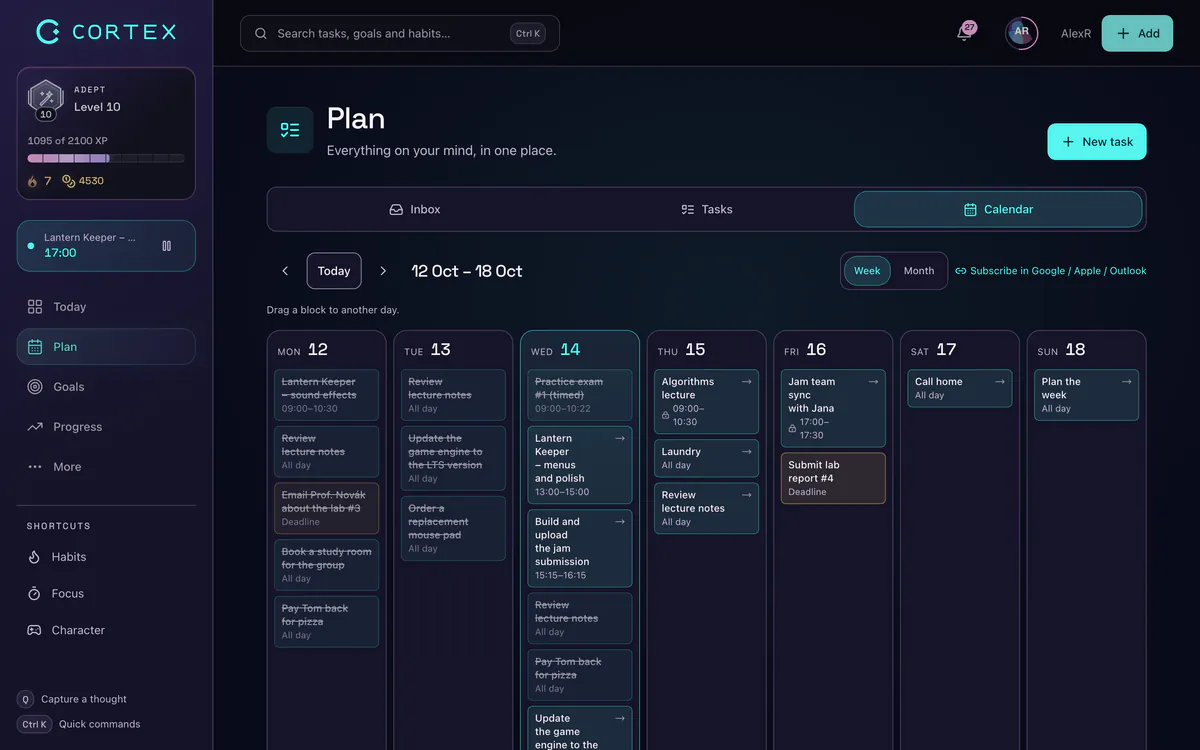
Honest limits: working hours in Plan My Day are fixed at 09:00–22:00 for now (the paper sheet starts at 6:00), and the calendar doesn't sync with Google Calendar or Outlook. If you want a planner for an ADHD-style brain, see the ADHD planner app page.
Frequently asked questions
Is this weekly planner printable free?
Yes – both pages are free to print for personal use, with no sign-up or email. Print as many copies as you want, or save them as a PDF from your browser's print dialog.
How do I get the weekly planner as a PDF?
Click "Print this template" and choose "Save as PDF" (or "Microsoft Print to PDF" on Windows) as the printer. You get two pages – the weekly planner and the daily time-block planner – sized for A4 or US Letter portrait.
Is a daily or weekly planner better?
A weekly planner is better for balancing priorities and deadlines across days; a daily planner is better for protecting focus time on busy or chaotic days. Most people do well with a weekly plan and add a daily time-block sheet only on days that need it.
What should a daily planner include?
At minimum: the date, your top 3 tasks with one clear "most important task", fixed appointments, and time blocks for the important work. A column for what actually happened helps you plan more realistically over time.
When should I plan my week?
Pick a fixed slot – Sunday evening or the first 20 minutes of Monday are the most common. Doing it at the same time every week matters more than which day you choose.
Sources and further reading
Level up your life
CORTEX is free for everyone. Tasks, a one-click day plan, time tracking, habits and rewards in one system – on desktop and mobile.
CREATE A FREE ACCOUNT