Buffer time: how much slack to keep so your plan survives the day
Buffer time is time you deliberately leave open in your day or week for things that run over or come up unexpectedly. For most people, keeping about 20–30% of working time free works well – tasks take longer than we estimate, even familiar ones. Below: why you need a buffer, how much to plan, where to put it and what to do when you don't use it.
- A buffer is planned free time for overruns and surprises – not a failure of planning.
- People consistently underestimate how long tasks take (Buehler, Griffin & Ross, 1994); one reason is that we remember past tasks as shorter than they were (Roy, Christenfeld & McKenzie, 2005).
- Breaking a task into steps produces longer, more realistic estimates (Kruger & Evans, 2004).
- As a rule of thumb: 20–30% of the day open; more with client work and frequent interruptions, less on meeting-free days.
- Spread the buffer through the day (after the main task, after meetings), not just at the end.
Why a plan without a buffer breaks
A plan filled to the last minute assumes everything will take exactly as long as estimated. It won't. Buehler, Griffin and Ross (1994) showed that people consistently underestimate how long tasks take – students estimated their thesis at 34 days on average, and it took 55. This tendency is the planning fallacy.
Why don't we learn? Roy, Christenfeld and McKenzie (2005) review evidence that we often remember past tasks as shorter than they really were – and then estimate the future from that biased memory. A buffer is the practical fix: you don't need to estimate perfectly, you need to plan for being wrong.
How much buffer to plan
| Type of day | Buffer | Why |
|---|---|---|
| No meetings, familiar tasks | 10–20% | Few interruptions, better estimates |
| Regular workday | 20–30% | Messages, small stuff, overruns |
| Client work, support, parents of small kids | 30–50% | Many unexpected requests |
| A new kind of task | Extra buffer for that task | The estimate is less certain |
These are rough values. Find your own by comparing estimates with actual time for a week – the gap is your natural buffer.
Where to put the buffer
- After the main task. If it runs over, the afternoon doesn't collapse.
- After meetings. Meetings overrun and generate follow-up work.
- Before a fixed end of day. The last 30–45 minutes as a safety zone.
- Not all at the end. A buffer only in the evening easily turns into overtime.
Better estimates mean a smaller buffer
- Break the task into steps. Kruger and Evans (2004) found that unpacking a task into subtasks leads to longer, more realistic estimates. See how to break down a big task.
- Track actual time and compare it with your estimate. After a few weeks you'll see your typical gap.
- Use a reference class: "How long did the last three similar tasks take?" instead of "How long should this take?".
- Watch out for Parkinson's law. An overly generous estimate lets work expand – see Parkinson's law. The buffer belongs in the day, not in every task.
Buffers for the week and for projects
A buffer isn't only for the day. The same idea works at larger scales:
- Week: keep one afternoon (say Friday) free of planned work. If the week goes well, it is time for small tasks or an early weekend; if it doesn't, it saves your deadlines. The weekly plan generator builds a week with a buffer for you.
- Project: don't promise a client the day your estimate says you will finish. Add slack in proportion to uncertainty – less for familiar work, more for something new.
- Year: expect illness, holidays and quiet months. Freelancers should build that into their rate – see the hourly rate calculator.
Beware the "buffer on a buffer": if you pad every task and also keep a free afternoon, the plan gets thin and work expands. One visible buffer at the day or week level works better than hidden padding in every estimate.
What to do with an unused buffer
A good day: everything went to plan and the buffer is free. Options:
- finish small items from your "when there's time" list,
- prepare tomorrow (materials, plan),
- take a short break or stop early – a perfectly legitimate use.
What not to do: immediately fill it with another big task that won't get finished. Then tomorrow has no buffer.
Buffer time in CORTEX
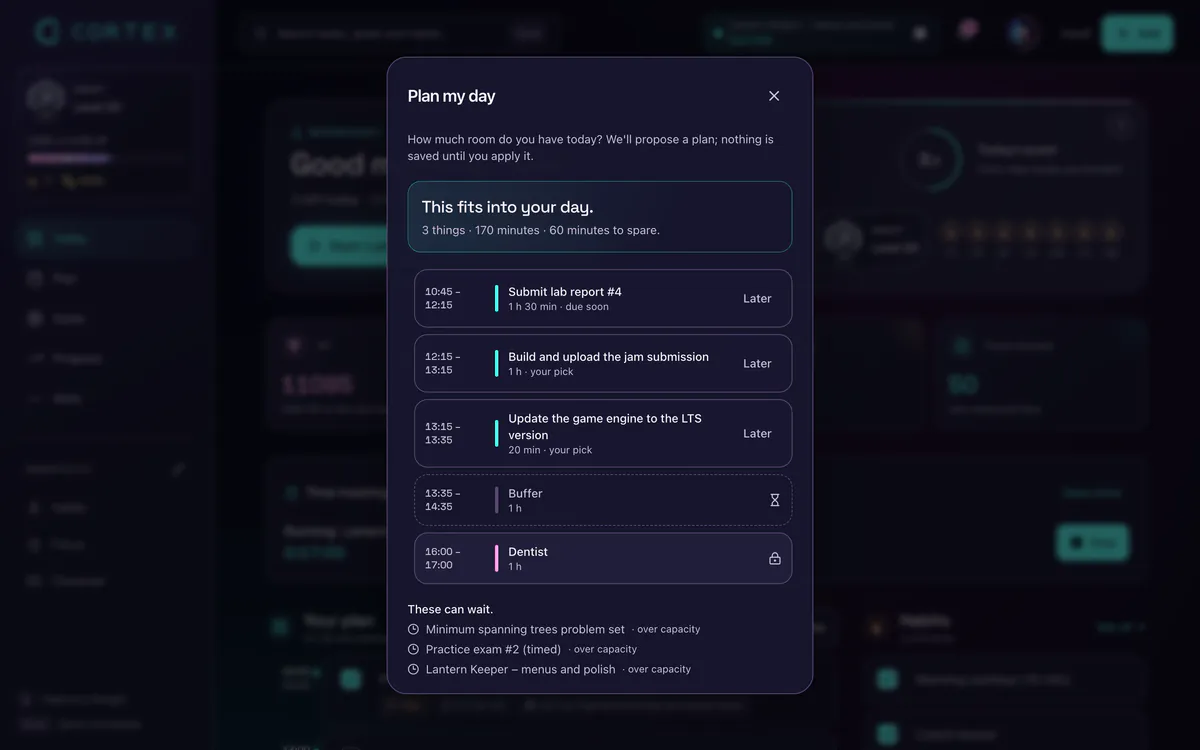
- A buffer setting – choose what percentage of the day stays free (0–50%), and Plan My Day plans with it; when the day is overbooked, it tells you what doesn't fit.
- Estimate vs. actual – each task shows its estimate and the time measured with Focus, so your estimates improve over time.
- Replanning with undo – when the day goes sideways, only the changed blocks move and fixed appointments stay put.
Frequently asked questions
How much buffer time should I leave in my day?
About 20–30% of working time as a rule of thumb. More with client work and frequent interruptions, less on calm days with familiar tasks. Compare your estimates with actual time to find your own number.
Why do tasks take longer than expected?
It is the planning fallacy: people consistently underestimate task duration, partly because they remember past tasks as shorter. Breaking tasks down, tracking time and keeping a buffer all help.
Where should I put buffer time?
After your main task, after meetings and before a fixed end of the day. Not all in the evening, or it becomes overtime.
Isn't buffer time wasted time?
No. If you don't need it, use it for small tasks, preparing tomorrow or rest. Without it, the plan falls apart at the first overrun.
How can I estimate task time more accurately?
Break tasks into steps, track actual time and compare it with your estimates, and ask how long the last similar tasks took.
Sources and further reading
- Buehler, Griffin & Ross (1994): Exploring the "planning fallacy", Journal of Personality and Social Psychology
- Roy, Christenfeld & McKenzie (2005): Underestimating the Duration of Future Events: Memory Incorrectly Used or Memory Bias?, Psychological Bulletin
- Kruger & Evans (2004): If you don't want to be late, enumerate: Unpacking reduces the planning fallacy, Journal of Experimental Social Psychology
Level up your life
CORTEX is free for everyone. Tasks, a one-click day plan, time tracking, habits and rewards in one system – on desktop and mobile.
CREATE A FREE ACCOUNT