ADHD planner app: built for brains that need a reward now
An ADHD planner app is a planner designed around common ADHD-style struggles – losing thoughts before they are written down, misjudging how long things take, freezing in front of big tasks and running out of motivation halfway. CORTEX is a free daily planner app that tackles these with quick capture, a one-click day plan, small subtasks and instant XP rewards. It is a productivity tool, not a medical device or a treatment.
- CORTEX is a free gamified productivity app – tasks, a one-click day plan, time tracking and habits, with XP, levels and real-life rewards.
- Quick capture (press Q) turns one typed sentence into a task with date, time, duration, priority and goal, so a thought is saved in seconds.
- Plan My Day is a transparent rule-based scheduler: it places today's, overdue and undated tasks into free 15-minute slots between 09:00 and 22:00 and tells you what doesn't fit.
- Finished tasks pay out XP and credits immediately; credits buy rewards you define yourself in the reward shop.
- CORTEX is not a medical device and does not diagnose or treat ADHD; if you think you have ADHD, talk to a qualified healthcare professional.
What an ADHD-friendly planner needs to do
ADHD (attention-deficit/hyperactivity disorder) involves ongoing patterns of inattention and/or hyperactivity-impulsivity, according to the US National Institute of Mental Health. Everyone's experience is different, and a planner is no substitute for professional support. But many adults with ADHD – and plenty of people without a diagnosis – describe the same day-to-day friction with classic planners:
| Friction | What a planner has to do | How CORTEX handles it |
|---|---|---|
| Thoughts vanish before you write them down | Capture in seconds, from anywhere | Quick capture: press Q, type one sentence |
| "Time blindness" – the hours slip away | Make time visible and concrete | Plan My Day puts tasks on a clock; focus timer with a progress bar |
| Big tasks cause freeze | Shrink the first step | Subtasks with progress; DEX bonus for tasks of 15 min or less |
| Deciding what to do next is exhausting | Remove decisions | One-click plan, ordered overdue → priority → shortest |
| Motivation needs a payoff now | Instant, visible reward | XP and credits on every finished task, reward shop |
| Setting up the system takes over | Work out of the box | No templates to build; defaults ready on day one |
Quick capture: get it out of your head in 5 seconds
If saving a thought takes six taps and a form, it doesn't get saved. In CORTEX you press Q (or tap the floating button on mobile) and type like you would text a friend:
Call dentist tomorrow @9 ~10m !p1Pay electricity bill friday !!Buy birthday gift for Mia ~30m #Family
CORTEX reads the date (tomorrow, friday, 24.12.), time (@9), duration (~10m), priority (!p1, !!) and goal (#Family). Anything without a goal lands in the Inbox, so you can sort it later when you have the energy. Capture now, decide later – the core idea of Getting Things Done.
Plan My Day vs. time blindness
"Time blindness" is a popular way to describe how time can feel either like now or not now, with nothing in between. A to-do list makes this worse: twelve tasks, no times, and somehow it is 4 pm.
Plan My Day turns the list into a timeline with one click:
- It takes today's tasks, overdue tasks and undated tasks.
- It keeps your fixed-time appointments where they are.
- It fills the free gaps of a 09:00–22:00 day, starting from now, in 15-minute steps.
- Order: overdue first, then by priority, then shortest first (quick wins).
- It tells you honestly what doesn't fit today – that list is your permission to stop.
- "Apply" writes the times into your tasks; "Re-plan" recalculates when the day blows up.
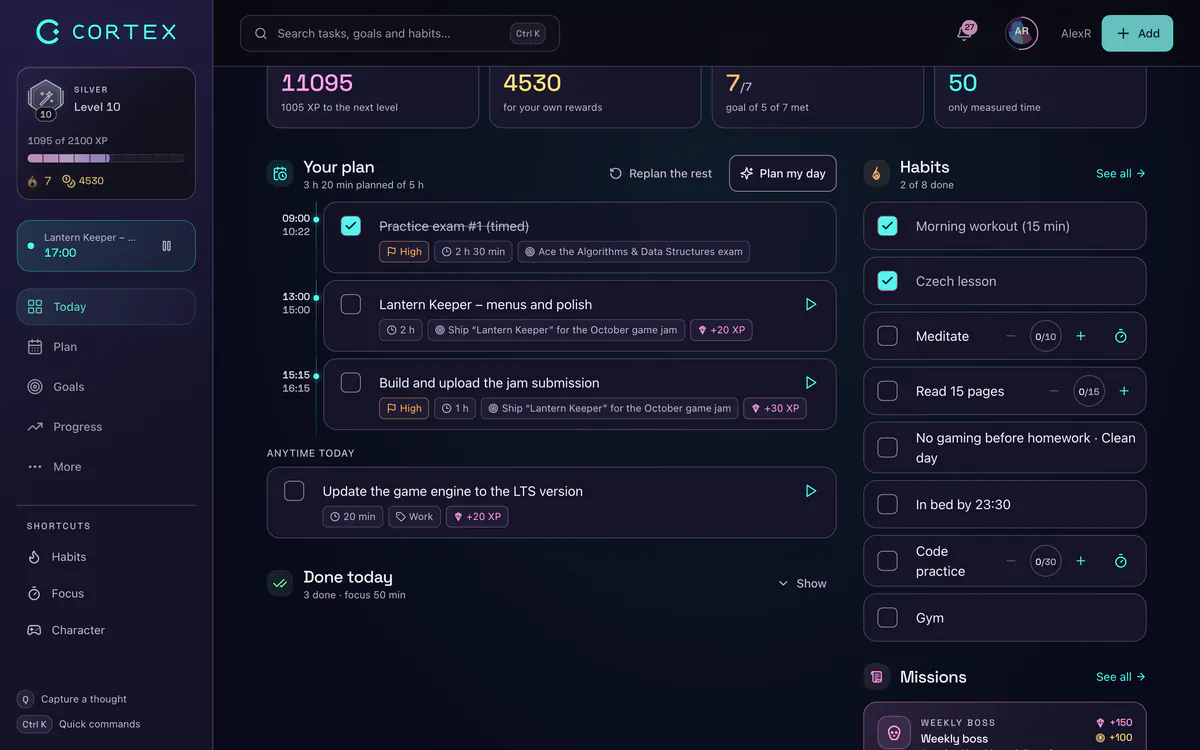
It is rule-based, not AI, so you can predict what it will do. No mystery, no "why did it put that there?". Working hours are fixed at 09:00–22:00 for now. More on the method in time blocking.
Small subtasks and a timer you can see
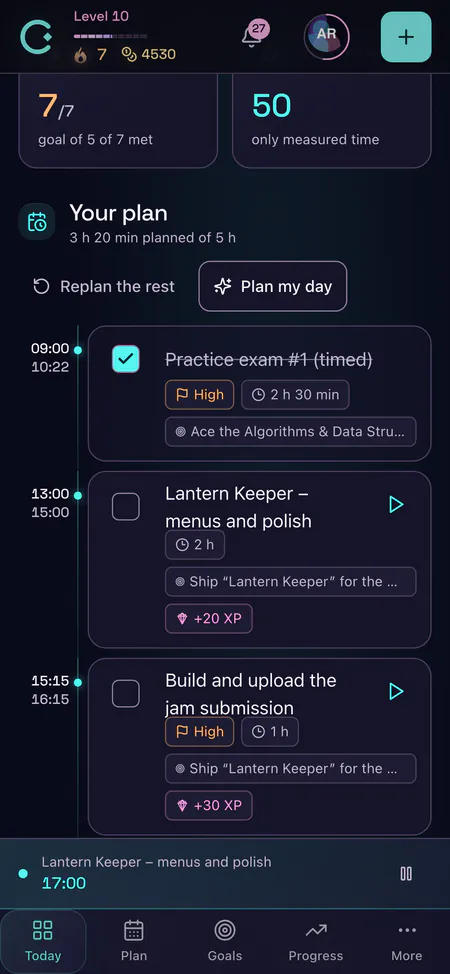
"Write report" is a wall. "Open the doc", "write three bullet points", "add the numbers" are steps. In the CORTEX planner, each task can have subtasks with a progress bar, so you see movement even when the big task is far from done.
Two more features help with starting and staying on task:
- Focus timer in the top bar: 15, 25 or 50 minutes with a visible progress bar, an in-app "done" notification and optional ambient sounds (Lofi, Synth, nature, Zen, alpha waves). Fifteen minutes is a great "just start" setting. See the free Pomodoro timer.
- Work timers on the Today screen: named Start/Stop timers that log real minutes to your reports, so you learn how long things actually take. That feedback is gold if your estimates are always off.
Instant rewards: XP now, not in six months
Long-term goals pay out in months. Many ADHD-style brains want feedback in seconds. CORTEX adds a game layer that closes the loop immediately:
- XP for every finished task, more for higher priority and longer estimates. Levels and ranks show long-term progress.
- Credits you spend in a reward shop stocked with your rewards: an episode, a snack, a gaming session.
- A daily reward of 100 credits for showing up, and achievements along the way.
- Attributes – quick tasks of 15 minutes or less give a DEX bonus, so tiny tasks count.
The design rule: rewards follow finished work, not time spent fiddling with the app. Read more in the RPG habit tracker.
A simple ADHD daily routine in CORTEX
- Morning (3 min): open Today, read the morning brief and set the "Prime directive" – the one thing that makes today a win.
- Plan (1 click): press Plan My Day, check what doesn't fit, hit Apply.
- Start small: 15-minute focus timer on the first task. Only goal: start.
- During the day: anything that pops into your head goes into quick capture, not into the current task.
- Day blew up? Re-plan. No guilt, it is a button.
- Evening (2 min): evening debrief and daily log (energy, focus, sleep, exercise) – it earns XP and over time shows patterns between sleep and focus.
Want more strategies? See how to stop procrastinating and how to focus.
Choosing the best ADHD productivity app (free)
There is no single best ADHD app – brains differ. Use this checklist when you test any free app for a week:
- Can you capture a task in under 10 seconds?
- Does it show your day on a clock, not just as a list?
- Does it give you something good right after you finish a task?
- Does it work without a long setup?
- Is it forgiving when you miss a day?
- Is it really free, or does the useful part sit behind a paywall?
If an app with visual timelines, a paper planner or a simple timer works better for you, use that. The best planner is the one you keep opening. CORTEX is a good fit if games motivate you and you want capture, planning, timers and rewards in one place. It runs in the browser and installs as a PWA on iOS and Android (it is not in the App Store or Google Play).
Important: CORTEX is not a medical device. It does not diagnose, treat or manage ADHD or any condition. For assessment or treatment, talk to a qualified healthcare professional.
Frequently asked questions
What is the best ADHD planner app?
The best ADHD planner app is the one you actually keep using: fast capture, a day shown on a clock, small steps and quick rewards. CORTEX is a free option that combines quick capture, a one-click day plan and XP rewards; others may suit you better if you prefer visual timelines or paper.
Is there a free daily planner app for ADHD?
Yes. CORTEX is free for everyone with all features and no credit card. It is a general productivity app designed with ADHD-style challenges in mind, not a medical product.
How can a planner help with time blindness?
By turning a list into a timeline: each task gets a duration and a time slot, so you see what fits today. In CORTEX, Plan My Day does this with one click and a focus timer shows time passing visually.
What are good ADHD planner tips for adults?
Capture everything immediately, give every task a duration, plan the day on a clock, start with a 15-minute timer and reward yourself right after finishing. Keep the system simple enough to restart after a bad day.
Is CORTEX a treatment for ADHD?
No. CORTEX is a productivity app, not a medical device, and it does not diagnose or treat ADHD. Please talk to a qualified healthcare professional about ADHD.
Does CORTEX use AI to plan my day?
No. Plan My Day is a transparent rule-based scheduler: overdue tasks first, then by priority, then shortest first, fitted into free 15-minute slots. You can always see and change the result.
Sources and further reading
Level up your life
CORTEX is free for everyone. Tasks, a one-click day plan, time tracking, habits and rewards in one system – on desktop and mobile.
CREATE A FREE ACCOUNT