Goal tracker app: track goals by what you actually finish
A goal tracker app is a tool that connects a long-term goal to the small tasks that move it forward and shows your progress as a number you can trust. In CORTEX, every goal gets a progress percentage calculated from its finished tasks, a deadline, a category and – if you want an accountability partner – a shared workspace where you can assign tasks to each other. It is free for everyone.
- CORTEX is a free gamified productivity app – tasks, a one-click day plan, time tracking and habits, with XP, levels and real-life rewards.
- In CORTEX, goal progress is calculated from finished tasks linked to the goal, so the percentage reflects real work instead of a slider you move by feel.
- Goals can be shared with a partner by email or username; members accept the invite and you can assign tasks to each other.
- A 2016 meta-analysis of 138 studies (Harkin et al.) found that monitoring goal progress improves goal attainment, with stronger effects when progress is recorded or reported.
- Each goal has a title, description, color category, deadline and difficulty; finishing a goal earns 100 XP.
How to track goals (the short version)
Most goals fail in the gap between "I want this" and "what do I do on Tuesday at 4 pm". Tracking closes that gap. Here is the method that works with or without an app:
- Write the goal as an outcome with a date. "Launch my portfolio site by November 30" beats "get better at web stuff". The SMART goals format is a good checklist.
- Break it into tasks you can finish in one sitting. If a task takes more than about two hours, split it. "Website" is a project; "write the About page draft" is a task.
- Measure progress by finished tasks, not by feeling. "I feel 70 % done" is how projects stay 70 % done for three months.
- Schedule the next task, not the whole goal. Only the next one or two steps need a date.
- Review weekly. Look at what moved, what stalled and why. Add, cut or re-split tasks.
That is it. Everything a goal tracker app does is a faster, more visible version of these five steps.
Why progress you can see matters
Monitoring progress is not just a nice dashboard. Harkin and colleagues (2016) pooled 138 experiments with almost 20,000 participants and found that interventions that made people monitor their progress more often also improved goal attainment. The effect was larger when progress was physically recorded or reported to someone else.
Two practical takeaways:
- Write it down somewhere persistent. A number in your head drifts; a number on a screen does not.
- Let someone else see it if that motivates you. That is exactly what shared goals are for.
There is a second, subtler point: progress has to be honest. A progress bar you drag by hand is a mood tracker. A progress bar that only moves when a task is done is a goal tracker.
How goal tracking works in CORTEX
CORTEX treats goals as the top of a simple hierarchy: goal → tasks → subtasks. Here is what you set when you create one:
| Field | What it does |
|---|---|
| Title and description | The outcome and why it matters to you. |
| Category (color) | Groups goals – for example Career, Health, Learning, Money – so you see balance at a glance. |
| Deadline | The date you are aiming for. |
| Difficulty | How hard the goal is; it feeds the game layer. |
| Progress % | Calculated automatically from the tasks linked to the goal. |
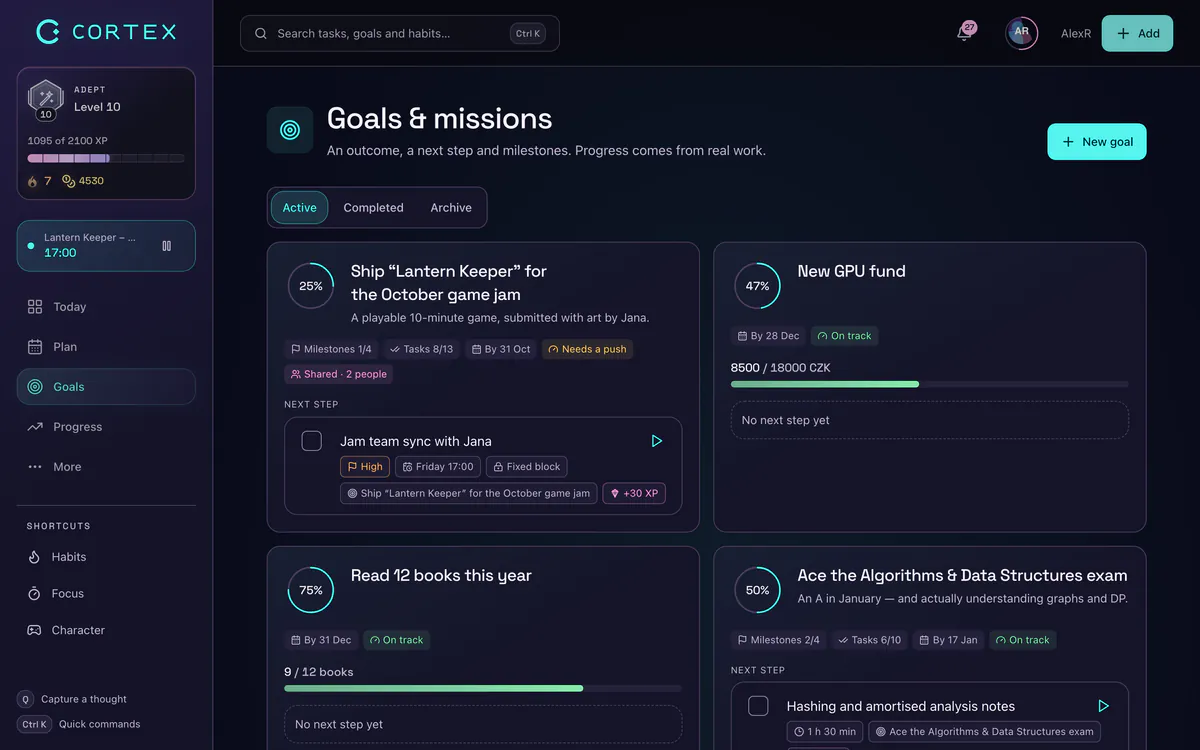
Linking tasks is quick. In the task planner you pick the goal from a list, or you add it while typing with quick capture: press Q and write Draft About page tomorrow ~45m !p2 #Portfolio. The task lands with a date, a 45-minute estimate, priority 2 and the goal "Portfolio" attached.
When you tick the task off, the goal's progress updates. Finishing the whole goal gives you 100 XP on top of the XP from each task – more on that in the RPG side of CORTEX.
Shared goals: an accountability partner built in
Accountability works best when it is specific: not "let's both get fit" but "we both log three workouts this week and can see each other's list". CORTEX shared goals do exactly that:
- Invite by email or username. The other person accepts or declines.
- Roles. Members have roles inside the goal, so the owner stays in control.
- Assign tasks. Each task can have an assignee, so "who does what" is never a debate.
- One progress bar. Everyone sees the same percentage moving.
Good uses: a couple saving for a trip, two friends training for a 10K, a study group preparing for an exam, two freelancers swapping weekly business goals. Note that this is shared goals, not a team workspace – for company project management with many people, a dedicated team tool is the better fit.
From goal to today: the daily link
A goal tracker that lives only on a goals page gets forgotten. In CORTEX the goal shows up where you work every day:
- Today screen shows your next goal, so you start the day knowing what matters.
- Plan My Day takes your dated and undated tasks – including goal tasks – and fits them into free time slots with one click.
- Time tracking reports show minutes per goal, so you see whether "my most important goal" actually gets your hours.
- Mind map draws the whole tree – vision, goals, tasks and subtasks – as an interactive graph, handy when a goal feels foggy.
Goal setting app checklist: what to look for
Whether you choose CORTEX or something else, a good goal setting app should pass these checks:
| Check | Why it matters | CORTEX |
|---|---|---|
| Progress from real tasks | Honest numbers | Yes, % from finished tasks |
| Deadlines on goals | Turns wishes into commitments | Yes |
| Goal ↔ daily plan link | Goals get time, not just attention | Yes, via tasks and Plan My Day |
| Sharing with a partner | Accountability | Yes, shared goals with assignees |
| Time per goal | Shows where your hours really go | Yes, in reports |
| Vision layer | Keeps the "why" visible | Yes, vision board tab |
| Motivation between milestones | Long goals are boring in the middle | XP, levels, rewards |
If you mainly want a minimalist list of yearly goals with no tasks, a notebook or a simple notes app is honestly enough. A goal tracker app earns its place when your goals involve dozens of steps over weeks or months.
Example: one goal, tracked end to end
Goal: "Run a 10K under 60 minutes by March 1." Category: Health. Difficulty: hard.
- Tasks: "Buy running shoes", "Run 3 × 5K this week", "Long run 8K", "Test 10K time trial" – each linked with
#10K. - Weekly runs are recurring tasks (
*weekly), so they reappear without retyping. - A habit like "Stretch 10 minutes" supports the goal day to day.
- Every Sunday you check the progress bar and the monthly review. Stalled? Split the next task smaller.
For bigger life changes you can go one step further and sign a 30-day commitment contract – optional, but useful when you know motivation will dip in week two.
Frequently asked questions
Is there a free goal tracker app?
Yes. CORTEX is a free goal tracker app with every feature available to everyone and no credit card. You get goals with deadlines and categories, progress from tasks, shared goals, a vision board and a mind map.
How do I track my goals?
Write the goal as a dated outcome, break it into tasks you can finish in one sitting, measure progress by finished tasks and review weekly. An app makes the progress visible and links goal tasks to your daily plan.
What is the best goal setting app?
The best goal setting app is one where progress comes from real tasks and goals connect to your daily plan. If you also want accountability and game-style motivation, CORTEX combines shared goals with XP, levels and rewards. For a simple yearly list, a notebook may be enough.
Can I share a goal with an accountability partner?
In CORTEX, yes. Invite someone to a goal by email or username; once they accept, you both see the same progress and can assign tasks to each other.
How is goal progress calculated in CORTEX?
Progress is a percentage based on the tasks linked to the goal that you have finished. You do not set it by hand, so it only moves when work is done.
Does CORTEX work on my phone?
Yes. CORTEX is a web app you can install as a PWA from the browser on iOS and Android (add to home screen). It is not in the App Store or Google Play.
Sources and further reading
- Harkin, B. et al. (2016): Does monitoring goal progress promote goal attainment? A meta-analysis, Psychological Bulletin
- American Psychological Association: press release on the Harkin et al. progress-monitoring study (October 2015)
- Locke, E. A. & Latham, G. P. (2002): Building a practically useful theory of goal setting and task motivation, American Psychologist
- Gollwitzer, P. M. & Sheeran, P. (2006): Implementation intentions and goal achievement: a meta-analysis
Level up your life
CORTEX is free for everyone. Tasks, a one-click day plan, time tracking, habits and rewards in one system – on desktop and mobile.
CREATE A FREE ACCOUNT