Vision board app: a dream board that turns into a plan
A vision board app is a digital board of images and short descriptions that show the life you are working toward. The catch: pictures alone don't move you. In CORTEX, the vision board is a tab right next to your goals and a mind map, so every dream on the board can be traced down to a goal, a task and a slot in today's plan – free for everyone.
- CORTEX is a free gamified productivity app – tasks, a one-click day plan, time tracking and habits, with XP, levels and real-life rewards.
- The CORTEX vision board stores items with an image, a title, a description and a category, on the same screen as your goals and mind map.
- Research by Kappes and Oettingen (2011) found that indulging in positive fantasies about an ideal future lowered people's energy, so a vision board works best when paired with concrete next steps.
- A practical rule: every vision item should have at least one goal and one dated next task behind it.
- CORTEX runs in the browser and installs as a PWA on iOS and Android; it is not in the App Store or Google Play.
The problem with most vision boards
Vision boards have a reputation problem, and it is partly deserved. Glue a beach house on a board, look at it every morning, wait. Nothing happens – because nothing was scheduled.
Psychology backs this up. Kappes and Oettingen (2011) ran four experiments and found that positive fantasies about an idealized future reduced energy compared with control conditions. Feeling like you are already there can quietly take away the pressure to get there.
That does not make vision boards useless. Gabriele Oettingen's later work on mental contrasting (the WOOP method: Wish, Outcome, Obstacle, Plan) suggests the fix: keep the dream, then look directly at what stands in the way and decide what you will do about it. A vision board is the "Wish" and "Outcome" part. You still need the "Obstacle" and "Plan".
So the best vision board app is not the one with the prettiest templates. It is the one that makes the jump from picture to plan short.
How to build a vision board that leads to action
Use this five-step method. It works on paper, in any app and in CORTEX.
- Pick 4–8 life areas, not 30 pictures. Career, health, relationships, money, learning, home, fun. Too many items and none of them feels important.
- One image + one sentence per item. The image gives emotion; the sentence gives meaning. "Cabin weekend every season with the kids" beats a random lake photo.
- Add the obstacle. In the description, write the honest blocker: "I never book anything in advance." This is the mental contrasting step.
- Attach one goal with a deadline. "Book the spring cabin by February 15." Now the dream has a date.
- Schedule the very next task. "Shortlist 3 cabins, Saturday 10:00, 30 minutes." If you can't name the next task, the item is not ready yet – that is useful information too.
The CORTEX vision board, goals and mind map
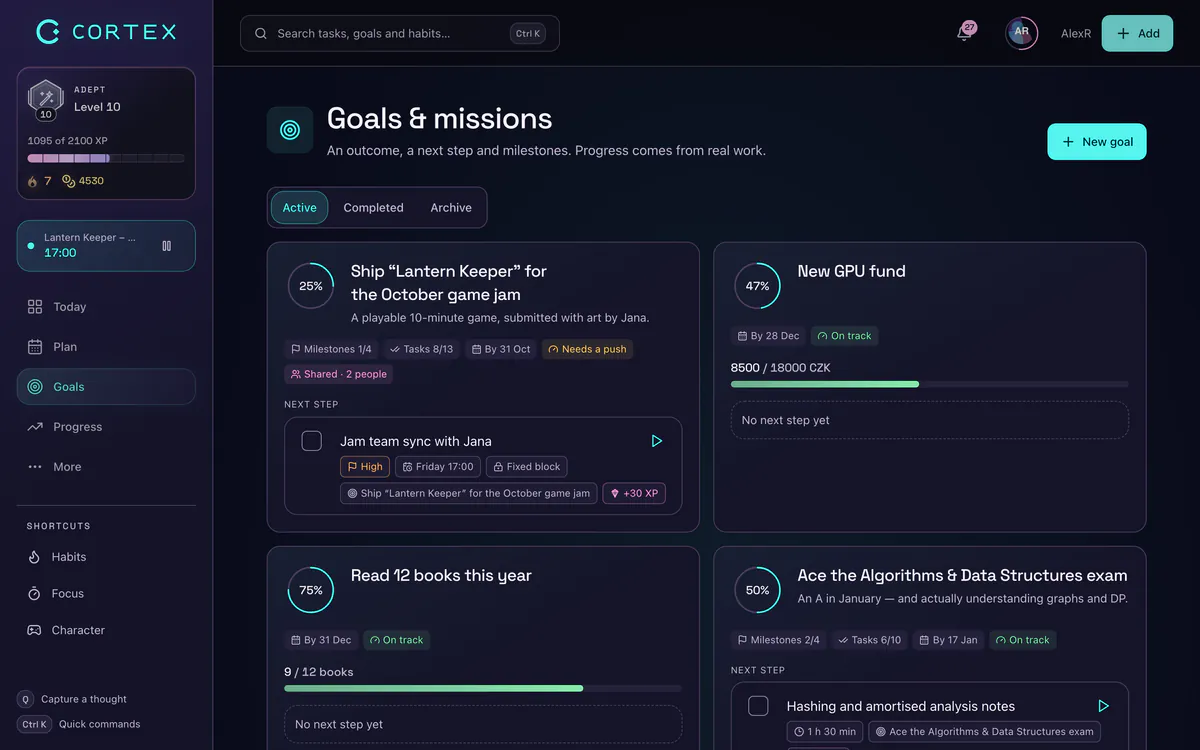
In CORTEX the Goals section has three tabs: Goals, Vision board and Mind map. They are three zoom levels of the same plan.
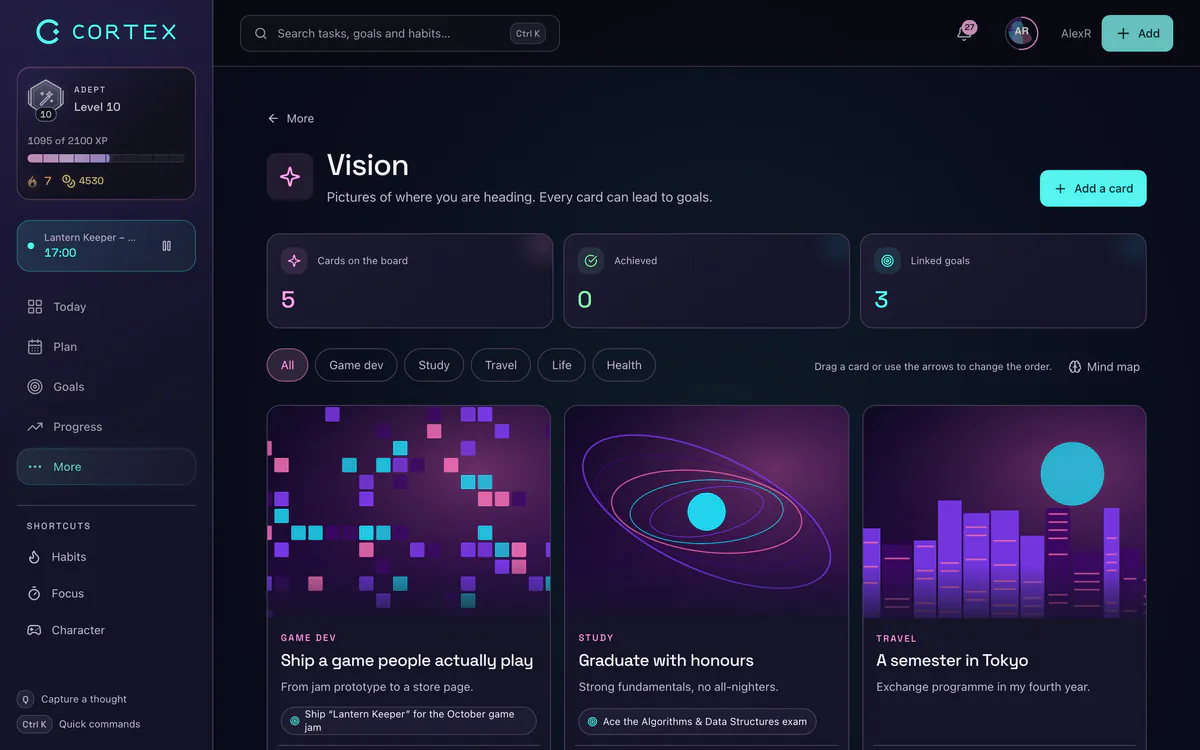
- Vision board – each item has an image, a title, a description and a category. This is the "why".
- Goals – outcomes with a deadline, category, difficulty and a progress percentage calculated from finished tasks. This is the "what". See the goal tracker for details.
- Mind map – an interactive graph of your vision, goals, tasks and subtasks, so you can literally see whether a dream has any work underneath it.
The tasks under each goal live in the task planner and flow into Plan My Day, which fits them into free slots of today with one click. That is the chain: picture → goal → task → time slot.
Vision board examples by life area
Here is how a single item travels from dream to today. Steal the structure and swap in your own content.
| Vision item | Obstacle | Goal (with deadline) | Next task |
|---|---|---|---|
| "I work remotely for clients I like" | No portfolio | Portfolio site live by Dec 15 | Pick 3 best projects, Tue, 45 min |
| "Strong enough to hike anywhere" | Skip workouts when tired | Hike 15 km by May 1 | Book gym intro session, today |
| "Six months of savings" | No idea where money goes | Save first 1,000 by Mar 31 | List fixed monthly costs, Sun, 20 min |
| "Speak Spanish on vacation" | Start strong, quit in week 2 | Hold a 10-minute chat by Jul 1 | 15 min lesson, daily habit |
| "A calm, tidy home" | Weekends get eaten up | Declutter 5 zones by Feb 28 | Kitchen drawer, Sat 9:00, 30 min |
Notice the "next task" column: small, dated and boring. That is the point. Dreams are motivating; small tasks are doable. You need both. Daily actions like the language lesson fit better as habits.
Best vision board app? Pick by what you need
Honest guidance, because different tools win at different jobs:
- You want a beautiful collage to print or set as wallpaper: a design tool such as Canva or a Pinterest board is better at layouts and image search than any productivity app.
- You want a dream board app for daily affirmations: dedicated vision board apps with slideshows and reminders do that well.
- You want the vision board to drive real progress: pick an app where the board sits next to goals, tasks and a daily plan. That is what CORTEX is built for.
Many people combine them: design the pretty version once in a design tool, then put the same images in CORTEX where the goals and tasks live.
Keep it alive: a 10-minute monthly review
A vision board is not a one-time craft project. Once a month:
- Open the mind map. Which vision items have no goal under them? Add one or archive the item.
- Check goal progress. Which goals moved? Which are stuck at the same percentage as last month?
- For each stuck goal, write the next smallest task and schedule it this week.
- Look at the monthly review: time tracked, tasks done and credits earned compared with the previous month.
If motivation keeps fading, two extra tools help: the game layer, where finished tasks earn XP and credits you can spend on real-life rewards, and an optional 30-day commitment contract for the one vision item that matters most right now. For the goal-writing side, see SMART goals.
Frequently asked questions
Is there a free vision board app?
Yes. CORTEX includes a free vision board with image, title, description and category for each item, next to goals and a mind map. Everything is free for everyone with no credit card.
What is the best vision board app?
It depends on the job. For a printable collage, a design tool like Canva is great. For a vision board that leads to action, choose an app where the board connects to goals, tasks and a daily plan, such as CORTEX.
Do vision boards actually work?
Looking at pictures alone is not enough: Kappes and Oettingen (2011) found that positive fantasies about the future can lower energy. Vision boards work better when each dream is paired with an honest obstacle, a dated goal and a scheduled next step.
What should I put on a vision board?
Choose 4–8 life areas and add one image plus one sentence for each, describing the life you want. Then add the obstacle and one goal with a deadline to each item.
Is a dream board the same as a vision board?
Yes, people use the names interchangeably. Both are collections of images and words that represent goals and the life you want.
Can I use the CORTEX vision board on my phone?
Yes. CORTEX works in any mobile browser and can be installed as a PWA via "Add to home screen" on iOS and Android.
Sources and further reading
- Kappes, H. B. & Oettingen, G. (2011): Positive fantasies about idealized futures sap energy, Journal of Experimental Social Psychology
- Gollwitzer, P. M. & Sheeran, P. (2006): Implementation intentions and goal achievement: a meta-analysis
- WOOP – the official site of the mental contrasting method by Gabriele Oettingen
Level up your life
CORTEX is free for everyone. Tasks, a one-click day plan, time tracking, habits and rewards in one system – on desktop and mobile.
CREATE A FREE ACCOUNT