Free to-do list app: type a task in one sentence, get it organized
CORTEX is a free to-do list app with no ads where you type a task as one plain sentence – Call dentist friday @9 ~15m !high – and it fills in the date, time, duration and priority for you. Tasks are grouped automatically into Overdue, Today, Tomorrow, This week and Later, can repeat on almost any schedule, and pay out XP and credits when you finish them. This page covers the full quick-capture syntax, how to keep a list you actually finish, and what the app deliberately does not do.
- CORTEX is a free gamified productivity app – tasks, a one-click day plan, time tracking and habits, with XP, levels and real-life rewards.
- Quick capture (press Q) parses priority (!p1–!p4, !!, !!!), duration (~30m), date (tomorrow, friday, 2026-12-24), time (@15:30), repeat (*weekly) and goal (#Name) from one line of text.
- Tasks are grouped automatically into Overdue, Today, Tomorrow, This week, Later, No date and Done; tasks with no goal land in the Inbox.
- Each task tracks time spent against its estimate, so you learn how long things really take.
- CORTEX has no Kanban board and no drag and drop inside the list; it is free for everyone with no ads.
Quick capture: the syntax cheat sheet
The fastest to-do list is the one you can add to without breaking your train of thought. Press Q anywhere in CORTEX (or tap the floating lightning button on your phone), type the task and add any of these tokens. Order does not matter; whatever is not a token becomes the task title.
| What | Type | Result |
|---|---|---|
| Priority | !p1 !p2 !p3 !p4 | Critical, high, medium, low |
| Priority (shortcuts) | !high or !! · !!! | High · critical |
| Duration estimate | ~15m ~2h ~1h30 | 15 minutes, 2 hours, 90 minutes |
| Relative date | today tomorrow | Due today or tomorrow |
| Weekday | mon … sun, friday | The next such day |
| Exact date | 24.12. or 2026-12-24 | December 24 (day first, or ISO format) |
| Time | @15:30 or @9 | 3:30 pm, 9:00 am (24-hour clock) |
| Repeat | *daily *weekly *monthly *yearly | A recurring task |
| Goal | #clients | Linked to the goal with that name (one word) |
A few real examples and what they turn into:
Send proposal to Corner Café tomorrow @10:00 ~30m !p1 #clients→ critical, tomorrow 10:00, 30 minutes, under the goal "clients".Pay rent *monthly 28.10. !!→ high priority, due October 28, repeats every month.Read chapter 4 for history class thu ~45m→ due Thursday, 45-minute estimate.Water plants *weekly sun ~5m→ every Sunday, 5 minutes.Idea: podcast about indie games→ no tokens, so it goes straight to the Inbox to sort later.
Inbox first, organize later
Tasks without a goal land in the Inbox: a holding area for things you captured fast. Once or twice a day, go through it and for each item either assign it to a goal and give it a date, or delete it. This is the "capture, then clarify" step from David Allen’s Getting Things Done, and it is what stops a to-do list from turning into a guilt list.
Capturing is not just tidiness. In experiments by Masicampo and Baumeister (2011), making a concrete plan for an unfinished goal reduced how much it intruded on people’s thoughts during other work. Writing the task down – with a date – is the cheap version of that plan.
A useful rule: if a task in the Inbox takes under two minutes, do it now instead of filing it.
How the list organizes itself
In the Planner you never sort by hand to see what matters today. Tasks are grouped by their deadline:
- Overdue – missed deadlines float to the top, so nothing quietly rots.
- Today and Tomorrow – the working set.
- This week and Later – planned, but out of your face.
- No date – someday items and ideas.
- Done – the trophy shelf.
Inside a group you can change the order with the up and down arrows, snooze a task to push it later, or start its timer straight from the row. The header shows how many tasks are on today’s list and how many hours they add up to – the single most useful number for avoiding overloaded days.
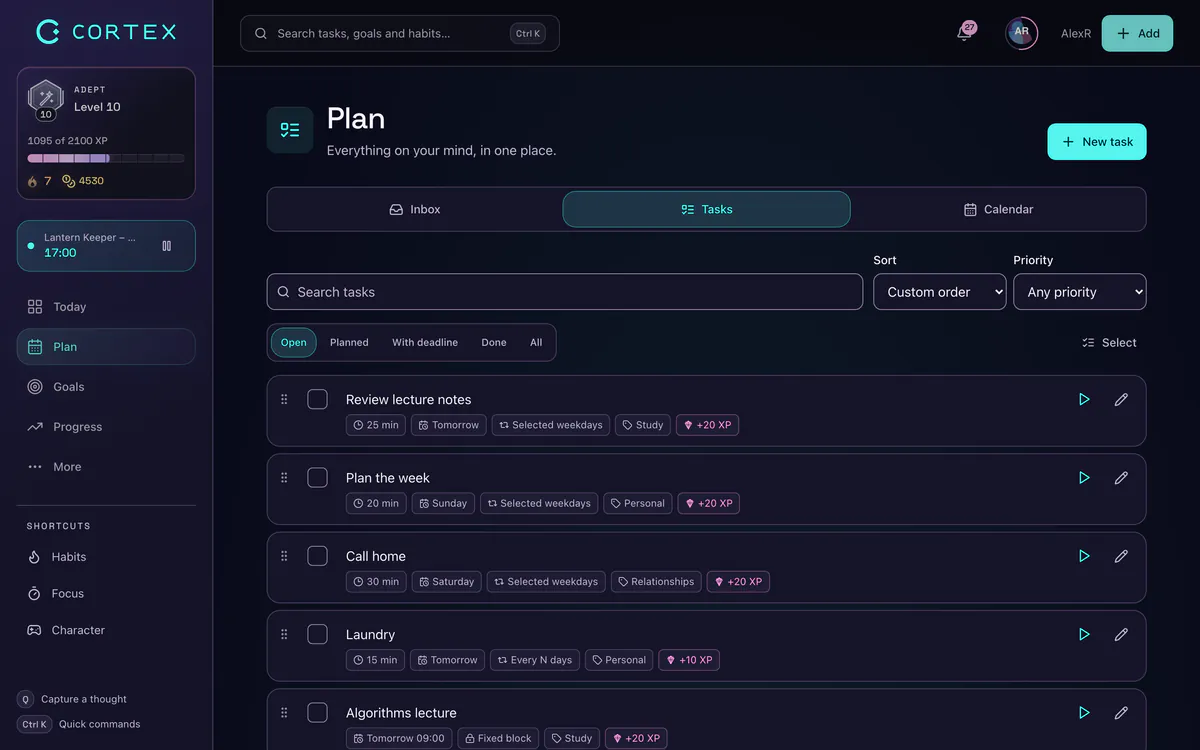
Everything a task can hold
Quick capture covers the basics. Open a task to fill in the rest:
| Field | Options | Why it helps |
|---|---|---|
| Type | easy, meeting, advanced | See at a glance what kind of energy a task needs. |
| Priority | low, medium, high, critical | Drives the order of your day plan and the reward. |
| Estimate | minutes | Compared with time actually spent. |
| Difficulty | trivial → heroic | Multiplies the credits you earn. |
| Deadline | date + time | Places the task in the right group and the calendar. |
| Recurrence | daily, weekly, monthly, yearly; every 2, 3, 5, 10, 14 or 30 days; or custom from 2 to 365 days | "Every 14 days" covers bi-weekly invoices, "every 3 days" covers watering. |
| Subtasks | checklist with progress | Breaks a scary task into steps you can start. |
| Goal | any of your goals | Progress on the goal is calculated from finished tasks. |
| Assignee | members of a shared goal | Split work with a partner or friend. |
Estimate vs. actual: the underrated feature
Each row shows something like 25 / 60 min: time already tracked on the task against your estimate. People underestimate how long their own tasks take – psychologists call it the planning fallacy (Buehler, Griffin & Ross, 1994). After two weeks of seeing your real numbers, your estimates get honest and your days stop overflowing. If you consistently need 1.5× your estimate, simply multiply before you plan.
How to keep a to-do list you actually finish
The app is only half of it. These rules make any list work, paper or digital (there is also a printable to-do list template):
- Start every task with a verb. "Email Sara about the deadline", not "Sara".
- Cap today at what fits. Add up the estimates; if they exceed your free hours, move tasks before the day starts, not at 9 pm.
- Sort by impact, not urgency. If everything feels urgent, run the list through the Eisenhower Matrix once and delete or delegate the bottom quadrant.
- Pick one "prime directive". The Today screen has a slot for the single task that makes the day a win. Do it first.
- Split anything over two hours into subtasks.
- Review weekly. Delete what no longer matters. A shorter list is a more honest list.
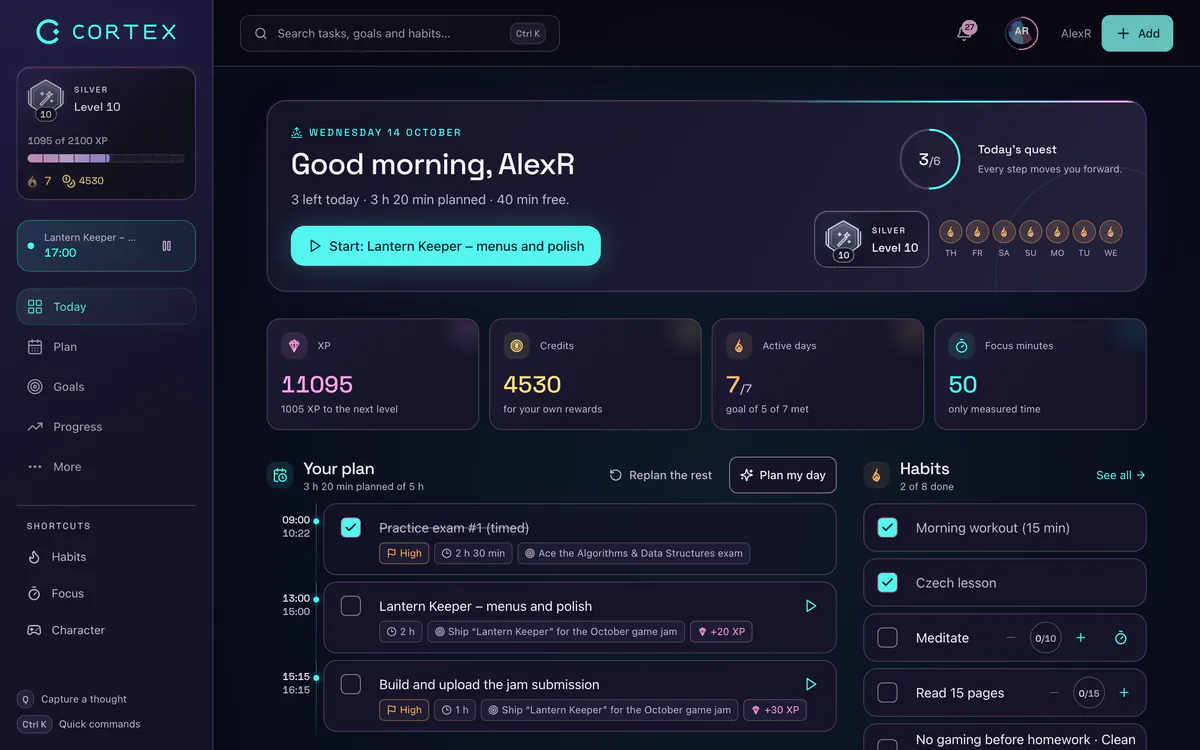
Stuck on starting at all? Read how to stop procrastinating, or let Plan My Day put each task on a clock.
A free to-do list app for students
Students get the most out of three things: recurring tasks for weekly assignments (*weekly), estimates so a "quick essay" does not eat the whole evening, and the focus timer for study sessions in 25 or 50-minute blocks. Create one goal per course – "Biology final", "Spanish B1" – and every finished task moves that course’s progress bar.
The game layer helps here too: each finished task earns XP and credits, and you can price your own rewards – an episode of a show for 100 credits, a night out for 500. It is free for everyone, with no ads and no student verification. Pair it with the free Pomodoro timer if you study in a different browser tab.
Honest limits
CORTEX is a personal task manager with a game layer, not a project-management suite. Before you move your whole life in, know what it does not do:
- No Kanban board and no drag and drop inside the task list (you reorder with arrows; drag and drop works in the calendar week grid).
- No sync with Google Calendar, Outlook or iCal.
- No imports from Todoist, TickTick or other apps.
- No team workspaces – collaboration is limited to shared goals and alliances.
- No native App Store or Google Play app – it installs from the browser as a PWA.
If you need boards and integrations, a classic task manager is the better tool; see Todoist alternatives for a comparison. If you want a list that is fast to fill and rewarding to empty, CORTEX is built for that.
Todoist, TickTick, Google Calendar and Outlook are trademarks of their respective owners. CORTEX is not affiliated with them.
Frequently asked questions
What is the best free to-do list app with no ads?
Look for an app that is free without a trial, shows no ads and lets you add tasks fast. CORTEX is free for everyone with no ads; you type a task in one sentence and it parses the date, time, priority and duration, then rewards you with XP and credits when you finish it.
Is there a to-do list app for students that is completely free?
Yes. CORTEX is free for everyone, including students, with no feature limits and no student verification. Recurring tasks, estimates, goals per course and a built-in focus timer cover most study planning.
Can I add tasks by typing natural language?
Yes. Press Q and type something like "Essay outline tomorrow @14:00 ~45m !high". CORTEX recognizes the date, time, duration, priority, repeat and goal tokens and turns the rest into the task title.
Does CORTEX have recurring tasks?
Yes. Tasks can repeat daily, weekly, monthly or yearly, every 2, 3, 5, 10, 14 or 30 days, or on a custom interval from 2 to 365 days. In quick capture, type *daily, *weekly, *monthly or *yearly.
Does CORTEX have a Kanban board?
No. Tasks are shown as a list grouped by day (Overdue, Today, Tomorrow, This week, Later, No date, Done) and in a calendar. If you need a Kanban board, a project-management tool is a better fit.
Can I use it on my phone?
CORTEX runs in any modern browser and can be installed on iOS or Android as a PWA from the browser menu. It is not available in the App Store or Google Play.
Sources and further reading
Level up your life
CORTEX is free for everyone. Tasks, a one-click day plan, time tracking, habits and rewards in one system – on desktop and mobile.
CREATE A FREE ACCOUNT