Budget app: make a monthly budget you will actually keep
A personal budget is a plan for one month: how much money comes in, where it goes and how much you set aside – so you decide before you spend, not after you check your statement. Below: a printable template, two proven methods (50/30/20 and zero-based budgeting), a five-step setup, and how to run a monthly budget in CORTEX, a free app where your budget sits next to your tasks, habits and goals.
- A personal budget plans one month of income and spending; its point is to decide in advance, not to explain the bank statement afterwards.
- The 50/30/20 rule splits take-home pay into 50% needs, 30% wants and 20% savings and debt repayment; it was popularized by Elizabeth Warren and Amelia Warren Tyagi.
- Zero-based budgeting gives every unit of income a job, savings included, until income minus plan equals zero.
- In CORTEX, the Finance module tracks monthly income and expenses by category, category budgets with an 80% warning, recurring payments, savings goals and CSV bank imports, and copies last month in one click.
- CORTEX is a free gamified productivity app – tasks, a one-click day plan, time tracking and habits, with XP, levels and real-life rewards.
Why keep a monthly budget
Most people know what they earn. Few know what food, subscriptions or "little things" cost them each month. A budget is not about saying no to everything; it is about you deciding, not the end of the month.
- You see the leaks. Five subscriptions at a few dollars each add up to real money over a year.
- You build a buffer. A car repair or a surprise bill stops being a crisis.
- Your money gets a direction. A trip, a deposit or a career change need a regular contribution, not whatever is left.
- Less stress. When you know what is left, you stop doing mental math at every checkout.
Free printable budget template
Fill in "Plan" at the start of the month and "Actual" as you go or once a week. The amounts are a made-up example for one person renting, with a take-home pay of 3,000 – replace them with yours, in your currency.
Monthly budget – month: ____________
| Item | Category | Plan | Actual | Paid |
|---|---|---|---|---|
| INCOME | ||||
| Salary / revenue after tax | Income | 3,000 | ☐ | |
| Side income | Income | 0 | ☐ | |
| Total income | 3,000 | |||
| EXPENSES | ||||
| Rent and utilities | Housing | 1,100 | ☐ | |
| Groceries and household | Food | 450 | ☐ | |
| Transit pass / fuel | Transport | 100 | ☐ | |
| Phone and internet | Subscriptions | 70 | ☐ | |
| Streaming and apps | Subscriptions | 40 | ☐ | |
| Loan payment | Loans | 150 | ☐ | |
| Eating out, hobbies, fun | Fun | 300 | ☐ | |
| Yearly costs (insurance, gifts) ÷ 12 | Other | 120 | ☐ | |
| Emergency fund and investing | Savings | 450 | ☐ | |
| Free money | Other | 220 | ☐ | |
| Total expenses | 3,000 | |||
| Balance (income − expenses) | 0 |
How to make a monthly budget in 5 steps
- Find your take-home pay. Employees: what lands in your account. Self-employed: your average monthly revenue over the last 6–12 months after tax and contributions.
- Go through 2–3 months of statements. Put every payment into a category. It is a dull hour, but the only way to see reality instead of a guess.
- Pick a method. 50/30/20 for simplicity, zero-based for detailed control (both below).
- Set realistic amounts. If you spend 600 on food, a plan of 350 won't survive the first week. Cut in steps of 10–15%.
- Compare plan and actual once a week. Five minutes on Sunday is enough – make it a recurring task so you don't forget.
The 50/30/20 rule
Elizabeth Warren and Amelia Warren Tyagi popularized the 50/30/20 rule in their book All Your Worth. Take-home pay goes into three buckets:
| Bucket | Share | At 3,000 | What belongs there |
|---|---|---|---|
| Needs | 50% | 1,500 | Housing, utilities, basic food, transport, insurance, minimum loan payments |
| Wants | 30% | 900 | Eating out, fun, hobbies, travel, clothes beyond the basics |
| Savings and debt | 20% | 600 | Emergency fund, investing, extra loan payments |
In expensive cities, rent alone can eat most of the 50%. Then adjust, for example to 60/20/20. The exact numbers matter less than the order: savings go first, ideally by automatic transfer the day after payday.
Zero-based budgeting
A zero-based budget is stricter. At the start of the month you assign all of your income so that income minus plan = 0. That doesn't mean spending everything – savings are a category too. The point is that no money is left without a job. The template above works this way: the planned balance is zero.
| Aspect | 50/30/20 | Zero-based |
|---|---|---|
| Effort | Low | Medium |
| Control | Rough | Detailed |
| Best for | Beginners, steady income | Freelancers, irregular income, paying off debt |
| Risk | Wants creep into needs | Burning out on strictness |
A budget app next to your daily plan: Finance in CORTEX
CORTEX is a free gamified productivity app. Next to tasks, a day plan, time tracking and habits, it has a Finance module for your personal or household budget:
- Monthly income and expenses with a title, amount, type and category (housing, food, income, transport, fun, subscriptions, loans, savings and others, or your own).
- Paid flag – tick an item when it leaves your account and see what is still ahead of you.
- Copy last month – bring all items over in one click (as unpaid), then change only what is different.
- Category budgets – a monthly limit, for example for food, with a warning at 80%.
- Recurring payments – rent or subscriptions are recorded automatically on the right day.
- Savings goals – "Emergency fund" with contributions and a progress bar.
- CSV bank import – map the columns of your bank's CSV export once; the same row is never imported twice.
- Currencies – CZK, EUR or USD; items in a foreign currency also keep their value in Czech crowns at the Czech National Bank rate of the day.
- Year view – the whole year at a glance.
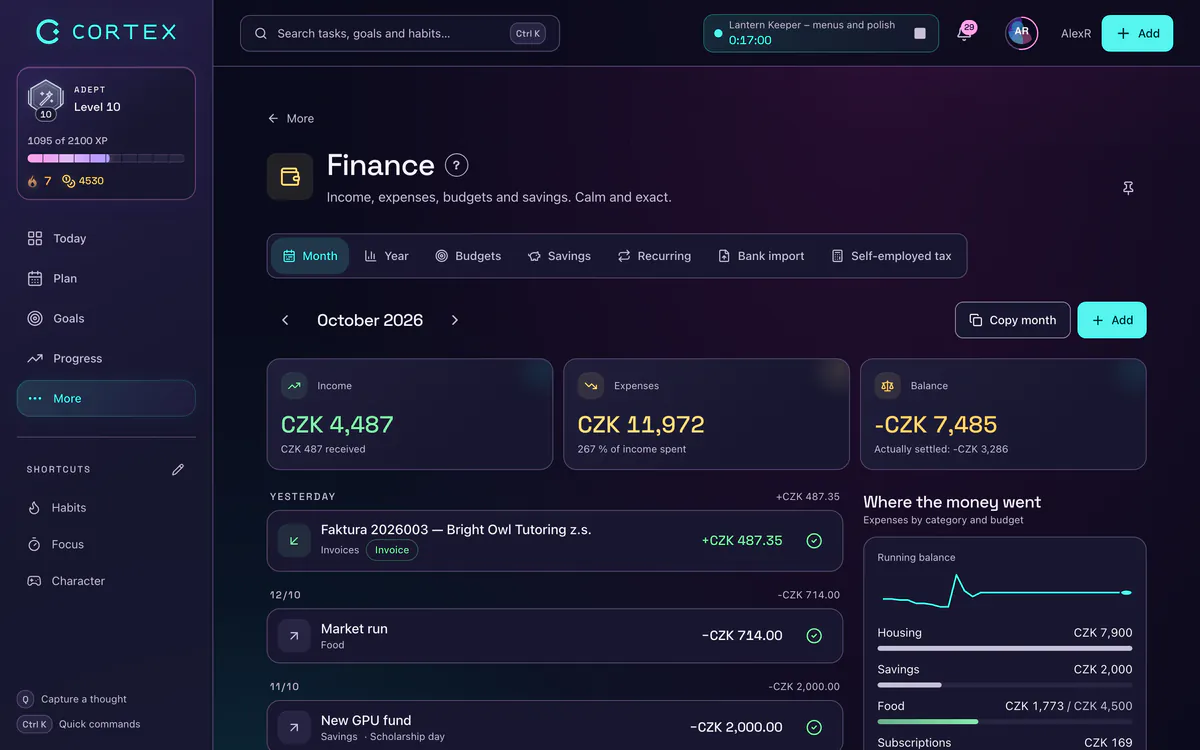
The advantage: your budget lives in the app you already open every day for tasks and your day plan. Logging an expense takes seconds, not another app you forget about by next week.
To be clear about the limits: CORTEX is not a banking app. It doesn't connect to your bank account – you enter payments or upload a CSV statement – and it has no investment tracking.
Connect your budget to goals and habits
- A money goal – "Six months of expenses saved" as a goal with a deadline and steps, see the goal tracker.
- A recurring task – "Review the budget" every Sunday, or "Check subscriptions" once a year, in the task planner. It fits naturally into your weekly review.
- A bad habit with a limit – "Takeout" as a bad habit in the habit tracker, counting clean days.
- A reward – finished tasks earn credits you spend on rewards you define yourself, see the gamified productivity app.
Common budgeting mistakes
- Amounts that are too strict. A budget you can't keep is a budget you stop keeping. Start from reality.
- No free money. A small "anything" line keeps one impulse buy from wrecking the whole plan.
- Forgotten yearly costs. Insurance comes every year and still surprises everyone.
- Saving what is left. Usually nothing is. Save right after payday.
- Checking once a quarter. A short weekly check beats a big cleanup now and then.
Frequently asked questions
How do I make a personal budget?
Find your take-home pay, go through 2–3 months of statements and sort spending into categories. Pick a method such as 50/30/20 or zero-based budgeting, set realistic amounts and compare plan and actual once a week.
Is there a free budget app?
Yes. CORTEX includes a free Finance module: monthly income and expenses by category, category budgets with a warning, recurring payments, savings goals, CSV bank import and a one-click copy of last month. It doesn't connect directly to your bank.
What is the 50/30/20 rule?
A simple split of take-home pay: 50% for needs, 30% for wants and 20% for savings and debt repayment. At a take-home pay of 3,000 that is 1,500, 900 and 600.
What is zero-based budgeting?
A method where you assign all of your income at the start of the month so that income minus plan equals zero. Savings count as a category, so zero-based doesn't mean spending everything.
Does CORTEX connect to my bank account?
Not directly. You can upload your bank's CSV export and map the columns, and recurring items are recorded automatically, so regular payments are entered only once.
Sources and further reading
Level up your life
CORTEX is free for everyone. Tasks, a one-click day plan, time tracking, habits and rewards in one system – on desktop and mobile.
CREATE A FREE ACCOUNT