Weekly plan generator: three big rocks, fixed appointments, a plan to print
A weekly plan generator turns a few inputs into a week you can follow: enter your three big rocks, your fixed appointments and how many hours of focused work a day are realistic, and you get a day-by-day schedule with a block for each priority and room for the unexpected. Print it or save it as a PDF. It runs entirely in your browser – nothing is sent anywhere.
- A good weekly plan has three big rocks, not ten, and each one gets a fixed block of focused work.
- The generator gives big rock #1 the first two days, #2 the next two and #3 Friday, and lists fixed appointments on the days you name.
- In Masicampo and Baumeister (2011), intrusive thoughts about unfinished goals disappeared once people made a specific plan.
- If-then plans (when and where I start) had a medium-to-large effect on goal attainment in Gollwitzer and Sheeran's 2006 meta-analysis.
- Leave 20–30% of each day open: tasks take longer than we expect (the planning fallacy).
Weekly plan generator
Fill in the fields and the plan below updates as you type. Put each fixed appointment on its own line and start it with the day (Mon, Tue, Wed, Thu, Fri, Sat, Sun), e.g. "Wed 14:00 Dentist".
How the generator plans your week
- Three big rocks. Next to everyday work, three is a realistic maximum. Each gets a focus block of the length you choose (1–5 hours a day).
- Most important first. Rock #1 gets Monday and Tuesday, #2 Wednesday and Thursday, #3 Friday – so your most important work starts before the week gets noisy.
- Fixed appointments in their own column. You see at a glance which day is broken up and can move the block if needed.
- An empty column for small tasks. Write the small stuff in by hand – it is not supposed to fit into the focus block.
- Weekends are for rest. If you include the weekend, it gets "rest", not another block. Recovery is part of the plan, not what is left over.
Why a weekly plan works
Unfinished goals keep nagging us. In a series of experiments, Masicampo and Baumeister (2011) found that people with an unfulfilled goal had more intrusive thoughts and did worse on an unrelated task – and that the effect vanished once they made a specific plan for the goal, even before acting on it. Planning frees your head before you start.
The second reason is deciding in advance. Plans phrased as "when X happens, I will do Y" (implementation intentions) had a medium-to-large effect on reaching goals in a meta-analysis of 94 tests (Gollwitzer & Sheeran, 2006). "Tue 9–12 proposal" is exactly that kind of plan: when, where, what.
And third: a week is short enough for the plan to stay realistic and long enough to move a big thing forward. Pair it with a regular weekly review – look back first, then plan.
Example: a freelance designer's week
Jana designs for small businesses. On Sunday evening she fills in the generator:
- Big rocks: 1) Finish the bakery logo, 2) Proposal for Corner Café, 3) September invoices and timesheet.
- Fixed: "Mon 9:00 Call with the bakery", "Wed 15:00 Physio", "Thu 10:00 Meeting at Corner Café".
- Focused work: 3 hours a day.
The plan gives the logo Monday and Tuesday (Monday's call means the block starts after it), the proposal Wednesday and Thursday (she can talk it through with the client on Thursday) and admin on Friday. Friday afternoon stays open as a buffer in case the logo runs over. For the time tracking side, see the time tracking app.
Common weekly planning mistakes
- Planning 100% of your time. Tasks take longer than expected – see the planning fallacy. Keep a buffer.
- Ten priorities. If everything is important, nothing is. Three big rocks, the rest in the gaps.
- Blocks without a time. "Sometime on Tuesday" dissolves. Give each block a start: "Tue 9:00".
- No look back. Without a review you repeat the same mistakes every week.
Your weekly plan in CORTEX
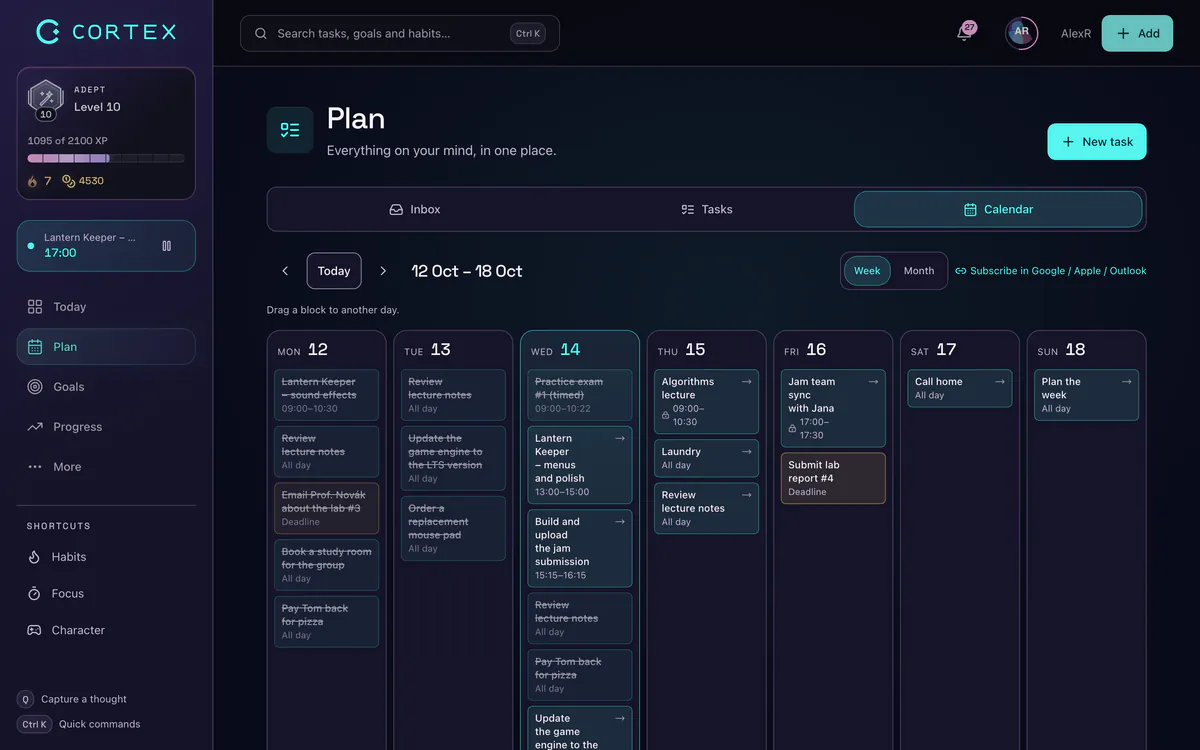
A paper plan is a great start. When you want the plan to adapt, move it into CORTEX:
- Big rocks as top-priority tasks – quick capture in one line:
Bakery logo tue @9:00 ~3h !p1 #bakery. - A weekly calendar grid – drag blocks to another day or hour when the week changes.
- Plan My Day – each morning Plan My Day fits the remaining tasks around fixed appointments and keeps the buffer you set.
- A weekly review shows finished tasks, focus time and up to three goals for next week.
Frequently asked questions
How do I plan my week?
Pick three big rocks, write down your fixed appointments and give each big rock a specific block of focused work (day and time). Keep 20–30% of your time as a buffer and do a short review at the end of the week.
Is the weekly plan generator free?
Yes. It runs only in your browser, sends and stores nothing and needs no sign-up. Print the plan or save it as a PDF.
How many priorities should a week have?
Three big rocks is a realistic maximum next to everyday work for most people. Small tasks fit into the gaps; big rocks need blocks.
How many hours of focused work should I plan per day?
It depends on the work, but 2–4 hours of deep work a day is realistic for most people. Measure your own number – see how many hours of focused work a day are realistic.
How do I print the plan?
Click "Print the plan". In the print dialog choose your printer or "Save as PDF"; only the plan is printed, not the form.
Sources and further reading
- Masicampo & Baumeister (2011): Consider it done! Plan making can eliminate the cognitive effects of unfulfilled goals, Journal of Personality and Social Psychology
- Gollwitzer & Sheeran (2006): Implementation intentions and goal achievement – a meta-analysis, Advances in Experimental Social Psychology
- Buehler, Griffin & Ross (1994): Exploring the "planning fallacy", Journal of Personality and Social Psychology
Level up your life
CORTEX is free for everyone. Tasks, a one-click day plan, time tracking, habits and rewards in one system – on desktop and mobile.
CREATE A FREE ACCOUNT