Daily planner app: time-block your day in one click
A daily planner app turns a list of tasks into a schedule – each task gets a start time and a length, so you see in the morning whether the day actually fits. CORTEX does it with one click: Plan My Day keeps your fixed appointments where they are and fills the free time between 09:00 and 22:00 with today’s, overdue and undated tasks, ordered by a simple rule you can predict. It is free for everyone. Below is the manual time-blocking method, the exact rules of the algorithm with a worked example, and its limits.
- CORTEX is a free gamified productivity app – tasks, a one-click day plan, time tracking and habits, with XP, levels and real-life rewards.
- Plan My Day is a rule-based scheduler, not AI: it keeps tasks with a fixed time and fills free 15-minute slots of a 09:00–22:00 day, starting from the current time.
- The order is overdue first, then higher priority, then shortest task first as a tiebreaker ("quick wins").
- Tasks that do not fit are listed instead of silently dropped; Apply writes the times to your tasks and Re-plan recalculates after interruptions.
- Working hours are currently fixed at 09:00–22:00 and the planner does not sync with Google Calendar or Outlook.
Time blocking: the method behind any day planner
A to-do list answers what. A day plan answers when. That second question is where most days break: twelve tasks look harmless on a list until you add up the hours and find nine hours of work in a day with five free ones.
Time blocking fixes it by giving every task a slot on the clock. Cal Newport popularized the approach for knowledge work; the idea is that a planned hour beats an unplanned one even if the plan changes. Psychology research points the same way: concrete if-then plans ("at 14:30, I write the blog post") make people more likely to follow through than good intentions alone (Gollwitzer, 1999). A time block is exactly that kind of plan. Here is the manual version, which takes about ten minutes:
- Mark the fixed blocks. Meetings, classes, calls, school pickup, the gym. They do not move.
- Count the free time. Working hours minus fixed blocks, minus a 15–20 % buffer for the unexpected.
- Estimate every task. No estimate, no plan – just a wish.
- Order them. Late things first, then by importance. When two tasks are equally important, do the short one first – a quick win frees your head.
- Fill the gaps. Big focused work into long gaps, small tasks into short gaps between meetings.
- Decide what does not fit. Move it, delegate it or drop it now, not at 9 pm.
The full guide with templates is on the time blocking page, and if you prefer paper there is a printable daily and weekly planner.
Plan My Day: the exact rules
Doing steps 3–6 by hand every morning is tedious, and for many people the tedium is exactly why planning never happens. In CORTEX you click Plan My Day and the app does steps 4–6 for you.
It is not AI. It is a short list of fixed rules, so you always know why a task landed where it did:
| Rule | What it means |
|---|---|
| Which tasks | Due today, overdue, and tasks with no date |
| Fixed appointments | A task with a set time (say a call at 14:00) stays exactly there; everything else is planned around it |
| Day window | 09:00–22:00, starting from the current time |
| Grid | 15-minute steps |
| Order | 1. overdue · 2. higher priority · 3. shortest first on a tie |
| Doesn’t fit | Listed separately so you can decide what to move |
| Apply | Writes the planned start times to the tasks (they then show in the calendar) |
| Re-plan | Recalculates from the current time – useful after a surprise call |
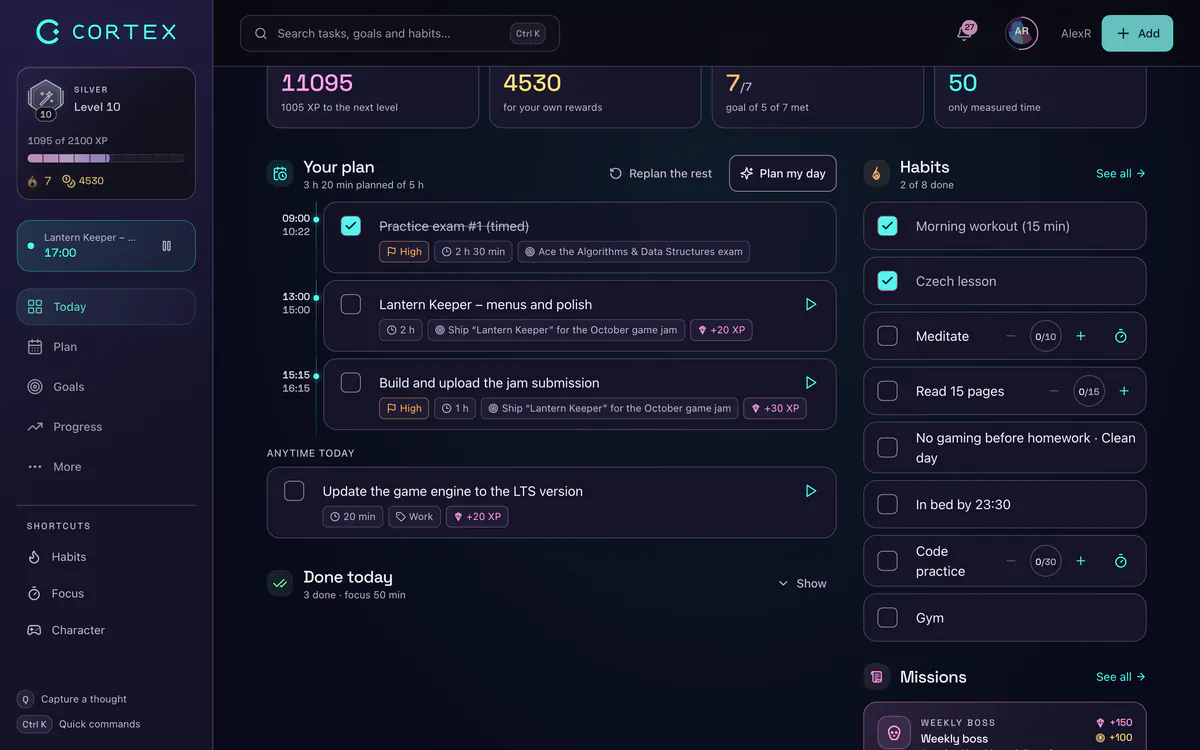
Worked example: planning an afternoon
It is 13:00 and you click Plan My Day. Your tasks:
| Task | Status | Priority | Estimate |
|---|---|---|---|
| Client call | today, fixed at 14:00 | high | 30 min |
| Gym | today, fixed at 18:00 | medium | 60 min |
| Send last week’s invoice | overdue | medium | 45 min |
| Write blog post | today | high | 90 min |
| Reply to Tom | today | high | 15 min |
| Rebuild portfolio site | no date | medium | 4 h |
| Book dentist | no date | low | 15 min |
Order: the overdue invoice goes first. Then high priority, shortest first: Reply to Tom (15 min), then the blog post (90 min). Then medium: the portfolio (4 h). Then low: the dentist.
Result:
- 13:00–13:45 Send last week’s invoice
- 13:45–14:00 Reply to Tom
- 14:00–14:30 Client call (fixed)
- 14:30–16:00 Write blog post
- 16:00–16:15 Book dentist
- 18:00–19:00 Gym (fixed)
- Doesn’t fit: Rebuild portfolio site – the longest free gaps are 16:15–18:00 and 19:00–22:00, both shorter than 4 hours.
That last line is the most valuable output of the whole plan. Instead of discovering at 21:30 that the portfolio never happened, you know at 13:00 – and you can split it into two 2-hour tasks, give it tomorrow’s date, or accept that it is a weekend job.
On your phone, in the calendar, with a timer
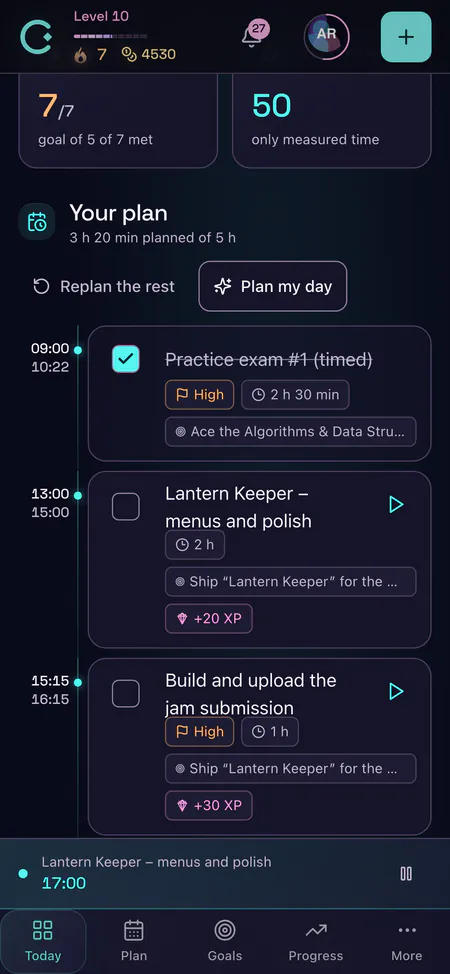
The plan works the same on mobile: install CORTEX from your browser (Add to Home Screen) and Plan My Day sits one tap away.
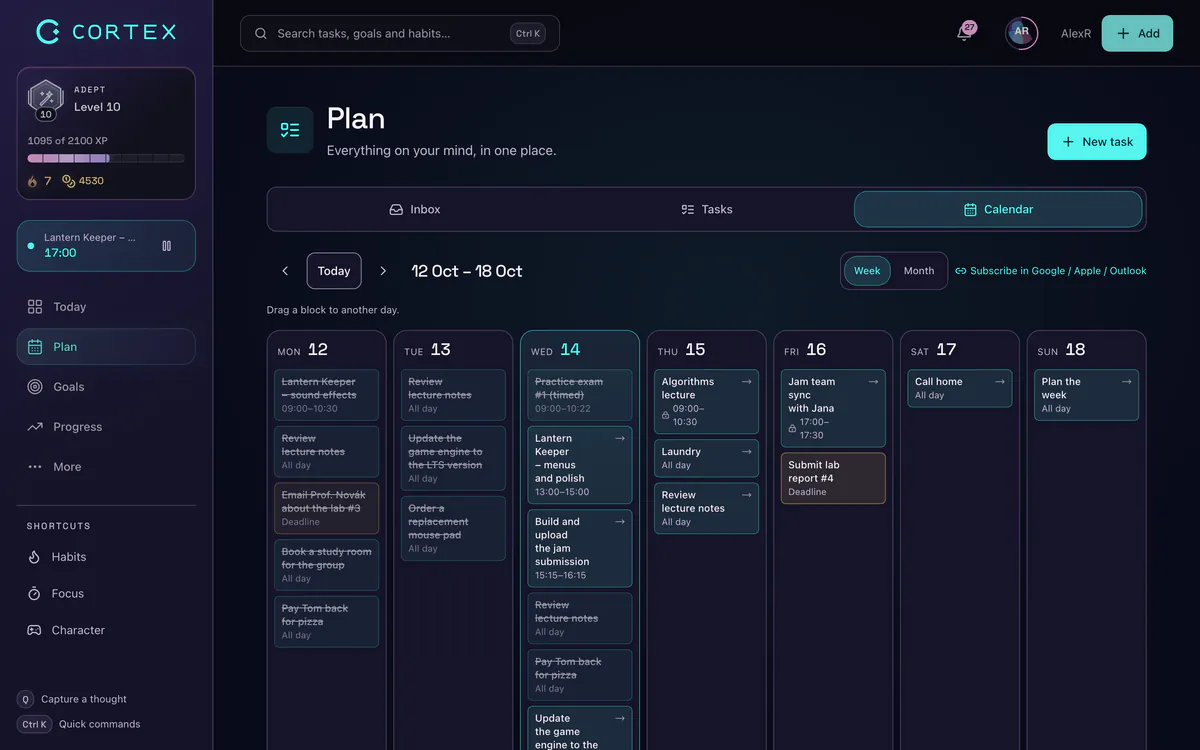
After you click Apply, the times show in the calendar. The week view is a time grid where you can drag a task to another slot if you want to override the plan by hand; the agenda view lists everything by day.
When a block starts, hit the focus timer in the top bar (15, 25 or 50 minutes, with optional ambient sounds) – the Pomodoro Technique fits neatly inside a time block. Every finished task pays XP and credits, which is the point of a gamified productivity app: the plan is not just a schedule, it is a quest log.
Choosing a time blocking app for ADHD
"Best time blocking app for ADHD" is one of the most searched planning questions, and the honest answer is: the one that removes the most friction for you. Things that tend to matter for brains that struggle with time blindness and starting:
- Planning has to take seconds, not a session. If building the plan feels like a task, it will be skipped. A one-click planner removes that step.
- Re-planning must be painless. Days derail. A plan you can recalculate in one tap survives the derailment.
- Small, visible blocks. 15-minute steps and a countdown you can see make time concrete.
- Immediate rewards. XP and credits on completion give the "reward now" signal long-term goals lack.
- Few settings. Too many options become their own procrastination.
CORTEX is a productivity tool, not a medical device or treatment. For more strategies see the ADHD planner app page.
Honest limits
- Working hours are fixed at 09:00–22:00 for now. Night-shift workers and early risers cannot change the window yet.
- Rule-based, not smart. The planner does not learn your energy curve or put deep work in the morning on its own. If you want that, give your deep work blocks a fixed time and let it fill the rest.
- No calendar sync. Meetings in Google Calendar or Outlook do not import; add them as tasks with a time.
- Estimates in, quality out. The plan is only as realistic as your estimates, and most people underestimate their own tasks (the planning fallacy, Buehler et al., 1994). Use the time-spent-vs-estimate numbers in the planner to calibrate.
If you need a planner that auto-schedules around a synced work calendar, a dedicated calendar-first tool will serve you better. If you want a free day planner that is fast, transparent and rewarding, start here – and see how it fits with the to-do list.
Google Calendar and Outlook are trademarks of their respective owners. CORTEX is not affiliated with them.
Frequently asked questions
What is the best free daily planner app?
A good free daily planner app should let you add tasks quickly, show whether they fit into your free time and make re-planning easy. CORTEX does this with one click: Plan My Day schedules today’s tasks around fixed appointments, lists what does not fit, and it is free for everyone.
What is a time blocking app?
A time blocking app assigns each task a start time and duration on your calendar instead of keeping it on an open list. That way you plan the day as blocks of time and see immediately when you have more work than hours.
What is the best time blocking app for ADHD?
The best one is the app you will actually open every day. Look for one-click planning, easy re-planning, short visible blocks and immediate rewards. CORTEX offers all four for free, but it is a productivity tool, not a treatment.
Does Plan My Day use AI?
No. It is a transparent rule-based scheduler: overdue tasks first, then by priority, then shortest first, placed in 15-minute steps between 09:00 and 22:00 around your fixed appointments.
Can I change my working hours in the day planner?
Not yet. The planning window is currently fixed at 09:00–22:00 and starts from the current time. You can still drag tasks in the calendar week view after applying the plan.
Is there a free day planner I can print?
Yes, there is a free printable daily and weekly planner on the CORTEX site. Many people plan on paper in the morning and use the app for tracking and rewards.
Sources and further reading
Level up your life
CORTEX is free for everyone. Tasks, a one-click day plan, time tracking, habits and rewards in one system – on desktop and mobile.
CREATE A FREE ACCOUNT