Notion alternatives for personal productivity: building kit or ready-made system?
The best free Notion alternative depends on why you're leaving: Obsidian if you want private, local notes in plain files with no built-in AI; Anytype if you want Notion-style objects that are local-first; Coda if you want docs that behave like apps; and CORTEX if you don't want to build a productivity system at all and just want a ready-made one – tasks, a day plan, time tracking, habits and goals with game-style rewards. CORTEX is not a notes app, and Notion is still the better tool for wikis, databases and teams.
- As of October 2026, Notion's Free plan has unlimited blocks for individuals, 7 days of page history and 5 MB file uploads; paid plans start at $10 per member a month billed annually.
- On Notion's Free and Plus plans, Notion AI is only a limited trial; the full AI features (Notion Agent, AI Meeting Notes, Enterprise Search) start on the Business plan.
- Obsidian is free for personal and work use without sign-up and stores notes as local Markdown files; Sync costs $4 a month and Publish $8 a month on annual billing.
- Anytype is a local-first workspace with a free plan (100 MB of remote storage, 10 shared channels, unlimited private channels); paid tiers start at $4 a month.
- CORTEX is a free gamified productivity app – tasks, a one-click day plan, time tracking and habits, with XP, levels and real-life rewards. Its day planner is rule-based, not AI.
Why people look for a Notion alternative
Notion is a brilliant building kit. That is also the problem for personal productivity: you get blocks and databases, not a finished system. Common reasons people look elsewhere:
- Setup fatigue. You spend more time building the dashboard than doing the tasks on it – productive-feeling procrastination.
- AI everywhere. Many people search for a Notion alternative with no AI – for privacy, focus or simply taste.
- Online-first. Your data lives in Notion's cloud; some people prefer local files.
- No built-in time or motivation layer. Timers, a day plan or rewards need templates, formulas or third-party tools.
Notion's current plans, as listed on its pricing page in October 2026:
| Notion plan | Price | Highlights |
|---|---|---|
| Free | $0 | Unlimited blocks for individuals (limited for 2+ members), 10 guests, 7-day page history, 5 MB uploads, limited Notion AI trial |
| Plus | From $10/member/mo billed annually | Unlimited blocks and uploads, 30-day history, unlimited guests; AI still a limited trial |
| Business | From $20/member/mo billed annually | Notion Agent, AI Meeting Notes, Enterprise Search, 90-day history |
| Enterprise | Custom | Everything in Business plus zero data retention with AI model providers |
Custom Agents run on Notion credits ($10 per 1,000 monthly credits after a free try). Prices are shown in your local currency, so non-US readers may see different numbers.
The alternatives compared
| App | Free plan | Paid | Data | AI | Best for |
|---|---|---|---|---|---|
| Notion | Generous for individuals | From $10/mo | Cloud | Trial on Free/Plus, full on Business | Wikis, databases, teams |
| Obsidian | Free, no sign-up, no limits | Sync $4/mo, Publish $8/mo (annual) | Local Markdown files | None built in (optional community plugins) | Notes, knowledge base, second brain |
| Anytype | 100 MB remote storage, 10 shared channels | Plus $4, Pro $8, Ultra $16 per month | Local-first | – | Notion-like objects with privacy |
| Coda | Free plan | Per Doc Maker | Cloud | Included features vary by plan | Docs that act like apps |
| CORTEX | Free, all features | – | Cloud | No AI – rule-based planner | A ready-made daily system |
Checked on official sites as of October 2026. "–" means we did not find a statement on the official page and are not making a claim.
Obsidian – best Notion alternative for notes, with no built-in AI
Obsidian stores everything as plain Markdown files in a folder on your device. You link notes together, see them in a graph view, and extend the app with thousands of community plugins and themes. Its pricing page says it is free without limits, no sign-up required – and a commercial license is optional for work use ($50 per user per year if your organization wants to support it).
- Paid add-ons: Obsidian Sync $4/user/month billed annually ($5 monthly); Obsidian Publish $8/site/month billed annually ($10 monthly).
- No AI by default: the core app doesn't ship an AI assistant; AI only arrives if you install a community plugin for it.
- Platforms: Windows, macOS, Linux, iOS and Android.
Pick it if you want a private second brain you fully own. Skip it if you want databases that "just work" or a task system without plugins – tasks in Obsidian are mostly checkboxes plus community plugins.
Anytype – best Notion-like, local-first workspace
Anytype feels closest to Notion in concept – pages, objects, types, relations and sets – but it is built local-first by Any, a Swiss association. The free plan includes 100 MB of remote storage, 10 shared channels and unlimited private channels; Plus ($4), Pro ($8) and Ultra ($16) per month add storage and unlimited shared channels, with about 20% off on yearly billing. You can also self-host your own network.
Pick it if you like Notion's structure but want your data on your devices. Skip it if you rely on Notion's huge template and integration ecosystem.
Coda – best for docs that behave like apps
Coda mixes documents, tables, buttons and automations, so a doc can become a small app (a habit tracker with buttons, a CRM, a sprint planner). It has a free plan and bills per Doc Maker – people who create docs – rather than per viewer. Coda is now part of Superhuman: coda.io/pricing redirects to Superhuman's plans page, so check current prices there before you commit.
Pick it if you like formulas and want interactive docs. Skip it if you wanted less building, not more.
CORTEX – a ready-made system instead of a building kit
CORTEX is our app, and it is not a notes app – don't move your wiki here. It is for the part of Notion many people try to build and never finish: a personal productivity dashboard. Instead of templates, you get the pieces already wired together:
- Goals with category colors, deadlines, difficulty and progress calculated from tasks – plus a vision board and an interactive mind map of vision → goals → tasks → subtasks.
- Tasks (see the to-do list app) with quick capture (
Draft chapter 3 friday ~2h !p2 #thesis), recurrence, subtasks and a calendar with week grid and drag and drop. - Plan My Day: a transparent, rule-based scheduler – no AI – that fills your free slots from 09:00 to 22:00 in 15-minute steps and tells you what doesn't fit.
- Time tracking with named timers and reports, habits (good and bad), a daily log and a monthly review.
- A game layer: XP, levels, attributes, achievements and a reward shop for your own real-life rewards.
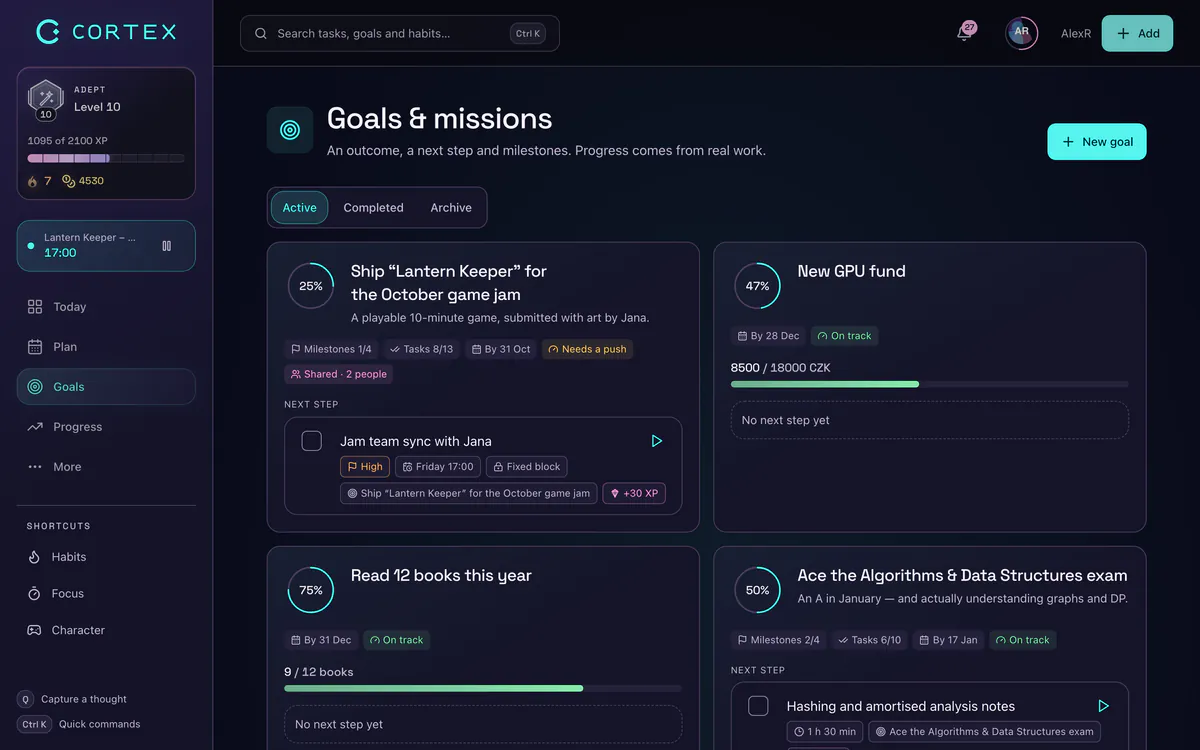
It is free for everyone. Limits to know: no free-form pages, databases or wiki; no Notion import; no calendar sync; no Kanban; it runs in the browser or as an installed PWA rather than native apps; and collaboration is limited to shared goals and alliances – no team workspaces.
Which one should you pick?
- Mainly notes and knowledge? → Obsidian (local, private) or Anytype (Notion-like, local-first).
- Interactive docs and light apps? → Coda.
- You want to plan and finish things, not design dashboards? → CORTEX. Pair it with Obsidian for notes if you like.
- Team wiki, databases, client portals, integrations? → Notion.
Related reading: how to write SMART goals, goal tracker app, vision board app and day planner app.
When Notion is the better choice
Notion still wins if you need:
- Databases with views (table, board, timeline, calendar) for anything – reading lists, content calendars, CRMs.
- Team wikis and docs with permissions, guests and comments.
- A huge template gallery and integrations.
- AI built in – if you want it, Notion's Business plan is one of the most integrated AI workspaces.
And if you love building systems, building them in Notion is a valid hobby. CORTEX is for the moment you'd rather use one.
Notion, Obsidian, Anytype, Coda and Superhuman are trademarks of their respective owners. CORTEX is not affiliated with, endorsed by or sponsored by any of them. Prices and features were checked on official websites as of October 2026 and may change.
Frequently asked questions
What is the best free Notion alternative?
For notes, Obsidian – it is free without limits and stores notes as local Markdown files. For a Notion-like structure that is local-first, Anytype. For a ready-made personal productivity system (tasks, day plan, time tracking, habits, goals), CORTEX, which is free with all features.
Is there a Notion alternative with no AI?
Yes. Obsidian has no built-in AI assistant (AI only via optional community plugins), and CORTEX has no AI at all – its Plan My Day scheduler is a transparent, rule-based algorithm. On Notion itself, Free and Plus plans only include a limited AI trial.
What is a good Notion alternative for personal productivity?
If you want to stop building templates, use a dedicated system: CORTEX combines goals, tasks, a one-click day plan, timers and habits out of the box. If you want flexible notes, Obsidian or Anytype.
Is Notion free for personal use?
Yes. As of October 2026, Notion's Free plan gives individuals unlimited blocks, 7 days of page history and 5 MB file uploads. Paid plans start at $10 per member per month billed annually.
Can CORTEX replace Notion?
Only for the productivity part – goals, tasks, planning, time tracking and habits. CORTEX has no free-form pages, databases or wiki, so keep notes and documents in Notion, Obsidian or Anytype.
Sources and further reading
Level up your life
CORTEX is free for everyone. Tasks, a one-click day plan, time tracking, habits and rewards in one system – on desktop and mobile.
CREATE A FREE ACCOUNT