Todoist alternatives: the best free picks for 2026
The best free Todoist alternative depends on what you miss: Microsoft To Do if you want a completely free, simple list; TickTick if you want calendar views, a Pomodoro timer and a habit tracker in one app; Things if you live on Apple devices and prefer a one-time purchase; and CORTEX if you want a free all-in-one system with a one-click day plan, time tracking and an RPG reward layer. Todoist is still the best choice for many people – the facts below show where each app wins.
- As of October 2026, Todoist's free Beginner plan allows 5 personal projects, 3 filter views, 7 days of activity history and 5 MB uploads; Pro costs $5 a month billed yearly ($60) or $7 month to month.
- Microsoft To Do is free on Windows, Mac, iOS, Android and the web, with a My Day view and Outlook tasks integration.
- TickTick's free plan allows 9 lists with up to 99 tasks each; Premium costs $49.99 a year and unlocks more lists, full calendar views and statistics.
- Things is Apple-only and sold as one-time purchases: $49.99 for Mac, $9.99 for iPhone and $19.99 for iPad on the US App Store.
- CORTEX is a free gamified productivity app – tasks, a one-click day plan, time tracking and habits, with XP, levels and real-life rewards. It is a web app/PWA without calendar sync.
What Todoist does well (and what the free plan limits)
Let's be fair to Todoist first. It is one of the best task managers ever made: fast natural-language input ("every Monday at 9"), projects and sections, labels and filters, Karma points with streaks, apps on Windows, Mac, Linux, iOS, Android, Apple Watch and Wear OS, and Google Calendar and Outlook Calendar integrations on every plan, including free.
People look for a Todoist alternative mostly because of the free-plan limits or the price. As of October 2026, the official pricing pages list:
| Todoist plan | Price | Key limits / additions |
|---|---|---|
| Beginner (free) | $0 | 5 personal projects, 3 filter views, 7 days of activity history, 5 MB uploads, up to 10 AI sessions a month |
| Pro | $5/mo billed yearly ($60) or $7 monthly | 300 projects, 150 filter views, calendar layout, task duration, custom reminders, deadlines, full reporting history |
| Business | $8/user/mo billed yearly or $10 monthly | Shared team workspace, roles and permissions, team projects |
Note that task duration and the calendar layout – the bits you need for time blocking inside Todoist – are Pro features.
Todoist alternatives compared
| App | Free plan | Paid | Platforms | Stand-out |
|---|---|---|---|---|
| Todoist | 5 projects, 3 filters | $5/mo yearly | Everything incl. Linux and watches | Natural language, integrations |
| Microsoft To Do | Free, no paid tier needed | – | Windows, Mac, iOS, Android, web | My Day, Outlook tasks |
| TickTick | 9 lists, 99 tasks per list | $49.99/yr | iOS, Android, Windows, Mac, Linux, web | Calendar views, Pomodoro, habits, Eisenhower view |
| Things | Free trial on Mac | $49.99 Mac, $9.99 iPhone, $19.99 iPad (one-time) | Apple only | Design, calm, no subscription |
| CORTEX | Free, all features | – | Web + PWA | One-click day plan, timers, RPG rewards |
Prices and limits were checked on official sites and the US App Store as of October 2026.
The alternatives in detail
Microsoft To Do – best completely free Todoist alternative
Microsoft To Do is free, clean and available on Windows, Mac, iOS, Android and the web. Its My Day view asks you to pick today's tasks each morning, and tasks show up in Outlook if you use a Microsoft account with Exchange Online. You also get shared lists, steps (subtasks), due dates and reminders.
Choose it if you want a simple list with no limits and no upsell, especially in a Microsoft 365 world. Skip it if you need filters, time blocking or anything game-like.
TickTick – best all-rounder
TickTick packs a lot into one app: lists, natural-language dates, calendar views (day, week, month, multi-day, agenda), a built-in Pomodoro timer, a habit tracker with statistics, an Eisenhower Matrix view, Kanban and more. The free plan covers 9 lists with up to 99 tasks each; Premium is $49.99 a year and unlocks 299 lists, full calendar views, task duration and detailed statistics.
Choose it if you want Todoist plus a calendar, focus timer and habits in one place. Skip it if feature density overwhelms you.
Things – best for Apple users who hate subscriptions
Things by Cultured Code is famously calm and well designed, with Today, Upcoming, Anytime and Someday views and projects with headings. It runs on Mac, iPhone, iPad, Apple Watch and Apple Vision Pro, and it is sold as one-time purchases per platform: $49.99 (Mac), $9.99 (iPhone) and $19.99 (iPad) on the US App Store. There is a free trial on Mac.
Choose it if you are all-in on Apple and want to pay once. Skip it if you use Windows, Android or need a web app.
CORTEX – best free Todoist alternative for a full daily system
CORTEX is our app, so weigh this accordingly. It works like a to-do list with a brain for your day: type Send proposal to Corner Café tomorrow @10:00 ~30m !p1 #clients and the date, time, duration, priority and goal are parsed. Tasks without a project land in the Inbox. Then Plan My Day takes today's, overdue and undated tasks, keeps your fixed appointments and fills the free slots – overdue first, then priority, then quick wins – and tells you what doesn't fit.
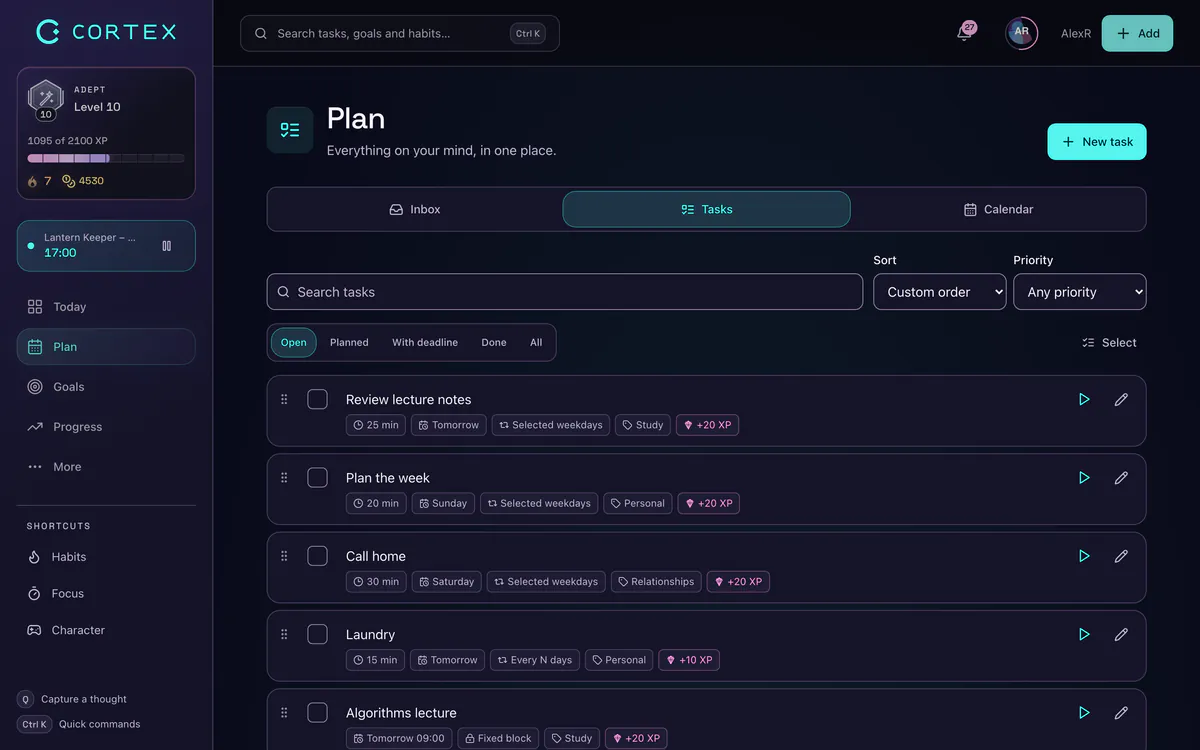
On top of that: named work timers with reports and CSV/PDF export, a 15/25/50-minute focus timer with ambient sounds, habits, goals with a vision board, and an RPG layer – XP, levels, five attributes, achievements and a reward shop where you "buy" your own real-life rewards with credits you earned. Everything is free.
Honest gaps vs. Todoist: no native App Store/Google Play apps (it installs as a PWA from the browser), no Google Calendar/Outlook sync, no import from Todoist, no Kanban board, no drag and drop in the task list (only in the calendar grid), and no team workspaces – collaboration is limited to shared goals and alliances.
How to choose: a 30-second decision guide
- "I just want free and simple." → Microsoft To Do.
- "I want my tasks on a calendar with a focus timer." → TickTick (or CORTEX if you want the day planned for you).
- "I only use Apple devices and hate subscriptions." → Things.
- "I procrastinate unless something rewards me." → CORTEX. See our gamified productivity apps comparison for more options.
- "I need integrations, teams and every platform." → stay on Todoist.
How to move from Todoist without losing anything
None of these apps can promise a perfect one-click move, and CORTEX has no importer at all, so treat the switch as a clean-up:
- Back up first. Todoist lets you export a project as a CSV file (project menu → Manage data → Export as CSV) – do it for each active project so you have a copy.
- Move only what is alive. Copy tasks with a date in the next 30 days, recurring routines and anything you would be upset to forget. Leave the "someday" pile in the backup.
- Translate the syntax. In CORTEX, Todoist-style lines map almost one to one:
Pay rent every month !p1becomesPay rent *monthly !p1, and#Projectbecomes a goal tag like#home. - Re-create recurring tasks first, then dated tasks, then the rest. Recurring tasks are what make a new system feel trustworthy on day one.
- Run both apps for one week. If you still open the old one by reflex on day 7, ask why – it is often a missing integration, which is a good reason to stay.
When Todoist is the better choice
Todoist wins, clearly, if you:
- need native apps everywhere – including Linux, Apple Watch and Wear OS – with offline support;
- rely on integrations (Google Calendar, Outlook Calendar, email add-ons, browser extensions and many third-party apps);
- work in a team with shared projects, roles and permissions;
- want a long-established tool with a big ecosystem of templates and tutorials.
CORTEX makes more sense if you want the planning, focus and reward parts in one free app and you are fine working in the browser. If you are moving over, our guide to writing a to-do list you actually finish and the time blocking guide help you set it up well. Prefer methods? Try Getting Things Done or the Eisenhower Matrix.
Todoist, Microsoft To Do, TickTick and Things are trademarks of their respective owners. CORTEX is not affiliated with, endorsed by or sponsored by any of them. Prices and features were checked on official websites and the US App Store as of October 2026 and may change.
Frequently asked questions
What is the best free Todoist alternative?
Microsoft To Do is the best completely free and simple option. TickTick has the most features on a free plan (with list limits). CORTEX is free with all features and adds a one-click day plan, time tracking and an RPG reward layer.
What is the best Todoist alternative in 2026?
For most people, TickTick – it covers tasks, calendar views, a Pomodoro timer and habits. Apple-only users often prefer Things, and people who need motivation and a planned day can try CORTEX for free.
Is Todoist free?
Yes, Todoist has a free Beginner plan with up to 5 personal projects, 3 filter views and 7 days of activity history. Pro costs $5 a month billed yearly or $7 month to month, as of October 2026.
Is Microsoft To Do really free?
Yes. Microsoft To Do is free to download and use on Windows, Mac, iOS, Android and the web. Work or school accounts need an Exchange Online mailbox for tasks to sync.
Can I import my Todoist tasks into CORTEX?
No, CORTEX has no import from other apps. You can re-create active tasks quickly with quick capture (press Q), which parses dates, times, priorities and durations from one line.
Does CORTEX sync with Google Calendar?
No. CORTEX has its own calendar with month and week views and drag and drop rescheduling, but no Google Calendar, Outlook or iCal sync.
Sources and further reading
Level up your life
CORTEX is free for everyone. Tasks, a one-click day plan, time tracking, habits and rewards in one system – on desktop and mobile.
CREATE A FREE ACCOUNT