A free study planner app that plans your exams backwards from the date
A good study planner app does three things for you: it turns an exam date into a schedule of small study blocks, it reminds you to review material at growing intervals instead of cramming the night before, and it makes starting a study session easy. CORTEX is a free planner that does all three. You enter the exam date and subject, choose how much you can study a day, and get study blocks in your calendar with reviews 14, 7, 3 and 1 day before – next to a focus timer, habits and the rest of your week.
- The Exam season template asks for the exam date, subject, study days and daily study time, then creates the goal, study blocks and reviews.
- Reviews are spaced 14, 7, 3 and 1 day before the exam. Spreading study over time beats cramming (Cepeda et al., 2006).
- Study blocks are 25 + 5 minutes and end with testing yourself, which helps memory more than rereading (Roediger & Karpicke, 2006).
- A focus timer, habits (sleep, phone away) and a one-click day plan sit in the same app.
- Free for everyone, no credit card, in the browser and on your phone.
What students actually need from a study planner
Most students do not lack a calendar. They lack a plan that starts early enough, a reason to sit down today rather than tomorrow, and a way to see how much is left. A paper planner can do the first part if you are disciplined; an app can do more because it can do the arithmetic for you.
- Backwards planning from the exam date. You know when the exam is. The planner should work out when each topic needs to be studied and when it needs to be reviewed.
- Spaced reviews. Material studied over several days sticks far better than material crammed in one night. Nicholas Cepeda and colleagues (2006) reviewed hundreds of experiments and found the effect again and again.
- Short, startable sessions. “Study statistics” is not a task you can begin. “25 minutes on chapter 3, then five questions without notes” is.
- Everything else in the same place. Exams compete with lectures, a job, sport and friends. A study plan that ignores the rest of your week will not survive it.
How CORTEX plans an exam
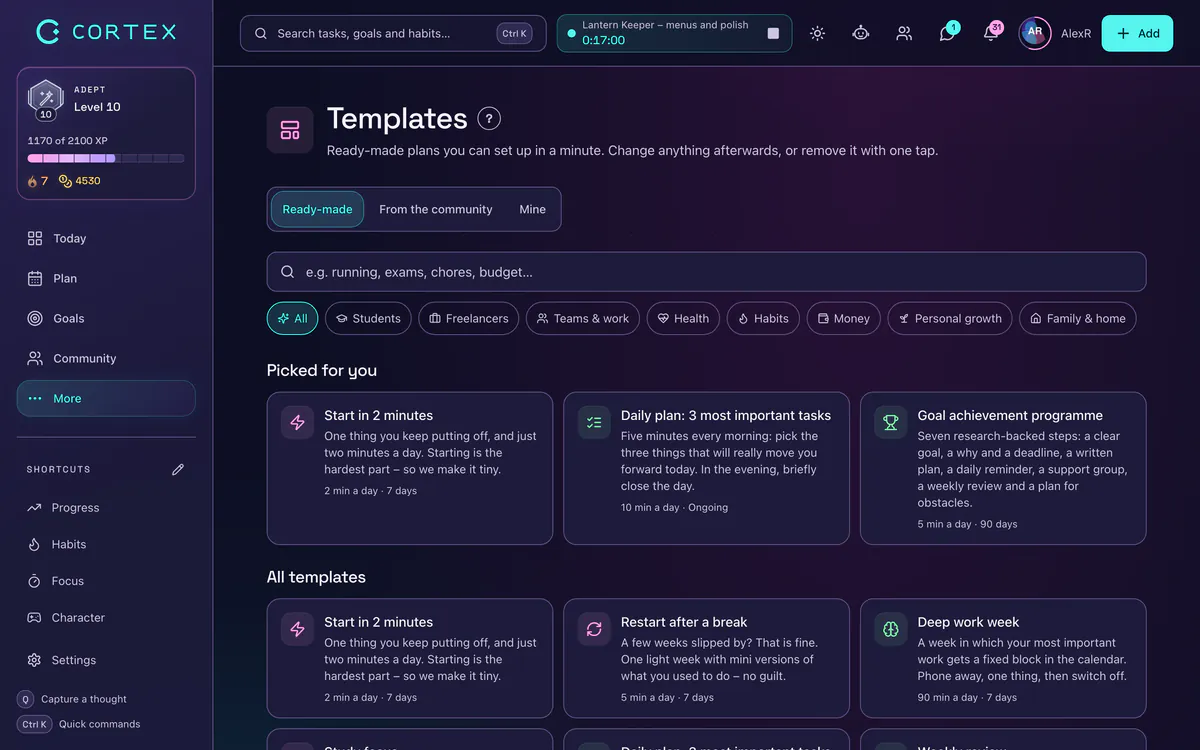
- Pick a study template. In More → Templates, open Exam season (one exam over about three weeks), Final exams: the countdown (a big exam with many topics and three mock exams) or Study focus (two weeks of short study blocks with self-testing).
- Answer a few questions. When is the exam, what subject, which days you study, when you start and how much a day – one, two or three hours.
- Check the preview. You see the goal (“Pass the exam: Statistics”), the study blocks and the reviews before anything is created.
- Apply it. The goal appears in Goals, study blocks in your calendar, and review tasks, a practice test and a calm last day are scheduled before the exam. If it does not fit, remove the whole template in one step.
Studying in blocks with the focus timer
Every study block in the template is a task you can start the timer on. Pomodoro (25 + 5) is the default, but you can run a free timer if you prefer longer blocks. When the time is up, the template reminds you to close your notes and test yourself: write down what you remember, answer practice questions or explain the topic out loud.
That last step matters. Henry Roediger and Jeffrey Karpicke (2006) showed that students who tested themselves remembered much more a week later than students who reread the same text, even though rereading felt more productive at the time. Spaced repetition explains how to combine testing and spacing; the Pomodoro technique explains the timer.
Habits that make exam season easier
Grades are rarely lost on the hardest topic; they are lost on sleep, the phone and the week before the exam. In CORTEX you can add a few small habits next to your study plan:
- Phone out of the room during study blocks (yes/no).
- Books closed at bedtime – the Exam season template asks when you go to bed and adds a habit for it: when it is that time, the books and the phone close. Sleep helps you keep what you learned (Diekelmann & Born, 2010).
- Ten minutes of movement between long sessions.
Streaks and a yearly heatmap show how consistent you have been, and finished study blocks earn XP and levels. If you like game mechanics, see how to gamify studying; if getting started is the problem, how to get motivated to study helps.
Free, and what it does not do
CORTEX is free for everyone – every feature, no ads and no credit card. It runs in the browser on a laptop and installs on your phone as a web app (iPhone and Android). It is available in English, German, Polish, Czech and Slovak.
To be clear about the limits: CORTEX does not import your university timetable automatically, it does not create flashcards from your notes and it is not a learning platform with course content. It is a planner: it decides when you study and makes the session easy to start. If you want a printable schedule instead, the study schedule guide has a template; for exam technique itself, read how to study for exams.
Start your study plan
If you already have an account, open the Exam season template or Final exams: the countdown. You can see all ready-made plans in goal and plan templates.
Frequently asked questions
Is there a free study planner app?
Yes. CORTEX is free for everyone, with no ads and no paid tier. It plans exams from a date, schedules study blocks and spaced reviews, and includes a focus timer and habit tracker.
How do I make a study plan for an exam?
Start from the exam date and work backwards: split the material into topics, spread them over the days you have, leave the last days for reviews and practice tests, and keep study blocks short. A template can do the arithmetic for you.
Does the study planner work on my phone?
Yes. CORTEX runs in any modern browser and can be installed on iPhone and Android from the browser as a web app. It is not in the app stores.
How far ahead should I start studying for an exam?
For a typical university exam, two to three weeks of short daily sessions works better than a few long days at the end. Bigger exams with many topics need more, which is why the final-exams template spreads topics over several weeks.
Can I plan several exams at once?
Yes. Apply the template once per exam. Each gets its own goal and study blocks, and the calendar shows where exams and other commitments overlap.
Sources and further reading
- Cepeda, N. J., Pashler, H., Vul, E., Wixted, J. T. & Rohrer, D. (2006): Distributed practice in verbal recall tasks: A review and quantitative synthesis – Psychological Bulletin
- Roediger, H. L. & Karpicke, J. D. (2006): Test-enhanced learning: Taking memory tests improves long-term retention – Psychological Science
- Diekelmann, S. & Born, J. (2010): The memory function of sleep – Nature Reviews Neuroscience
Build a small study plan
Start from a ready-made study template and fit its tasks and study blocks to your timetable.
Build my study plan